Windows 7 Forums Search
Welcome to Windows 7 Forums. Our forum is dedicated to helping you find solutions with any problems, errors or issues you are experiencing with Windows 7. The Windows 7 forum also covers news and updates and has an extensive Windows 7 tutorial section that covers a wide range of tips and tricks.


Windows 7 - wrong memory showing in Control panel and also in BIOS

 
05-20-2010   #1


windows 7 ultimate


wrong memory showing in Control panel and also in BIOS

hi all,

I Installed windows 7 64bit, but in my control panel/system it shows "Installed memory (RAM): 4.0GB (3.0GB usable)”. My system is running slow. please suggest a solution for this. I am using -
- DG41BI
- Core 2 Quad 3.0ghz
- DDR3 800MHZ 4GB
I am unable to play games on my pc. it hangs so many times in between. also start up is late at times

My System SpecsSystem Spec
05-21-2010   #2


WCP ONLY


Quote   Quote: Originally Posted by Sunitamishra View Post
hi all,

I Installed windows 7 64bit, but in my control panel/system it shows "Installed memory (RAM): 4.0GB (3.0GB usable)”. My system is running slow. please suggest a solution for this. I am using -
- DG41BI
- Core 2 Quad 3.0ghz
- DDR3 800MHZ 4GB
I am unable to play games on my pc. it hangs so many times in between. also start up is late at times

Type configsys in search. go to the advanced tab. Check for "max memory" it should be unchecked.


Let us know if that doesnt fix it


ken
My System SpecsSystem Spec
05-21-2010   #3


Windows 7 Ultimate 64bit


Quote   Quote: Originally Posted by zigzag3143 View Post
Quote   Quote: Originally Posted by Sunitamishra View Post
hi all,

I Installed windows 7 64bit, but in my control panel/system it shows "Installed memory (RAM): 4.0GB (3.0GB usable)”. My system is running slow. please suggest a solution for this. I am using -
- DG41BI
- Core 2 Quad 3.0ghz
- DDR3 800MHZ 4GB
I am unable to play games on my pc. it hangs so many times in between. also start up is late at times

Type configsys in search. go to the advanced tab. Check for "max memory" it should be unchecked.


Let us know if that doesnt fix it


ken
Can't find it :s I've got the x32
My System SpecsSystem Spec
.


05-21-2010   #4


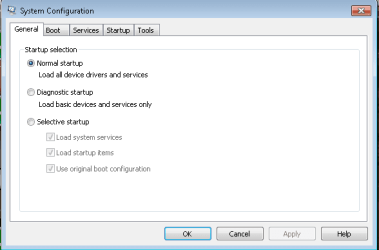
From the start bar, enter msconfig then hit enter ...
My System SpecsSystem Spec
05-21-2010   #5


Windows 7 Ultimate 64bit


Quote   Quote: Originally Posted by Tews View Post
From the start bar, enter msconfig then hit enter ...
Hmm, can't find any advanced tab, or anything that says Memory
My System SpecsSystem Spec
05-21-2010   #6


Windows 7 Ultimate x64


I have attached a zip file. unzip it and open the file by IE8. Follow the steps.

ram.zip
My System SpecsSystem Spec
05-21-2010   #7


Windows 7 Ultimate 64bit


Nothing here
Attached Thumbnails
wrong memory showing in Control panel and also in BIOS-sfdgsdsss.png  
My System SpecsSystem Spec
05-21-2010   #8


Windows 7 Ultimate x64


Quote   Quote: Originally Posted by ColdIce View Post
Nothing here
Because you're not looking at the right place.
Click on Boot>Advanced Options> Uncheck maximum memory.
My System SpecsSystem Spec
07-17-2010   #9


Windows 7 Home Premium 64bit sp1


ok to the memory issue as far as the os goes windows will always leave one gig unused in my case im runing 8 gigs windows is using 6.94 instead of the whole 8
my system runs fine you want more performance on 64 bit throw in 4 more gigs and really max it out
My System SpecsSystem Spec
07-17-2010   #10


Windows 7 Professional 64-Bit


@ Sunitamishra

Contact your PC manufacturer or motherboard manufacturer to get the proper procedure on how to update your BIOS to the latest. If your BIOS is already the latest and your BIOS/Windows still shows 3GB useable it's a BIOS/chipset limitation with your motherboard; you cannot do anything about it until your computer/motherboard manufacturer decides to fix/update this via BIOS update.

As for your computer hanging and running slow, it maybe just a conscious thing that's going on in your head or you have a bad install of Windows. I was running 4GB (3GB useable) on my Acer Veriton without a hitch.

If it indeed is a bad Windows install, a re-installation is highly advised and this time with 32-bit if that's still an option.

Let us know your results.
My System SpecsSystem Spec
Reply

 wrong memory showing in Control panel and also in BIOS problems?


Thread Tools


Similar Threads for: wrong memory showing in Control panel and also in BIOS
Thread Forum
GPU Bios showing up before Mobo BIOS (slowing boot up time) Graphic Cards
Solved Control panel General Discussion
How to change the color of the top panel in control panel Themes and Styles
Installed Printer Not Showing Up in Control Panel Hardware & Devices
Solved Control Panel not showing sizes 0f installed programs Software


All times are GMT -5. The time now is 12:42 PM.


Windows 7 Forums is an independent web site and has not been authorized,
sponsored, or otherwise approved by Microsoft Corporation.
"Windows 7" and related materials are trademarks of Microsoft Corp.
© Designer Media Ltd
  

1 2 3 4 5 6 7 8 9 10 11 12 13 14 15 16 17 18 19 20 21 22 23 24 25 26 27 28 29 30