
I am not sure and want to know if I need to update my BIOS.
This laptop is 2 years old, and is running all well. I haven't had any crashes etc. But I am wondering if updating the BIOS will prolong my machine's life.
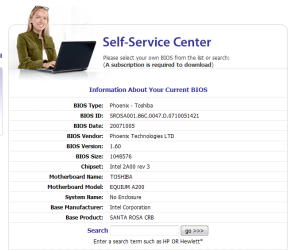
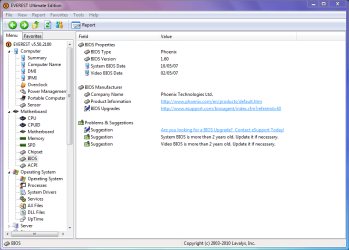
Here are some screenshots which give basic info. about the laptop in question.
PS I didn't like the idea of paying more than 20 quid for their yearly subscription.
This laptop is 2 years old, and is running all well. I haven't had any crashes etc. But I am wondering if updating the BIOS will prolong my machine's life.
Here are some screenshots which give basic info. about the laptop in question.
PS I didn't like the idea of paying more than 20 quid for their yearly subscription.
Attachments
My Computer
At a glance
Windows 7 Ultimate x86Intel(R) Pentium(R) Dual CPU T2310 @ 1.46GHz2GBMobile Intel(R) 965 Express Chipset Family
- Computer Manufacturer/Model Number
- TOSHIBA EQUIUM A200 (X86-based PC AT/AT COMPATIBLE)
- OS
- Windows 7 Ultimate x86
- CPU
- Intel(R) Pentium(R) Dual CPU T2310 @ 1.46GHz
- Motherboard
- Intel Corporation SANTA ROSA CRB
- Memory
- 2GB
- Graphics Card(s)
- Mobile Intel(R) 965 Express Chipset Family
- Screen Resolution
- 1280 * 800 Pixels
- Hard Drives
- ST9120822AS ATA Device (IDE)


