| Windows 7: seagate HDD wont format |
24 May 2010
|
#1 | | Windows 7 Ultimate x64 OEM |
seagate HDD wont format ello everyone,
so my problem is that i have a Seagate Barracuda 7200.11 ST31500341AS 1.5TB HDD that seems to disconnect itself when trying to format it, by that imean it stops responding. every time i try to format the drive in windows it produces 5 event id 15's (The device, \Device\Harddisk1\DR2, is not ready for access yet.) a event id 11 (The driver detected a controller error on \Device\Ide\IdePort2.) and another event id 15.
another possibly related oddity is that inside windows and when i boot from the Windows 7 install dvd the drive letters/paths are different. inside windows i have the System Reserved partition on my first HDD(Western Digital VelociRaptor WD3000HLFS 300GB) without a drive letter, my Windows 7 partition is labeled as C:, my seagate HDD is labeled as E: and my DVD burner is labeled as D:. outside of windows, booting into the install DVD, the System Reserved partition is labeled as C:, the Windows 7 partition is listed as E:, the seagate drive is listed as D: and the dvd burner is labeled as F:.
my question is if this is a software or hardware issue, the seagate drive is still under warranty and i can just return it, but if it's a software issue that will rear up it's head later then i would need to fix that instead. so, any ideas? | My System Specs |
| System Manufacturer/Model Number Custom Built OS Windows 7 Ultimate x64 OEM CPU AMD Phenom II x4 965 3.4 GHz Motherboard MSI NF750-G55 Memory G. Skill - F3-12800CL9D-2GBNQ (3GB - 3x1GB) Graphics Card MSI N250GTS Twin Frozr 1Gig Sound Card N/A Monitor(s) Displays Asus VK246H 24" LCD Monitor,Starlogic M17ANA 17" LCD Monitor PSU 850 watt OCZ Z Series Gold Case XCLIO A380BK Cooling Stock Heatsink, 2x 250mm fans, 1x 120mm fan Hard Drives Western Digital VelociRaptor WD3000HLFS 300GB(W7), Seagate Barracuda 7200.11 ST31500341AS 1.5TB |
24 May 2010
|
#2 | | MS Windows 7 Ultimate SP1 64-bit Austin, Texas |
Kabliga,
Boot up your system from a System Repair Disk
When you see the first dialog asking you to hit Next, then:
Shift + F10 key combo
This will get you a Command Prompt produced by the Win7PE on your repair disk.
the prompt will appear as X:>
At this point, you may remove the System Repair Disk.
Now you will use the DiskPart command.
The DiskPart command is very powerful.
Please read further--to avoid a disaster.
Enter following command
DiskPart
You will now be at the DiskPart prompt.
DISKPART>
Now you will enter some DiskPart commands.
LIST DISK
this will list the disks on your system
You will now select the desired disk. I'm going to use disk 2. You use the disk number appropriate for your system.
SELECT DISK 2
DETAIL DISK
This should help you verify that you selected the correct disk.
CLEAN
this will write zeroes over the first and last sectors of the drive.
CREATE PARTITION PRIMARY
you just created a partition on the drive
LIST PARTITION
SELECT PARTITION 1
DETAIL PARTITION
you will have only one partition, with the number 1
FORMAT FS=NTFS QUICK
will quick format the partition. Wait for this command to finish.
EXIT
EXIT
Reboot your system and use Disk Management for any further disk management.
WIN | type DISKMGMT.MSC | Enter | My System Specs | | System Manufacturer/Model Number Toshiba Satellite S875D-S7239 laptop OS MS Windows 7 Ultimate SP1 64-bit CPU AMD A10-4600M Motherboard AMD Pumori (Socket FT1) Memory 6.00 GB Dual-Channel DDR3 @ 798MHz (11-11-12-28) Graphics Card AMD Radeon HD 7660G Sound Card High Definition Audio Device Monitor(s) Displays Generic PnP Monitor (1600x900@60Hz) Screen Resolution 1600x900@60Hz Keyboard Standard PS/2 Keyboard Mouse HP Wireless Optical Mobile Mouse Model FHA-3410 Hard Drives SSD 119GB Corsair CSSD-V128GB2 ATA Device Internet Speed What the local pub, local coffee shop offers. Other Info Optical Drive:MATSHITA BD-CMB UJ160B ATA Device
Also have an Asus ha1002xp netbook with Win 7 Ultimate installed. |
24 May 2010
|
#4 | | Windows 7 Ultimate x64 OEM |
karl, when i attempted to use the diskpart command/exe from the X: it asked me to put in a script myself, but i will go and try it again and edit my post afterwards. i had to use the diskpart.exe from the windows directory on my Windows 7 partition to actually use diskpart 
Quote: Originally Posted by theog cable is fine, i've removed it and plugged it into a different spot and still gotten the same problem .i've already looked at that and itonly describesa scsi interfaces. also i have checked the firmware and pretty much everything i can think of, it only stops responding when i try to format it or read a specific block on the disk(i couldnt tell you which block at the momment). unless someone will tell me that each sata spot on a MB gets a different controller( which i highly doubt) and even then i still got the same problem | My System Specs | | System Manufacturer/Model Number Custom Built OS Windows 7 Ultimate x64 OEM CPU AMD Phenom II x4 965 3.4 GHz Motherboard MSI NF750-G55 Memory G. Skill - F3-12800CL9D-2GBNQ (3GB - 3x1GB) Graphics Card MSI N250GTS Twin Frozr 1Gig Sound Card N/A Monitor(s) Displays Asus VK246H 24" LCD Monitor,Starlogic M17ANA 17" LCD Monitor PSU 850 watt OCZ Z Series Gold Case XCLIO A380BK Cooling Stock Heatsink, 2x 250mm fans, 1x 120mm fan Hard Drives Western Digital VelociRaptor WD3000HLFS 300GB(W7), Seagate Barracuda 7200.11 ST31500341AS 1.5TB |
24 May 2010
|
#5 | | MS Windows 7 Ultimate SP1 64-bit Austin, Texas |
Kabliga,
Make a Windows 7 System Repair Disk. CREATE A SYSTEM REPAIR DISK START | type System Repair | Enter key | Create Disk button
Set your Bios to boot first from CD.
Power off your computer with the CD inserted.
Power on your computer.
When you get that first dialog, Shift F10 key combo
You will end up a command prompt!!!
Do NOT try to run cmd.exe . Simply
Diskpart
and then all of the diskpart commands I listed. | My System Specs | | System Manufacturer/Model Number Toshiba Satellite S875D-S7239 laptop OS MS Windows 7 Ultimate SP1 64-bit CPU AMD A10-4600M Motherboard AMD Pumori (Socket FT1) Memory 6.00 GB Dual-Channel DDR3 @ 798MHz (11-11-12-28) Graphics Card AMD Radeon HD 7660G Sound Card High Definition Audio Device Monitor(s) Displays Generic PnP Monitor (1600x900@60Hz) Screen Resolution 1600x900@60Hz Keyboard Standard PS/2 Keyboard Mouse HP Wireless Optical Mobile Mouse Model FHA-3410 Hard Drives SSD 119GB Corsair CSSD-V128GB2 ATA Device Internet Speed What the local pub, local coffee shop offers. Other Info Optical Drive:MATSHITA BD-CMB UJ160B ATA Device
Also have an Asus ha1002xp netbook with Win 7 Ultimate installed. |
24 May 2010
|
#6 | | ME/XP/Vista/Win7 uk Hampshire |
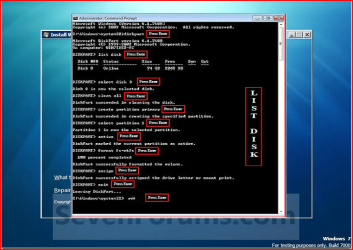
This may be of help. | My System Specs | | |
24 May 2010
|
#7 | | MS Windows 7 Ultimate SP1 64-bit Austin, Texas |
theog,
On the size disk he has, 1.5 TB a clean all will take between 12-14 hours according to one chap.
This is why I did not recommend a clean all.
As a security measure and to rule out unusual possibilities then a clean all is excellent. Clean all will write zeroes to his entire disk which is a very time-consuming operation. | My System Specs | | System Manufacturer/Model Number Toshiba Satellite S875D-S7239 laptop OS MS Windows 7 Ultimate SP1 64-bit CPU AMD A10-4600M Motherboard AMD Pumori (Socket FT1) Memory 6.00 GB Dual-Channel DDR3 @ 798MHz (11-11-12-28) Graphics Card AMD Radeon HD 7660G Sound Card High Definition Audio Device Monitor(s) Displays Generic PnP Monitor (1600x900@60Hz) Screen Resolution 1600x900@60Hz Keyboard Standard PS/2 Keyboard Mouse HP Wireless Optical Mobile Mouse Model FHA-3410 Hard Drives SSD 119GB Corsair CSSD-V128GB2 ATA Device Internet Speed What the local pub, local coffee shop offers. Other Info Optical Drive:MATSHITA BD-CMB UJ160B ATA Device
Also have an Asus ha1002xp netbook with Win 7 Ultimate installed. |
24 May 2010
|
#8 | | ME/XP/Vista/Win7 uk Hampshire |

Quote: Originally Posted by karlsnooks theog,
On the size disk he has, 1.5 TB a clean all will take between 12-14 hours according to one chap.
This is why I did not recommend a clean all.
As a security measure and to rule out unusual possibilities then a clean all is excellent. Clean all will write zeroes to his entire disk which is a very time-consuming operation. Only meant as a screenshot of diskpart, to help OP.
Not to override your command line list. | My System Specs | | |
24 May 2010
|
#9 | | Win 8 Release candidate 8400 |

Quote: Originally Posted by kabliga ello everyone,
so my problem is that i have a Seagate Barracuda 7200.11 ST31500341AS 1.5TB HDD that seems to disconnect itself when trying to format it, by that imean it stops responding. every time i try to format the drive in windows it produces 5 event id 15's (The device, \Device\Harddisk1\DR2, is not ready for access yet.) a event id 11 (The driver detected a controller error on \Device\Ide\IdePort2.) and another event id 15.
another possibly related oddity is that inside windows and when i boot from the Windows 7 install dvd the drive letters/paths are different. inside windows i have the System Reserved partition on my first HDD(Western Digital VelociRaptor WD3000HLFS 300GB) without a drive letter, my Windows 7 partition is labeled as C:, my seagate HDD is labeled as E: and my DVD burner is labeled as D:. outside of windows, booting into the install DVD, the System Reserved partition is labeled as C:, the Windows 7 partition is listed as E:, the seagate drive is listed as D: and the dvd burner is labeled as F:.
my question is if this is a software or hardware issue, the seagate drive is still under warranty and i can just return it, but if it's a software issue that will rear up it's head later then i would need to fix that instead. so, any ideas?
Go to seagate and download their diagnostic tool. run it on the drive and you will have your answer
ken | My System Specs | | System Manufacturer/Model Number HP Pavillion dv-7 1005 Tx OS Win 8 Release candidate 8400 CPU 2@2.4 Memory 4 gigs Graphics Card Nvidia 9600M Sound Card HD built-in Monitor(s) Displays 17" Wxga Screen Resolution 1440x900 Cooling none Internet Speed 45Mb down 5Mb up |
24 May 2010
|
#10 | | MS Windows 7 Ultimate SP1 64-bit Austin, Texas |
Theog,
Thanks. As many times as diskpart questions come up, I think I'd better get in the habit of making screen saves of the sequence. Would probably be better.
karl | My System Specs | | System Manufacturer/Model Number Toshiba Satellite S875D-S7239 laptop OS MS Windows 7 Ultimate SP1 64-bit CPU AMD A10-4600M Motherboard AMD Pumori (Socket FT1) Memory 6.00 GB Dual-Channel DDR3 @ 798MHz (11-11-12-28) Graphics Card AMD Radeon HD 7660G Sound Card High Definition Audio Device Monitor(s) Displays Generic PnP Monitor (1600x900@60Hz) Screen Resolution 1600x900@60Hz Keyboard Standard PS/2 Keyboard Mouse HP Wireless Optical Mobile Mouse Model FHA-3410 Hard Drives SSD 119GB Corsair CSSD-V128GB2 ATA Device Internet Speed What the local pub, local coffee shop offers. Other Info Optical Drive:MATSHITA BD-CMB UJ160B ATA Device
Also have an Asus ha1002xp netbook with Win 7 Ultimate installed. seagate HDD wont format problems? All times are GMT -5. The time now is 03:58 AM. | |