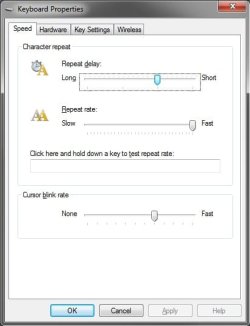
I've done some heavy text processing lately and hot swapping ps/2 keyboard between pc's, and I found out that my Windows 7 drops my repeat rate to 11. I have to fix it manually by going to the keyboard cpl and move the sliders lower and then back on maximum and hit Apply to recover my default 27chars/s which is already slow as it is.
I used to tweak win.ini back in the days. Here is some reference:
Access Pack for Windows WIN.INI Settings.
Happy to see it still works on Windows 7, after a search in the registry I found what I was looking for in
HKEY_CURRENT_USER\Control Panel\Accessibility\Keyboard Responce
Tweaking those settings allows going beyond 32 chars/sec accesible through Control Panel and will fix my issue, too
.
AutoRepeatRate, a value of
15 equals 64 chars/sec on my ps/2 keyboard. A value of 30 equals 32chars/sec but any values in between do not translate proper.
AutoRepeatDelay should be at least
300, 400-500-1000 works too if your hands are heavy
 BounceTime
,
DelayBeforeAcceptance I use them on
0. Check reference.
Flags is
35 if enabled, will cause FilterKeys icon in the system tray, 34 will disable this. Setting these through registry requires rebooting.
I always tought that Accessibility Options should go both ways. There should be choises for the quicken, using Set up Filter Keys in the Control Panel cries for
Fast Keys, pitty is so easy to implement.