
darkangel86
New member
- Local time
- 7:28 AM
- Messages
- 5
Hey guys,
I have a quick question ... I'm not sure if this is doable or not, but here is my question anyway...
I followed the following link on how to create a keyboard shortcut that turns off all connected screens to my computer at once Link. This worked just fine, and has been really useful for the past few days, however my problem is as follows:
When I use my keyboard shortcut and turn off my screens (which are two Acer multi-touch screens), any key-press to the keyboard or move to the mouse will bring them back on... Is there ANY WAY to disable that?
I would like my screens to ONLY turn on when I touch them, and NOT when I move the mouse or press the keyboard.
It is annoying for me because when I place anything on my desk that causes the mouse to move both screens go back on. I don't use SLEEP or STANDBY neither do I lock my machine, since my computer is always on.
Any ideas?
Thanks!
I have a quick question ... I'm not sure if this is doable or not, but here is my question anyway...
I followed the following link on how to create a keyboard shortcut that turns off all connected screens to my computer at once Link. This worked just fine, and has been really useful for the past few days, however my problem is as follows:
When I use my keyboard shortcut and turn off my screens (which are two Acer multi-touch screens), any key-press to the keyboard or move to the mouse will bring them back on... Is there ANY WAY to disable that?
I would like my screens to ONLY turn on when I touch them, and NOT when I move the mouse or press the keyboard.
It is annoying for me because when I place anything on my desk that causes the mouse to move both screens go back on. I don't use SLEEP or STANDBY neither do I lock my machine, since my computer is always on.
Any ideas?
Thanks!
My Computer
At a glance
Windows 7 Professional x64 w/ Dual Multi-Touc...Intel Q6600 Quad Core Processor 2.4 GHz OC'd ...4GB DDR2 800MHzNVIDIA GeForce 8600 GTS
- Computer Manufacturer/Model Number
- Home-Built PC
- OS
- Windows 7 Professional x64 w/ Dual Multi-Touch Monitors
- CPU
- Intel Q6600 Quad Core Processor 2.4 GHz OC'd to 3.2 GHz
- Motherboard
- ASUS PE-VM HDMI
- Memory
- 4GB DDR2 800MHz
- Graphics Card(s)
- NVIDIA GeForce 8600 GTS
- Sound Card
- Realtek HD Audio
- Monitor(s) Displays
- Dual 23 inch 1080p Acer T230H Multi-Touch Monitors
- PSU
- 500W
- Cooling
- Stock
- Keyboard
- Logitech Wave Keyboard
- Mouse
- Generic Wheel USB Mouse
- Internet Speed
- 35MBPS Down, 8MBPS Up

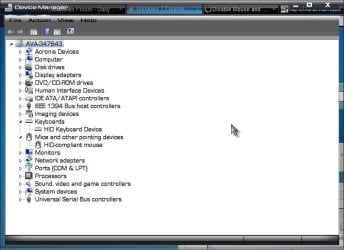
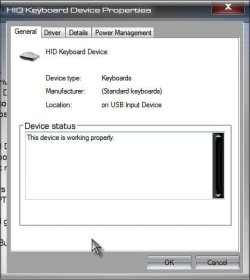
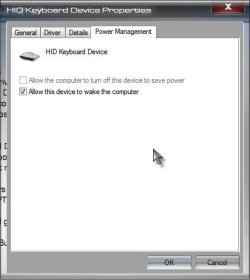


 . Well, give it some time, someone else might come along with the perfect answer. A Guy

