RAM issue

randyrayrobb

New member
Local time
3:18 PM
Messages
2
I have updated to Windows 7 64, from XP, from a clean install. I have had an issue getting windows to use all 8 gigs of the PQI TURBO 2GB 240-Pin DDR2 SDRAM DDR2 667 (PC2 5400) ram that i have installed in my ASUS V3-M2A690G, that I built myself about 2 or 3 years ago now. My bios, and windows will see 8.0 gigs of ram installed, but the most I can get it get windows will allow "usable" is 3.25 gigs.
I have been trolling the internet, and here are the things I have tried:
  1. I have run a memtest (extended version, three passes) no problems.
  2. I have moved the ram into different slots to no avail.
  3. I have tried to force windows to use all 8 by using the advanced boot options and checking the use maximum memory box and typing in 8192, and when I restart I get a BOSD, boot into safe mode, change the number back to 4095 and it works fine. Any number over 4095 will revert to a lower number. sometimes as low as 0
  4. I have tried unchecking the maximum memory box, and get the same BSOD
  5. I have unistalled all anti-virus/firewall software.
I have attached my list of .dmp files for today.

Thank you all,
Randy

System specs:
AMD Athlon 64 X2 6400+ Windsor 3.2GHz
SAMSUNG Black DVD/CD burner
PQI TURBO 2GB 240-Pin DDR2 SDRAM DDR2 667 (PC2 5400)
Seagate Barracuda 7200. ST3250410AS 250GB 7200 RPM 16MB Cache SATA 3.0Gb/s 3.5" Hard Drive
ASUS V3-M2A690G
POWERCOLOR AX3850 1GBD2 Radeon HD 3850 1GB 256-bit GDDR2 PCI Express 2.0 x16
 

My Computer My Computer

At a glance

Windows 7
OS
Windows 7
change it in your bios, advanced settings
 

My Computer My Computer

At a glance

7 home premium 64AMD Turion X2 Dual Core RM744 Gig
Computer Manufacturer/Model Number
Toshiba Satellite 18.4 inch
OS
7 home premium 64
CPU
AMD Turion X2 Dual Core RM74
Memory
4 Gig
Hard Drives
400 gig sata 1TB WD external
Right click on Computer, select properties. Right below Installed memory is System type. Does it display 32-bit or 64?
 

My Computer My Computer

At a glance

7 Ultimate x64i5-2500k8GB G.Skill Ripjaws X F3-12800CL7D-8GBXH 1866...EVGA GTX 570 SC
OS
7 Ultimate x64
CPU
i5-2500k
Motherboard
Asus P8P67 Pro
Memory
8GB G.Skill Ripjaws X F3-12800CL7D-8GBXH 1866MHz 8-9-8-24
Graphics Card(s)
EVGA GTX 570 SC
Sound Card
X-Fi Titanium Fatality
Monitor(s) Displays
Samsung S27A550H 27" LED
Screen Resolution
1920x1080
Hard Drives
OCZ Vertex 3 120GB.
1TB Samsung F3.
2TB Samsung F4.
PSU
PC Power & Cooling Silencer 760
Case
Lian Li Lancool K62
Cooling
Thermalright Venomous X Black/Scythe S-Flex/Shin-Etsu X23
Keyboard
MS Natural Elite 4000 Ergonomic
Mouse
Logitech G500
Internet Speed
6MB/768
Other Info
Logitech Z-5500 505 watts.
D-Link DGL-4500.
Tripp-Lite Smart Pro 1500.
Ram issue

"change it in your bios, advanced settings"
There is no option for memory remapping in my bios, if that is what you are talking about. I looked for that last night. I flashed this morning, I'll see if anything new poped up.

"Right click on Computer, select properties. Right below Installed memory is System type. Does it display 32-bit or 64?"

Yes it is 64 bit, it should love to use all 8 gigs of that ram, but sadly it won't. :(
 

My Computer My Computer

At a glance

Windows 7
OS
Windows 7
randyrayrobb, welcome to the forums.

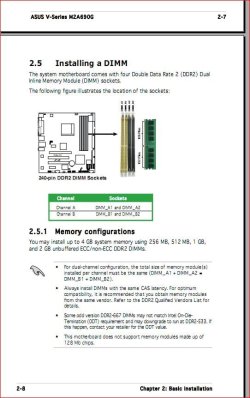
Just had a look at the manual for your barebone kit and it looks like there is a very good reason you can't use 8 GB of ram,

maxram.JPG
according to that it only supports up to 4 GB.
 

My Computer My Computer

At a glance

Win 7 Ultimate x64FX-8350 @ 4.6 GHz so farADATA XPG V1 Series Black 8GB DDR3 1600Sapphire R9 270x Dual-X
Computer type
PC/Desktop
Computer Manufacturer/Model Number
Me
OS
Win 7 Ultimate x64
CPU
FX-8350 @ 4.6 GHz so far
Motherboard
Asus M5A97 EVO
Memory
ADATA XPG V1 Series Black 8GB DDR3 1600
Graphics Card(s)
Sapphire R9 270x Dual-X
Sound Card
Xonar DGX w/ Corsair Vengence 1300
Monitor(s) Displays
Acer S232HL Abid
Screen Resolution
1920x1080
Hard Drives
120 GB OCZ Vertex 3
500 GB Seagate 7200.12
PSU
Antec Earthwatts 650W Green
Case
Antec Three Hundred
Cooling
Cooler Master 212 EVO
Keyboard
Logitech G510
Mouse
Logitech G500s
Internet Speed
35000/3000
Start->run->msconfig->boot->advanced options

Uncheck everything in there.... hit OK, then restart.

zzz2496
 

My Computer My Computer

At a glance

Windows7 Ultimate 64bitIntel Core 2 Quad Q6600DDR2 Adata 4GBNvidia GeForce GTX 285 1024 and Nvidia GeForc...
Computer Manufacturer/Model Number
Self Built
OS
Windows7 Ultimate 64bit
CPU
Intel Core 2 Quad Q6600
Motherboard
Abit IN9-32X-MMAX
Memory
DDR2 Adata 4GB
Graphics Card(s)
Nvidia GeForce GTX 285 1024 and Nvidia GeForce 8800GT 512
Sound Card
Asus Xonar HDAV 1.3
Monitor(s) Displays
Dell 2407WFP and BenQ 2400v and Philips 150v3
Screen Resolution
3840x1200 and 1024x768
Hard Drives
2 WDC 1TB
1 WDC 1.5TB
1 WDC 640GB
1 WDC 320GB
1 Seagate 200GB
PSU
Corsair TX 850W
Case
Cooler Master HAF932
Cooling
Arctic Cooling Freezer Extreme and plenty of fans...
Keyboard
MicrosoftNaturalKeyboard 4000/Apple Alu keyboard/Dinovo mini
Mouse
Logitech G5/MarbleMouseTrackball/PerformanceMX/SpacePilotPRO
Internet Speed
1.5Mbps down/384Kbps up
Other Info
APC SURT 1000XL
Logitech Z-560
Wiimote
Mikrotik Router
Linksys (now Cisco) SD2008 8 port Gigabit switch
Linksys WRT54G (acting as AP)
Apple wireless Aluminium keyboard
Apple Magic Mouse
Xbox360 wired controller
Back
Top