Windows 7 Forums


Windows 7: Re-Format Hard Drive.

11 Jun 2010   #1

Windows 7 64bit.
 
 
Re-Format Hard Drive.

Hi Guys.
Briefly. I tried to reformat my dads hard drive to reinstall windows 7. It was in 2 partitions, so i ran the windows 7 disc and it ran through the motions, i formatted the c to re-install windows and it wouldn't let me. I went into dos under diskpart to try and format it that way, still no luck. I connected it to my computer then under disk managment deleted the 2 partitions so there was only 1 now which had the size i.e, 600GB Unallocated. I connected it back into my dads computer and ran the set-up again. Now the computer wont even detect the drive. I need to re-format the drive to like factory default, is this possible, also do i have to do it in dos, I really hope you tech wizards ca help me.
Thanks for your time.
Kevin.

My System SpecsSystem Spec

11 Jun 2010   #2

7 Ultimate x64
California


You could just plug it back into your machine and format it under disk management.
My System SpecsSystem Spec
11 Jun 2010   #3

Windows 7 HP 64bit, Windows 8 Pro w/Media Center 64bit
Covington, La


"Unallocated" means there is no partition, just blank disk space.
You need to create a partition, format it, make it active and then you can install Win 7.

Jim
My System SpecsSystem Spec
.


11 Jun 2010   #4

ME/XP/Vista/Win7
uk Hampshire


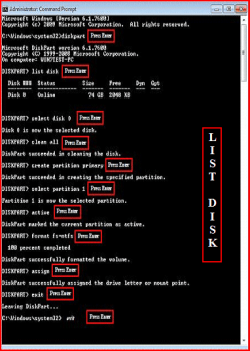
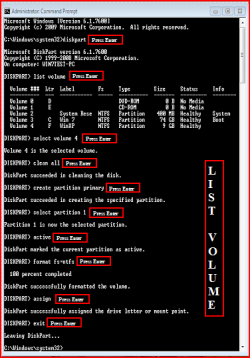
Try a full clean & full format.
Disk - Clean and Clean All with Diskpart Command
Partition or Volume - Delete
Partition or Volume - Create New
1) Boot DVD.
2) Press Shift+F10 (for command prompt)

Type in command line
DISKPART
LIST DISK OR List Volume (If you have partitions)
SELECT DISK # (win HD)
CLEAN ALL
CREATE PARTITION PRIMARY
SELECT PARTITION 1
ACTIVE
FORMAT=NTFS
ASSIGN
EXIT
EXIT
Re-Format Hard Drive.-list-disk.png
Re-Format Hard Drive.-list-volume.png
My System SpecsSystem Spec
23 Oct 2010   #5

windows 7 x64


Quote   Quote: Originally Posted by theog View Post
Try a full clean & full format.
Disk - Clean and Clean All with Diskpart Command
Partition or Volume - Delete
Partition or Volume - Create New
1) Boot DVD.
2) Press Shift+F10 (for command prompt)

Type in command line
DISKPART
LIST DISK OR List Volume (If you have partitions)
SELECT DISK # (win HD)
CLEAN ALL
CREATE PARTITION PRIMARY
SELECT PARTITION 1
ACTIVE
FORMAT=NTFS
ASSIGN
EXIT
EXIT
Attachment 78050
Attachment 78051
I also wanted a way to format my hard drives back to factory specs. I had them loaded up with all kinds of info and they started making a vibration so I decided to RMA them. Just wanted to thank you for giving a complete and easy to understand way of doing this. It worked perfectly. One thing, you need to type "FORMAT FC=NTFS" Thank you again!
My System SpecsSystem Spec
25 Oct 2010   #6

ME/XP/Vista/Win7
uk Hampshire


Quote   Quote: Originally Posted by dwayne3686 View Post
Quote   Quote: Originally Posted by theog View Post
Try a full clean & full format.
Disk - Clean and Clean All with Diskpart Command
Partition or Volume - Delete
Partition or Volume - Create New
1) Boot DVD.
2) Press Shift+F10 (for command prompt)

Type in command line
DISKPART
LIST DISK OR List Volume (If you have partitions)
SELECT DISK # (win HD)
CLEAN ALL
CREATE PARTITION PRIMARY
SELECT PARTITION 1
ACTIVE
FORMAT=NTFS
ASSIGN
EXIT
EXIT
Attachment 78050
Attachment 78051
I also wanted a way to format my hard drives back to factory specs. I had them loaded up with all kinds of info and they started making a vibration so I decided to RMA them. Just wanted to thank you for giving a complete and easy to understand way of doing this. It worked perfectly. One thing, you need to type "FORMAT FC=NTFS" Thank you again!
You are welcome.

PS.
FORMAT FS=NTFS
My System SpecsSystem Spec
Reply

 Re-Format Hard Drive. problems?


Thread Tools


Similar help and support threads for: Re-Format Hard Drive.
Thread Forum
how do i format my hard drive Hardware & Devices
Solved Will format the hard drive [D & C drive], delete the all file in it? Hardware & Devices
Format old OS hard drive Hardware & Devices
hard drive format Hardware & Devices
can't format the hard drive General Discussion


All times are GMT -5. The time now is 03:09 AM.


Seven Forums Android App Seven Forums IOS App Follow us on Facebook

Windows 7 Forums is an independent web site and has not been authorized,
sponsored, or otherwise approved by Microsoft Corporation.
"Windows 7" and related materials are trademarks of Microsoft Corp.
© Designer Media Ltd
  

1 2 3 4 5 6 7 8 9 10 11 12 13 14 15 16 17 18 19 20 21 22 23 24 25 26 27 28 29 30 31 32