
| Windows 7: My mouse keeps selecting things without a button being pressed |
14 Jun 2010
|
#1 | | |
My mouse keeps selecting things without a button being pressed I need help.
I am getting used to single-clicking and not double-clicking. However wherever I leave the cursor, after a moment it will select whatever it is resting on. Which I find annoying. It will open applications if it was left on an icon or icon.
I spend a lot of time on forums, I click to respond and then in the text box, I begin typing a message with the text cursor. But wherever the mouse cursor is sitting, after a moment it will select something on it's own. For example in this text box, if I left the mouse cursor to hoover over the smileys to the right, then it will randomly put smileys in my text.
If I make sure to leave it inside the text box, it will jump my text cursor to wherever the mouse cursor is resting.
Whenever that happens in a block of text, say a paragraph, then suddenly my last sentence was pasted into a pre-existing paragraph. Which I find annoying.
I am having to focus a lot more on exactly where is the mouse cursor resting, and where is the text cursor located and has it jumped recently.
Can I make the mouse cursor stop clicking?
Typing this message, I am fighting with it as my typing keeps jumping into the middle of lines that I previously typed.
Hoovering seems to left-click, since a single left-click will select and/or open a link or application. Then hoovering opens applications. How do I stop this?
Thank you | My System Specs |
| System Manufacturer/Model Number acer laptop OS version 7 32-bit CPU Intel Atom N450 @ 1.66GHz Motherboard Acer AO532h Memory 1.0GB Single-Channel DDR3 Graphics Card GATEWAY EV700 @ 1024x600 Sound Card Realtek High Definition Audio Monitor(s) Displays GATEWAY EV700 Screen Resolution 1024x600 pixels Mouse Alps Pointing-device plugged into PS/2 mouse port Hard Drives Seagate 156GB Other Info also a Logitech wireless USB Input Device |
14 Jun 2010
|
#2 | | Windows® 8 Pro (64-bit) Mumbai, India |
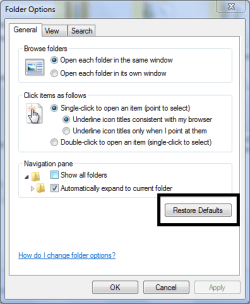
Hi there, go to Folder Options and click Restore Defaults and then make the necessary changes to see if it helps. | My System Specs | | System Manufacturer/Model Number Samsung NP530U4B-S02IN OS Windows® 8 Pro (64-bit) CPU Intel® Core™ i5 Processor 2467M (1.60GHz, 3MB L3 Cache) Motherboard Samsung Electronics Memory 6GB DDR3 System Memory at 1,333MHz (on BD 4GB + 2GB x 1) Graphics Card AMD Radeon™ HD7550M 1GB DDR3 (Ext. Graphic) Sound Card Realtek High Definition Audio Monitor(s) Displays 35.56cm (14.0) SuperBright 300nit HD LED Display Screen Resolution 1366x768 Hard Drives 1TB S-ATA II Hard Drive (5400RPM) with ExpressCache 16GB SSD Internet Speed sucks Antivirus Microsoft Security Essentials Browser Google Chrome (Sync enabled) |
14 Jun 2010
|
#3 | | |
Thanks I tried that, but it seems to have had no effect. | My System Specs | | System Manufacturer/Model Number acer laptop OS version 7 32-bit CPU Intel Atom N450 @ 1.66GHz Motherboard Acer AO532h Memory 1.0GB Single-Channel DDR3 Graphics Card GATEWAY EV700 @ 1024x600 Sound Card Realtek High Definition Audio Monitor(s) Displays GATEWAY EV700 Screen Resolution 1024x600 pixels Mouse Alps Pointing-device plugged into PS/2 mouse port Hard Drives Seagate 156GB Other Info also a Logitech wireless USB Input Device |
14 Jun 2010
|
#4 | | Windows 7 Ultimate AMD64 Sydney, Nova Scotia |
Check the settings for "Make the mouse easier to use" in the "Ease of Access Center". | My System Specs | | Computer type PC/Desktop System Manufacturer/Model Number Home Built OS Windows 7 Ultimate AMD64 CPU AMD Phenom II X4 980 Black Edition Deneb 3.7GHz Motherboard Asus M4N68T-M V2 µATX Motherboard Memory 8GB 4GBx2 Kingston PC10600 DDR3 1333 Memory Graphics Card BFG NVIDIA Geforce 220GT 1 Gig DDR2 PCIe Sound Card VIA VT1708s High Definition Audio 8-channel Onboard Monitor(s) Displays 2 x 19" I-INC AG191D TFT Flat Panel Screen Resolution 1280x1024 x 2 Keyboard Logitech Internet 600 Mouse Logitech Wireless Trackman Wheel PSU Retail Plus 465 Watt Case Power Up Black ATX Mid-Tower Case Cooling Stock heatsink and fan Hard Drives 500 Gig WesternDigital SATA-300 Drive Internet Speed 80 Mbps Down 30 Mbps Up Antivirus Microsoft Security Essentials Browser Internet Explorer 10 Other Info HP DVD1040e Lightscribe - External USB2 |
15 Jun 2010
|
#5 | | |
Yes. thank you, I went through that last night.
This morning my mouse is still left-clicking on it's own. | My System Specs | | System Manufacturer/Model Number acer laptop OS version 7 32-bit CPU Intel Atom N450 @ 1.66GHz Motherboard Acer AO532h Memory 1.0GB Single-Channel DDR3 Graphics Card GATEWAY EV700 @ 1024x600 Sound Card Realtek High Definition Audio Monitor(s) Displays GATEWAY EV700 Screen Resolution 1024x600 pixels Mouse Alps Pointing-device plugged into PS/2 mouse port Hard Drives Seagate 156GB Other Info also a Logitech wireless USB Input Device |
15 Jun 2010
|
#6 | | Windows 7 Ultimate La Crosse, WI |
Are you on a laptop using an external mouse? If not, reply now with "no", haha.
If so, make sure you arent hitting the trackpad on the laptop while you are typing, or if your laptop has a trackpointer in the middle of the keyboard, same thing, make sure you are not hitting it. | My System Specs | | System Manufacturer/Model Number Custom Built OS Windows 7 Ultimate CPU AMD Athlon II X2 245 2.90Ghz Motherboard Some Gigabyte one, dont remember model Memory 3.00 GB Graphics Card 8800GTS 512MB Sound Card Sound Blaster X-Fi Titanium Fatal1ty Monitor(s) Displays Dual 22" widescreen Keyboard Saitek Eclipse 2 Mouse Logitech MX518 PSU CORSAIR CMPSU-850TX 850W Power Supply Case Thermalkake Tsunami Dream Cooling Thermaltake Golden Orb II Hard Drives 250GB internal, 500GB internal |
15 Jun 2010
|
#7 | | |
It might be hardware. is this doing this with other mice? can you borrow a mouse from someone to see if it still happens on your computer?
If you cant borrow a mouse, you should test in safe-mode to see if the problem persists while in safe-mode Safe Mode | My System Specs | | Computer type Laptop System Manufacturer/Model Number ASUS G60-RBBX05 OS Win7 Home Premium 64x CPU Intel Core 2 Duo P7450 / 2.13 GHz (2.29 with Extreme Turbo) Memory 4 GB PC-6400 Hyundai (2X2) at 800Mhz Graphics Card NVIDIA GeForce GTX 260M 1GB DDR3 VRAM Monitor(s) Displays 16" LED Backlit Screen Resolution 1366 x 768 on laptop 1600x1050 max res on 22" external mon Keyboard Chicklet type back-lit (white light) keyboard Mouse Logitech G9 Laser Mouse 3200dpi and 1000 reports per minute PSU 6-cell Lithium ion { lasts 1.5 hours } Case ASUS G60 Laptop Hard Drives OCZ Agility 3 60GB SSD / 320 GB - Serial ATA-150 - 7200 rpm Internet Speed Comcast 8.60mb/s up - 3.11mb/s down Antivirus MSE Browser Firefox Other Info General mid-budget gaming Comp. Low batterylife - High FrameRates - currently overheating problems :(
2nd Rig: Case: Rosewill BLACKHAWK Gaming ATX Mid Tower Computer Case
Mobo: GIGABYTE GA-990FXA-UD3
CPU: AMD FX-6200 Zambezi 3.8GHz (4.1GHz Turbo)
Heatsink: COOLER MASTER V8 CPU Cooler
RAM: Patriot Viper 3 8GB (2 x 4GB) 240-Pin DDR3 SDRAM 1866 (PC3 15000)
GPU: SAPPHIRE Radeon HD 6850 1GB 2 |
15 Jun 2010
|
#8 | | |
We got a new Acer laptop, I plugged a wireless mouse into it and a full-sized keyboard.
I have figured out that by hoovering the mouse cursor near the bottom-right corner of a text-box. It does not jump my text cursor around much.
Outside of typing text on forums, I find it does on occasion highlight parts of a page, whenever it decides to click as I am moving the mouse.
I will try a different mouse. Thanks. | My System Specs | | System Manufacturer/Model Number acer laptop OS version 7 32-bit CPU Intel Atom N450 @ 1.66GHz Motherboard Acer AO532h Memory 1.0GB Single-Channel DDR3 Graphics Card GATEWAY EV700 @ 1024x600 Sound Card Realtek High Definition Audio Monitor(s) Displays GATEWAY EV700 Screen Resolution 1024x600 pixels Mouse Alps Pointing-device plugged into PS/2 mouse port Hard Drives Seagate 156GB Other Info also a Logitech wireless USB Input Device |
15 Jun 2010
|
#9 | | MS Windows 7 Ultimate SP1 64-bit Austin, Texas |
The following program will supply you with the info you need to complete the 'My System' info: SPECCY- System Information Tool http://www.piriform.com/speccy
Operating System, CPU and Temp, Ram, Motherboard, Graphics, Hard Drives, Optical Drives, Audio, Peripherals, Network info.
Simply put—this is the best and it’s free! | My System Specs | | System Manufacturer/Model Number Toshiba Satellite S875D-S7239 laptop OS MS Windows 7 Ultimate SP1 64-bit CPU AMD A10-4600M Motherboard AMD Pumori (Socket FT1) Memory 6.00 GB Dual-Channel DDR3 @ 798MHz (11-11-12-28) Graphics Card AMD Radeon HD 7660G Sound Card High Definition Audio Device Monitor(s) Displays Generic PnP Monitor (1600x900@60Hz) Screen Resolution 1600x900@60Hz Keyboard Standard PS/2 Keyboard Mouse HP Wireless Optical Mobile Mouse Model FHA-3410 Hard Drives SSD 119GB Corsair CSSD-V128GB2 ATA Device Internet Speed What the local pub, local coffee shop offers. Other Info Optical Drive:MATSHITA BD-CMB UJ160B ATA Device
Also have an Asus ha1002xp netbook with Win 7 Ultimate installed. |
15 Jun 2010
|
#10 | | Windows 8 Pro x64 Sydney, Australia |
In control panel/mouse do you have this setting turned on,this may cause the problem you are having
Last edited by kodi; 25 Mar 2011 at 01:28 PM..
| My System Specs | | System Manufacturer/Model Number Self Built Custom Computer. OS Windows 8 Pro x64 CPU QX6850 Quad Extreme Motherboard Gigabyte GA EP45-UD3LR Memory 6Gig DDR2-800 Graphics Card Gigabyte GTX 550 TI Sound Card Creative Audigy SE (SB0570) Sound Card Monitor(s) Displays Asus VW222 [22" LCD] and Benq 2200w [22" LCD] Screen Resolution 1680x1050 Keyboard Logitech illuminated keyboard Mouse Logitech M950 PSU Corsair TX 750watt Case Coolermaster Haf - X Cooling Noctua NH-C12P CPU Cooler Hard Drives Samsung 840 Pro 128g SSD
OCZ Vertex 3 60GB SSD
1xWestern Digital Caviar Green 1tb
2xWestern Digital Caviar Green 2 tb Internet Speed Cable = speeds to 20Mbps downsteam and 512kbps upsteam Antivirus Avast Internet Security Browser Firefox My mouse keeps selecting things without a button being pressed problems? All times are GMT -5. The time now is 01:16 AM. | |