| Windows 7: Dual screen centers the active window |
18 Jun 2010
|
#1 | | Windows 7 Pro, Windows XP Pro |
Dual screen centers the active window Hi everyone,
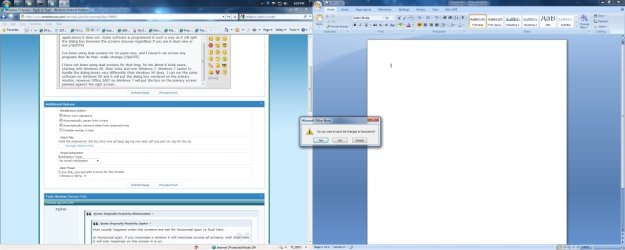
I'm working on deploying Windows 7 Pro into my office and one of the problems I've come across is that, when a window opens on a dual screen system it opens centered on the two screens. This leaves one half of the window on one screen and half on the other screen. While this doesnt sound like a major problem, my test user is getting every non full screen window opening split between the two screens. Has anyone seen this kind of behavior before? | My System Specs |
| System Manufacturer/Model Number Dell Latitude E6500 OS Windows 7 Pro, Windows XP Pro CPU Intel Core i7-620M (2.66GHz, 4M cache) Memory 4.0 GB, DDR3-1333MHz SDRAM (2 DIMMS) Graphics Card 512MB nVidia NVS 3100M Monitor(s) Displays Dell P190S 19" Standard LCD Screen Resolution 1600x900 Laptop Display, 1280x1024 Second Display Hard Drives 250GB 7200rpm HDD |
18 Jun 2010
|
#2 | | Windows 7 Ultimate x64 RTM Ohio |
I've had dual screens for quite a while, and seldom see that.
Usually the box pops up on the primary screen. | My System Specs | | System Manufacturer/Model Number Gateway FX-510X OS Windows 7 Ultimate x64 RTM CPU Intel(R) Pentium(R) D CPU 3.00GHz Motherboard Intel OEMD975XW2G1 Memory 6 GB dual channel DDR2 333 MHz Graphics Card NVIDIA GeForce 7800 GTX 256 MB Sound Card Creative X-Fi Fatal1ty Extreme Gamer Monitor(s) Displays 15" Planar PL170 LCD, 17" Gateway FPD1965 LCD Screen Resolution 1280 x 1024 Hard Drives 64 GB SSD Crucial
2000 GB internal WDC
500 GB internal WDC |
18 Jun 2010
|
#3 | | |

Quote: Originally Posted by Reboot Hi everyone,
I'm working on deploying Windows 7 Pro into my office and one of the problems I've come across is that, when a window opens on a dual screen system it opens centered on the two screens. This leaves one half of the window on one screen and half on the other screen. While this doesnt sound like a major problem, my test user is getting every non full screen window opening split between the two screens. Has anyone seen this kind of behavior before? hi if you drag the pop up to the middle of either screen and then close it
the next time it pops up it should be in the middle of one or the other of the screens
brad | My System Specs | | Computer type PC/Desktop System Manufacturer/Model Number my own build OS win 7 64 RTM CPU PHENOM II X4 Quad Core 965 Black Edition CPU, 3.40 GHz Motherboard GA-MA790FXT-UD5P Memory G.Skill 8GB (4x XMS3 2GB) PC-12800 (1600MHz Graphics Card nvidia 9500 gt Sound Card on board Monitor(s) Displays T231H / X243H ACER Screen Resolution 1980/1080 Keyboard microsoft Mouse logitech PSU 550 watt Case cooler master Cooling stock Hard Drives Hitachi 500 samsung1terabyte wd 750 Internet Speed 20000 dl 1020 ul exetel Other Info booting xp32 2x dual pci-e digital tv tuners
xp pro v 1xusb2 digital tv tuner
vista ultimate 64
win7 64 win8 64 |
21 Jun 2010
|
#4 | | Windows 7 Pro, Windows XP Pro |
We've tried dragging it and closing it in one of the two screens but this has not resolved the problem. One thing I will point out is that the software that does this is running in a virtual computer for XP compatibility. No matter where we close one of these windows the next one always reappears on the split between the two screens. | My System Specs | | System Manufacturer/Model Number Dell Latitude E6500 OS Windows 7 Pro, Windows XP Pro CPU Intel Core i7-620M (2.66GHz, 4M cache) Memory 4.0 GB, DDR3-1333MHz SDRAM (2 DIMMS) Graphics Card 512MB nVidia NVS 3100M Monitor(s) Displays Dell P190S 19" Standard LCD Screen Resolution 1600x900 Laptop Display, 1280x1024 Second Display Hard Drives 250GB 7200rpm HDD |
21 Jun 2010
|
#5 | | |
I have seen this, but only with Error messages and the "info" windows that show up when launching certain apps.
Is this happening with every non-full screen program or just a few in particular. the coding is probably saying to center the window by dividing total screenwidth and screenheight by 2 to find center of screen. | My System Specs | | Computer type Laptop System Manufacturer/Model Number ASUS G60-RBBX05 OS Win7 Home Premium 64x CPU Intel Core 2 Duo P7450 / 2.13 GHz (2.29 with Extreme Turbo) Memory 4 GB PC-6400 Hyundai (2X2) at 800Mhz Graphics Card NVIDIA GeForce GTX 260M 1GB DDR3 VRAM Monitor(s) Displays 16" LED Backlit Screen Resolution 1366 x 768 on laptop 1600x1050 max res on 22" external mon Keyboard Chicklet type back-lit (white light) keyboard Mouse Logitech G9 Laser Mouse 3200dpi and 1000 reports per minute PSU 6-cell Lithium ion { lasts 1.5 hours } Case ASUS G60 Laptop Hard Drives OCZ Agility 3 60GB SSD / 320 GB - Serial ATA-150 - 7200 rpm Internet Speed Comcast 8.60mb/s up - 3.11mb/s down Antivirus MSE Browser Firefox Other Info General mid-budget gaming Comp. Low batterylife - High FrameRates - currently overheating problems :(
2nd Rig: Case: Rosewill BLACKHAWK Gaming ATX Mid Tower Computer Case
Mobo: GIGABYTE GA-990FXA-UD3
CPU: AMD FX-6200 Zambezi 3.8GHz (4.1GHz Turbo)
Heatsink: COOLER MASTER V8 CPU Cooler
RAM: Patriot Viper 3 8GB (2 x 4GB) 240-Pin DDR3 SDRAM 1866 (PC3 15000)
GPU: SAPPHIRE Radeon HD 6850 1GB 2 |
21 Jun 2010
|
#6 | | Windows 7 Pro, Windows XP Pro |
This is happening with two programs that we have to run in Windows XP Compatibility mode. The programs are being run in non-full screen mode, usually positioned on the right hand monitor. Each time the user does something that would cause an error window or info window to appear it pops in right on the dividing line. All other programs running normally on Win 7 are not behaving in this manner. | My System Specs | | System Manufacturer/Model Number Dell Latitude E6500 OS Windows 7 Pro, Windows XP Pro CPU Intel Core i7-620M (2.66GHz, 4M cache) Memory 4.0 GB, DDR3-1333MHz SDRAM (2 DIMMS) Graphics Card 512MB nVidia NVS 3100M Monitor(s) Displays Dell P190S 19" Standard LCD Screen Resolution 1600x900 Laptop Display, 1280x1024 Second Display Hard Drives 250GB 7200rpm HDD |
21 Jun 2010
|
#7 | | |
This is because the code for the program is saying "display errorwindow A at position x,y (center of screen)" Technically, actual code whould look something like this: display errorwindow A at position x,y where x= 1/2(screen_width) - 1/2 (errorwindow_width) and y= 1/2(screen_height) - 1/2 (errorwindow_height)
or something like that.
I dont think, if you move it, it is going to remember the screenposition as its screenposition is always calculated as find-center-of-screen.
If you run it on a one-monitor workstation you wont see this. Are you seeing the issue if you run it as full-screen?
Last edited by Thorsen; 21 Jun 2010 at 10:32 AM..
Reason: many typos and missing words
| My System Specs | | Computer type Laptop System Manufacturer/Model Number ASUS G60-RBBX05 OS Win7 Home Premium 64x CPU Intel Core 2 Duo P7450 / 2.13 GHz (2.29 with Extreme Turbo) Memory 4 GB PC-6400 Hyundai (2X2) at 800Mhz Graphics Card NVIDIA GeForce GTX 260M 1GB DDR3 VRAM Monitor(s) Displays 16" LED Backlit Screen Resolution 1366 x 768 on laptop 1600x1050 max res on 22" external mon Keyboard Chicklet type back-lit (white light) keyboard Mouse Logitech G9 Laser Mouse 3200dpi and 1000 reports per minute PSU 6-cell Lithium ion { lasts 1.5 hours } Case ASUS G60 Laptop Hard Drives OCZ Agility 3 60GB SSD / 320 GB - Serial ATA-150 - 7200 rpm Internet Speed Comcast 8.60mb/s up - 3.11mb/s down Antivirus MSE Browser Firefox Other Info General mid-budget gaming Comp. Low batterylife - High FrameRates - currently overheating problems :(
2nd Rig: Case: Rosewill BLACKHAWK Gaming ATX Mid Tower Computer Case
Mobo: GIGABYTE GA-990FXA-UD3
CPU: AMD FX-6200 Zambezi 3.8GHz (4.1GHz Turbo)
Heatsink: COOLER MASTER V8 CPU Cooler
RAM: Patriot Viper 3 8GB (2 x 4GB) 240-Pin DDR3 SDRAM 1866 (PC3 15000)
GPU: SAPPHIRE Radeon HD 6850 1GB 2 |
21 Jun 2010
|
#8 | | Windows 7 Enterprise (x64); Windows Server 2008 R2 (x64) Earth - I wish I was on Risa |

Quote: Originally Posted by chinga69 
Quote: Originally Posted by Reboot Hi everyone,
I'm working on deploying Windows 7 Pro into my office and one of the problems I've come across is that, when a window opens on a dual screen system it opens centered on the two screens. This leaves one half of the window on one screen and half on the other screen. While this doesnt sound like a major problem, my test user is getting every non full screen window opening split between the two screens. Has anyone seen this kind of behavior before? hi if you drag the pop up to the middle of either screen and then close it
the next time it pops up it should be in the middle of one or the other of the screens
brad I have had this happen many times as well. Unfortunately Brad’s solution only works if the program is designed to remember the last position. Many applications just center the message not thinking about multi-monitors. Every time this happens to me I post or email a message to the author of the software hoping they will fix the software to support multi-monitor as this is becoming the norm. | My System Specs | | System Manufacturer/Model Number Dell OP760 OS Windows 7 Enterprise (x64); Windows Server 2008 R2 (x64) Memory 8GB Monitor(s) Displays 2 Dell 19" LCD Screen Resolution 1280x1024 Keyboard Dell Mouse Dell Optical Internet Speed 40meg |
21 Jun 2010
|
#9 | | Windows 7 Ultimate 64bit Norfolk, VA |
that usually happens when the screens are set for horizontal span vs Dual View.
In Horizontal span, if you maximize a window it will maximize across all screens, with Dual View it will only maximize on the screen it is on. | My System Specs | | System Manufacturer/Model Number HAL-9000 OS Windows 7 Ultimate 64bit CPU Intel i7 3770K Motherboard Asus Sabertooth Z77 Memory 16GB DDR3 1333 Corsair XMS3 Graphics Card XFX HD6950 2GB EyeFinity Sound Card Logitech G35 & Sennheiser PC135 & VIA HD Monitor(s) Displays 23" HP 2310e, 23" Samsung B2230, 21.5" Viewsonic Screen Resolution 5760x1080 Keyboard Logitech G15 and G13 Mouse Logitech G700 Gaming Mouse PSU Antec True Power New 650watt Case Cooler Master HAF-932 Cooling Corsair H60 Hydro Cooler, 3x 230mm Fans, 2x120mm Fan Hard Drives 16TB of Storage
128GB & 256GB Crucial M4 SSD's, 2X 1TB WD Black, 3x 2TB WD, 3x 2TB Samsung F4, 1.5TB Seagate, WD 500GB, Internet Speed 50/10 Mbit Other Info Speakers : Alesis M1 Active Mk2 Studio Monitors , APC RS 1200 UPS, HP 4500DN Color Laser, HP P1006 mono Laser, Kodak 8500 Dye-Sub, Epson 1280 inkjet, Epson Worforce 610 MFC |
21 Jun 2010
|
#10 | | Windows 7 Enterprise (x64); Windows Server 2008 R2 (x64) Earth - I wish I was on Risa |

Quote: Originally Posted by Zepher that usually happens when the screens are set for horizontal span vs Dual View.
In Horizontal span, if you maximize a window it will maximize across all screens, with Dual View it will only maximize on the screen it is on. That makes complete sense, and it should work that way, unfortunately for some applications it does not. Some software is programmed in such a way as it will split the dialog box between the screens anyway regardless if you are in dual view or not. | My System Specs | | System Manufacturer/Model Number Dell OP760 OS Windows 7 Enterprise (x64); Windows Server 2008 R2 (x64) Memory 8GB Monitor(s) Displays 2 Dell 19" LCD Screen Resolution 1280x1024 Keyboard Dell Mouse Dell Optical Internet Speed 40meg Dual screen centers the active window problems? All times are GMT -5. The time now is 09:13 PM. | |