| Windows 7: Dropped external HD D: help. |
22 Jun 2010
|
#1 | | |
Dropped external HD D: help. (ok initially i didn't plan on asking this...but...= A =" sorry)
...ok the external HD wasn't exactly dropped...but it did get hit so...
ok i got an astone external HD (bought a new one after so long)
last night, while i was holding onto its outer leather casing (you know, sometimes external HDs come with some outer casing) and the wire, the external HD slipped out of the casing and hit against a wooden cupboard approximately 5-10 cm away. (thickness of wooden cupboard: approximately 4cm)
today, when i plug it into the computer, the computer is able to read it, there hasn't been any funny noises coming from the external HD, the computer can still read the external HD, it's not lagging, i can still transfer stuff in and out of the external HD, stuff can still be extracted from winrar. files without any errors and it still can be safely removed. i have yet to check if all the files in it have been corrupted, or whatnot.
1) should i still be worried that there's something wrong with it's insides?
2) is there anyway to ensure the internal health of my external HD?
3) (ok this might be a really strange question to ask but...)
how many times can an external HD be dropped from a table before any internal damage can be noticed?
4) usually when an external HD is dropped, will signs of internal damage start showing immediately (in less than 30mins), average (1-3 days) or a long time (a few weeks)? | My System Specs |
| |
22 Jun 2010
|
#2 | | 7 Ultimate x64 California |
A few years back, to prove a point about HDD durability, HardOCP dropped one off the side of a building several stories high (5 I think?). The picked it up, brushed off the dust and debris, and installed it. Amazingly, it fired up just fine.
As long as it wasn't on when this (relatively minor jolt) took place, then I think you're going to be alright. That's not to suggest you can run around drop kicking HDD's when bored and looking for things to do, but, they're pretty durable, again, as long as the power is off. | My System Specs | | OS 7 Ultimate x64 CPU i5-2500k Motherboard Asus P8P67 Pro Memory 8GB G.Skill Ripjaws X F3-12800CL7D-8GBXH 1866MHz 8-9-8-24 Graphics Card EVGA GTX 570 SC Sound Card X-Fi Titanium Fatality Monitor(s) Displays Samsung S27A550H 27" LED Screen Resolution 1920x1080 Keyboard MS Natural Elite 4000 Ergonomic Mouse Logitech G500 PSU PC Power & Cooling Silencer 760 Case Lian Li Lancool K62 Cooling Thermalright Venomous X Black/Scythe S-Flex/Shin-Etsu X23 Hard Drives OCZ Vertex 3 120GB.
1TB Samsung F3.
2TB Samsung F4. Internet Speed 6MB/768 Other Info Logitech Z-5500 505 watts.
D-Link DGL-4500.
Tripp-Lite Smart Pro 1500. |
22 Jun 2010
|
#3 | | |
To Fumz:
lol, i'm not that weird to kill external HDs for fun. those things are really precious to me!! x.x
eh, what difference would it make whether it's on or off | My System Specs | | |
22 Jun 2010
|
#4 | | Windows 7 x64 pro/ Windows 7 x86 Pro/ XP SP3 x86 |
If the impact is sufficiently strong, the disk can get shattered or the reader arm may break or a circuit board may get damaged. But normally, if any of these were to happen, you would know immediately after dropping the disk. However, to be safe, do a random check to ensure the integrity of your data. If you have some critical stuff, back it up to another media. | My System Specs | | System Manufacturer/Model Number Too many to describe... OS Windows 7 x64 pro/ Windows 7 x86 Pro/ XP SP3 x86 |
22 Jun 2010
|
#5 | | |
To Bill2:
what do you mean by "random check" ._.
and another media...you referring to the computer or another external HD | My System Specs | | |
22 Jun 2010
|
#6 | | Windows 7 x64 pro/ Windows 7 x86 Pro/ XP SP3 x86 |
By random check I mean, randomly pick a few data files on your computer and check they are readable.
Another media can be anything, whether another HD, computer or dvd/cd/usb drive. The idea is to have your data safe in case the dropped disk starts acting up. | My System Specs | | System Manufacturer/Model Number Too many to describe... OS Windows 7 x64 pro/ Windows 7 x86 Pro/ XP SP3 x86 |
22 Jun 2010
|
#7 | | Windows 7 Ultimate The Southern Hinterlands |
How to Run Disk Check in Windows 7 This will show you how to run Check Disk or chkdsk in Windows 7 to check a selected hard disk for file system errors and bad sectors on it. | My System Specs | | System Manufacturer/Model Number ASUSTeK Computer INC. CM5675 OS Windows 7 Ultimate CPU Core(TM) i5 CPU 650 @ 3.20GHz Motherboard ASUSTeK Computer INC. CM5675 Memory 6.00 GB Graphics Card Intel(R) HD Graphics Sound Card Intel HD integtrated Monitor(s) Displays Samsung 24' Screen Resolution 1900/1020 Hard Drives (1) INTEL SSD SA2M120G2GC ATA Device (2) ST31000528AS ATA Device Internet Speed 30mb |
22 Jun 2010
|
#8 | | 7 Ultimate x64 California |

Quote: Originally Posted by lorripop To Fumz:
lol, i'm not that weird to kill external HDs for fun. those things are really precious to me!! x.x
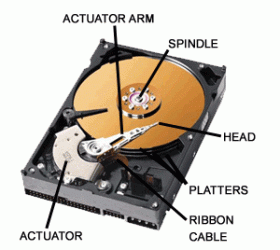
eh, what difference would it make whether it's on or off If you jolt the drive when it's powered on and the heads actually touch the platter, you'll lose data and possibly corrupt the file system, etc etc etc. While the story I told was extreme, and it does say a lot about the durability of these drives, Bill2 is also correct.
I can't explain why the drive worked, because there's more to a drive than just a big round hunk of metal (IC's, spindles and heads). The guys over at HardOCP may have just been lucky and the drive hit "just right". It's not like I'm advising you abuse the drive, and dropping them off tall buildings isn't a common practice of HardOCP. Take care of your stuff. | My System Specs | | OS 7 Ultimate x64 CPU i5-2500k Motherboard Asus P8P67 Pro Memory 8GB G.Skill Ripjaws X F3-12800CL7D-8GBXH 1866MHz 8-9-8-24 Graphics Card EVGA GTX 570 SC Sound Card X-Fi Titanium Fatality Monitor(s) Displays Samsung S27A550H 27" LED Screen Resolution 1920x1080 Keyboard MS Natural Elite 4000 Ergonomic Mouse Logitech G500 PSU PC Power & Cooling Silencer 760 Case Lian Li Lancool K62 Cooling Thermalright Venomous X Black/Scythe S-Flex/Shin-Etsu X23 Hard Drives OCZ Vertex 3 120GB.
1TB Samsung F3.
2TB Samsung F4. Internet Speed 6MB/768 Other Info Logitech Z-5500 505 watts.
D-Link DGL-4500.
Tripp-Lite Smart Pro 1500. |
22 Jun 2010
|
#9 | | |
To Bill2:
ohhhh . A .
lol i quickly backed up everything on my computer.
To: Tews:
ok i can try running chkdsk.
To Fumz:
well...my external HD wasn't connected to the computer when it got hit...so...i guess it was off when it got hit, right? ._.
what's a head ._.
well, when i was trying to find solutions on google there were many stories where the external HDs dropped from a TABLE onto a CARPETED floor, and after a while there were problems...that's why i'm paranoid and posted this question x.x
lol, usually i take better care of my things, but this time the external HD slipped out of it's case...i'm not putting it in there anymroe = A = | My System Specs | | |
22 Jun 2010
|
#10 | | 7 Ultimate x64 California |
Drives fail for a variety of reasons. One cannot conclude that because a drive is dropped on the carpet that its failure x weeks later was a direct result of the shock. If it were immediate, then yeah sure, I'd buy that, but things become gray as time goes on.
I baby my gear. I buy excellent psu's, voltage regulating UPS systems, and do just about anything I can to ensure my stuff runs well; despite my safeguards, I've lost ntfs file systems. Why? Beats me? Stuff happens. The only thing I did was return to the machine several hours later. Conversely, I've got a stack of old no longer used hard drives that I do not take care of very well; mostly because they're always in the way of something else I need. Every so often they'll hit the floor, but, when I need to fire up a test rig, they all work just fine.
The best, and only, thing you can do is to check the integrity of the drive. As Bill2 and Tews have advised: run a check disk, go open up files randomly. I'm sure your drive will turn out to be just fine. | My System Specs | | OS 7 Ultimate x64 CPU i5-2500k Motherboard Asus P8P67 Pro Memory 8GB G.Skill Ripjaws X F3-12800CL7D-8GBXH 1866MHz 8-9-8-24 Graphics Card EVGA GTX 570 SC Sound Card X-Fi Titanium Fatality Monitor(s) Displays Samsung S27A550H 27" LED Screen Resolution 1920x1080 Keyboard MS Natural Elite 4000 Ergonomic Mouse Logitech G500 PSU PC Power & Cooling Silencer 760 Case Lian Li Lancool K62 Cooling Thermalright Venomous X Black/Scythe S-Flex/Shin-Etsu X23 Hard Drives OCZ Vertex 3 120GB.
1TB Samsung F3.
2TB Samsung F4. Internet Speed 6MB/768 Other Info Logitech Z-5500 505 watts.
D-Link DGL-4500.
Tripp-Lite Smart Pro 1500. Dropped external HD D: help. problems? All times are GMT -5. The time now is 09:04 AM. | |