
Memtest86+ V4.10 And 2 Kits Of Corsair Ram (tw3x4g1333c9)

DukeX007X

New member
Local time
1:35 AM
Messages
6
Hello,

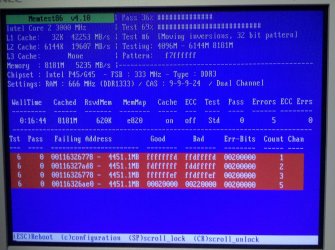
I recently upgraded my systems (Intel DP45SG) RAM capacity to 8GB from 4 GB. Once installed, I booted up to my systems BIOS and verified the RAM modules have been detected and restored all BIOS settings to default to make sure all new changes have been updated properly. All RAM has been detected and everything looks good in the BIOS. Next, I decided to run Memtest86+ v4.10 to fully test the new modules. Around Test #6 Pass 36% & Test 69% I received four errors (I've attached a screenshot of Memtest86+). After receiving the errors I turned off the system, reseated the RAM modules retested and got the same error. I went ahead and turned off the system, and removed my original 4GB modules and only left the new 4GB modules. This time Memtest86+ passed. I decided to test the other RAM slots to make sure it's not the MB. Memtest86+ passed again. At this point I thought my original RAM modules might have gone bad. I removed the new modules and reinstalled the original modules, ran Memtest86+ and the original 4GB modules passed as well. Now it seems Memtest86+ pass with only 4GB installed but once I get to 8GB it fails.

At this point, I decided to go a few steps further. I left the 8GB RAM installed in the system and booted up to Windows 7. I decided to run Prime95 for 24hrs to see if any errors occur. After 24hrs Prime95 had no errors. I decided to use my computer normally for a few days to see if any issues occurred. After 4 days of playing games for a few hours, watching and editing videos, and normal web surfing, no issues have occurred in the OS.

I am not sure where to go from here. I am not experiencing any issues with my newly installed RAM modules however I am not passing Memtest86+ with all modules installed. Also the BIOS is up to date, my system is not over clocked and is running on factory stock settings (except the Geforce GTX 470 which is over clocked by the factory). Any help will be appreciated for this issue and thank you for your time.

My System Specs:

Motherboard: Intel Desktop Board DP45SG
Processor: Intel Core 2 Quad Q9650 @ 3.00GHz
Memory: Four 2GB Corsair - tw3x4g1333c9
Video Card: Nvidia GeForce GTX 470 SC+
Hard Drive # 1: Hitachi Deskstar 7K1000.B 1 TB (HDT721010SLA360)
Hard Drive # 2: SAMSUNG Spinpoint F1 1TB (HD103UJ)
Hard Drive # 3: Western Digital Caviar SE 160GB (WD1600JS)
Optical Drive: LG Super Multi DVD Rewriter (GH22NS40)
Power Supply: Ultra X3 1000W ATX Power Supply
Case: ThermalTake Tsunami Dream (Silver)
Sound Card: Creative Sound Blaster Audigy 2 ZS
Monitor: NEC Multisync LCD1765
Operating System: Windows 7 Professional 64bit
 

Attachments
  • Memtest86 error.jpg
    Memtest86 error.jpg
    678.3 KB · Views: 94

My Computer My Computer

At a glance

Windows 7 Professional 64bitIntel Core 2 Quad Q9650 @ 3.00GHz8GB Corsair XMS3 DDR3 PC3-10666Nvidia Geforce GTX 470 SC+
Computer Manufacturer/Model Number
Custom Built System
OS
Windows 7 Professional 64bit
CPU
Intel Core 2 Quad Q9650 @ 3.00GHz
Motherboard
Intel Desktop Board DP45SG
Memory
8GB Corsair XMS3 DDR3 PC3-10666
Graphics Card(s)
Nvidia Geforce GTX 470 SC+
Sound Card
Creative Sound Blaster Audigy 2 ZS Gamer
Monitor(s) Displays
NEC MultiSync LCD1765
Screen Resolution
1280 X 1024
Hard Drives
Seagate Barracuda 7200.11RPM SATA 3Gb/s 750GB,
Western Digital Caviar 7200RPM SATA 3Gb/s 160GB, &
Hitachi 7200RPM SATA 3Gb/s 1TB.
PSU
Ultra X3 1000 Watt
Case
Thermaltake Tsunami Dream - Color: Silver
Cooling
Thermaltake Fans
Keyboard
Saitek Gamer Keyboard
Mouse
Logitec MX1100 Laser Cordless Mouse
Internet Speed
Comcast Cable - DOCSIS 3.0 - 30Mbps

My Computer My Computer

At a glance

Windows 7 64 Bit Home Premium SP1i7-3820GSkill F3-14900CL9Q - 16GBEVGA GeForce GTX660 - Driver 352.86
Computer type
PC/Desktop
Computer Manufacturer/Model Number
Home Built - Jan 2013
OS
Windows 7 64 Bit Home Premium SP1
CPU
i7-3820
Motherboard
Asus P9X79-PRO - Bios 4608
Memory
GSkill F3-14900CL9Q - 16GB
Graphics Card(s)
EVGA GeForce GTX660 - Driver 352.86
Sound Card
On board Realtek ALC898
Monitor(s) Displays
Acer S271HL
Screen Resolution
1920 x 1080
Hard Drives
#1- Samsung 840 Pro Series
#2- Western Digital WD1002FAEX Sata3 Black
#3- Western Digital WD1002FAEX Sata3 Black
PSU
Corsair CMPSU-850TX-V2 - 850 watt (by Seasonic)
Case
Corsair Obsidian 550D
Cooling
Standard 3 120mm case fans, Cooler Master Hyper 212 EVO
Keyboard
MS KC-0405
Mouse
Intellimouse 5-button
Internet Speed
56 Mbits/Sec (on a good day)
Antivirus
Avast & Malwarebytes
Browser
Firefox
Other Info
Asus DVD - DRW-24B1ST 24X
TVeblen,

Thank you for your response. I've always liked that saying, "If it ain't broke, don't fix it". Trust me, I thought about it a few times before posting anything in the forums. However, I've always had excellent luck with Memtest86+ testing good and bad RAM. I just don't want this to be a dormant issue and the day I need my computer to be on its best performance, have it mess up on me.

Let me explain what I've attempted so far.

Yesterday I was working on the computer and updated a few applications. After the update, I restarted Win 7 and encountered a BIOS error. After the restart the system did not post and provided 3 Beeps. According to the MB manual 3 beeps indicate the memory was not detected. I decided to turn off the power completely, wait a few secs. and turn on the system again. This time the system posted and booted up to the OS. I attempted to recreate this error again, I restarted the OS and the system successfully restarted and posted with no errors or beep codes.

I attempted your suggestion and bumped up the memory voltage to 1.6v from 1.5v. However, Memtest86+ gave the same errors like the last time but with errors in different test #s.

I was looking through some other threads and found discussions about different revision numbers on the memory modules. Is it a possibility that this time around I got a different revision number? I bought the first 4GB kit last year and bought this other 4GB kit about a week ago.

What is the next step? For the first time I got BIOS beep code errors. Can this indicate a faulty memory module(s)? Thank you again for your time in this matter. Any further help will be appreciated.
 

My Computer My Computer

At a glance

Windows 7 Professional 64bitIntel Core 2 Quad Q9650 @ 3.00GHz8GB Corsair XMS3 DDR3 PC3-10666Nvidia Geforce GTX 470 SC+
Computer Manufacturer/Model Number
Custom Built System
OS
Windows 7 Professional 64bit
CPU
Intel Core 2 Quad Q9650 @ 3.00GHz
Motherboard
Intel Desktop Board DP45SG
Memory
8GB Corsair XMS3 DDR3 PC3-10666
Graphics Card(s)
Nvidia Geforce GTX 470 SC+
Sound Card
Creative Sound Blaster Audigy 2 ZS Gamer
Monitor(s) Displays
NEC MultiSync LCD1765
Screen Resolution
1280 X 1024
Hard Drives
Seagate Barracuda 7200.11RPM SATA 3Gb/s 750GB,
Western Digital Caviar 7200RPM SATA 3Gb/s 160GB, &
Hitachi 7200RPM SATA 3Gb/s 1TB.
PSU
Ultra X3 1000 Watt
Case
Thermaltake Tsunami Dream - Color: Silver
Cooling
Thermaltake Fans
Keyboard
Saitek Gamer Keyboard
Mouse
Logitec MX1100 Laser Cordless Mouse
Internet Speed
Comcast Cable - DOCSIS 3.0 - 30Mbps
Beep codes. Well, those are definitely symptoms!

From what you say it certainly sounds like one or more of those modules are not performing to spec. If you just bought them you may want to avoid all the work and just do a RMA. I agree with you, there have been a number of times that Memtest passes RAM but it turns out to be bad in the end regardless. Yours doesn't pass. It may be just bad RAM.

If you want to play with the RAM to see if you can get it to pass Memtest a couple of things to try is:

Go into the BIOS and turn the DRAM Frequency down to 1066 or even 800 and test (Leave the voltages back at default). RAM modules are made in batches and are only designated at a frequency by a test/pass basis. Yours may be incorrectly rated for 1333 (bounced out of the 1066 bin into the 1333 bin:sarc:). But if you find your 1333 only works at 1066 you'd want to RMA anyway, wouldn't you?
Also, try resetting the BIOS defaults and then only make the changes you need for the correct SATA configuration -0 leave everything else at default values. Also, check @ Intel to see if they have a newer BIOS for your board that lists memory issues as a fix.

You can also play with a combination of reduced timings, voltages, and multipliers to see if you can get the new RAM to run stable.
 

My Computer My Computer

At a glance

Windows 7 64 Bit Home Premium SP1i7-3820GSkill F3-14900CL9Q - 16GBEVGA GeForce GTX660 - Driver 352.86
Computer type
PC/Desktop
Computer Manufacturer/Model Number
Home Built - Jan 2013
OS
Windows 7 64 Bit Home Premium SP1
CPU
i7-3820
Motherboard
Asus P9X79-PRO - Bios 4608
Memory
GSkill F3-14900CL9Q - 16GB
Graphics Card(s)
EVGA GeForce GTX660 - Driver 352.86
Sound Card
On board Realtek ALC898
Monitor(s) Displays
Acer S271HL
Screen Resolution
1920 x 1080
Hard Drives
#1- Samsung 840 Pro Series
#2- Western Digital WD1002FAEX Sata3 Black
#3- Western Digital WD1002FAEX Sata3 Black
PSU
Corsair CMPSU-850TX-V2 - 850 watt (by Seasonic)
Case
Corsair Obsidian 550D
Cooling
Standard 3 120mm case fans, Cooler Master Hyper 212 EVO
Keyboard
MS KC-0405
Mouse
Intellimouse 5-button
Internet Speed
56 Mbits/Sec (on a good day)
Antivirus
Avast & Malwarebytes
Browser
Firefox
Other Info
Asus DVD - DRW-24B1ST 24X
Tveblen,

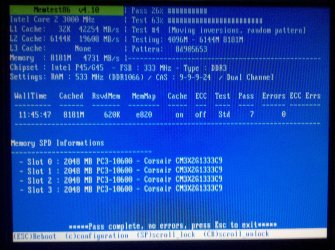
Again, thank you for your response. Running voltage at 1.6v, DRAM Frequency at 1066, and CAS at 9-9-9-24.
Memtest86+ Passed! With no reported errors!

The test ran for 11hours and 45mins (please see screen shot below). You were right. It seems one or some of the modules are not running at the right specifications. I also currently have the latest BIOS for this MB. I am currently working with Corsair on getting an RMA for these modules. I'll keep you posted on any further developments. Again, thank you for all your help.
 

Attachments

  • Memtest86noerror.jpg
    Memtest86noerror.jpg
    1,012.6 KB · Views: 51

My Computer My Computer

At a glance

Windows 7 Professional 64bitIntel Core 2 Quad Q9650 @ 3.00GHz8GB Corsair XMS3 DDR3 PC3-10666Nvidia Geforce GTX 470 SC+
Computer Manufacturer/Model Number
Custom Built System
OS
Windows 7 Professional 64bit
CPU
Intel Core 2 Quad Q9650 @ 3.00GHz
Motherboard
Intel Desktop Board DP45SG
Memory
8GB Corsair XMS3 DDR3 PC3-10666
Graphics Card(s)
Nvidia Geforce GTX 470 SC+
Sound Card
Creative Sound Blaster Audigy 2 ZS Gamer
Monitor(s) Displays
NEC MultiSync LCD1765
Screen Resolution
1280 X 1024
Hard Drives
Seagate Barracuda 7200.11RPM SATA 3Gb/s 750GB,
Western Digital Caviar 7200RPM SATA 3Gb/s 160GB, &
Hitachi 7200RPM SATA 3Gb/s 1TB.
PSU
Ultra X3 1000 Watt
Case
Thermaltake Tsunami Dream - Color: Silver
Cooling
Thermaltake Fans
Keyboard
Saitek Gamer Keyboard
Mouse
Logitec MX1100 Laser Cordless Mouse
Internet Speed
Comcast Cable - DOCSIS 3.0 - 30Mbps
I just wanted to say this for those budgeting for a new build I always try and keep in mind the max amount of ram I'm going to want to use in my budget when purchasing it. This way it has a higher probability of being tested , paired and binned under the same circumstances and are more likely to be manufactured and handled under the same quality control, thus the less likely hood of something through the manufacturing process becoming an issue.
As most of us know it's never a good idea to mix ram but even purchasing the exact brand and model # at a later date can make a difference, but then again sometimes it's just a bad stick here or their JMO. Hoepe it works out for you. Fabe
 

My Computer My Computer

At a glance

Windows 7 ultimate 64 bit / XP Home sp3intel Core 2 Duo E8400 3.0ghz8 gigs 1066 OCZ Fata1tyEVGA GTX 580 Call of Duty Black Ops Edition
Computer Manufacturer/Model Number
Self Built
OS
Windows 7 ultimate 64 bit / XP Home sp3
CPU
intel Core 2 Duo E8400 3.0ghz
Motherboard
Asus P5ND bios 1401
Memory
8 gigs 1066 OCZ Fata1ty
Graphics Card(s)
EVGA GTX 580 Call of Duty Black Ops Edition
Sound Card
Creative Soundblaster Audigy 2zs
Monitor(s) Displays
Asus 24in LCD's 2MS X2
Screen Resolution
1920x1080p @60Hz
Hard Drives
WD Caviar 500 Black/ WD Caviar 200 Blue
PSU
OCZ 700W GameXtreme
Case
NZXT Apollo
Cooling
Corsair H50 CPU/120mm x3 /60mm x2 /Corsair Dominator Ram
Keyboard
Logitech Bluetooth Wireless MX5000
Mouse
Logitech Bluetooth Wireless MX1000
Internet Speed
Download 19.83 Upload 0.97
Other Info
Logitech Z2300 Speakers/ Bose Noise Cancelling Headphones/Avermedia PCI-e Hybrid TV Bravo/Epson NX415 all in one/ 4 Port Powered USB Hub/ LG 10x Bluray Burner /TSST Corp DVDRW External
Glad to see you got it sorted.
Sorry that you're dealing with bad RAM.

This can sometimes be a hard problem for folks to track down. Good work!
 

My Computer My Computer

At a glance

Windows 7 64 Bit Home Premium SP1i7-3820GSkill F3-14900CL9Q - 16GBEVGA GeForce GTX660 - Driver 352.86
Computer type
PC/Desktop
Computer Manufacturer/Model Number
Home Built - Jan 2013
OS
Windows 7 64 Bit Home Premium SP1
CPU
i7-3820
Motherboard
Asus P9X79-PRO - Bios 4608
Memory
GSkill F3-14900CL9Q - 16GB
Graphics Card(s)
EVGA GeForce GTX660 - Driver 352.86
Sound Card
On board Realtek ALC898
Monitor(s) Displays
Acer S271HL
Screen Resolution
1920 x 1080
Hard Drives
#1- Samsung 840 Pro Series
#2- Western Digital WD1002FAEX Sata3 Black
#3- Western Digital WD1002FAEX Sata3 Black
PSU
Corsair CMPSU-850TX-V2 - 850 watt (by Seasonic)
Case
Corsair Obsidian 550D
Cooling
Standard 3 120mm case fans, Cooler Master Hyper 212 EVO
Keyboard
MS KC-0405
Mouse
Intellimouse 5-button
Internet Speed
56 Mbits/Sec (on a good day)
Antivirus
Avast & Malwarebytes
Browser
Firefox
Other Info
Asus DVD - DRW-24B1ST 24X
TVeblen & thefabe,

Thank you for your responses. I found the exact cause of the issue. The first kit of 4GB RAM modules were 1.5v RAM Modules. The second kit of 4GB RAM Modules I just purchased were 1.6v RAM Modules. Also both kits had different revision numbers.

The RMA has been requested and processed. Corsair will be replacing both kits. I'll be sending the defective modules sometime this week. Again, thank you all for your assistance.
 

My Computer My Computer

At a glance

Windows 7 Professional 64bitIntel Core 2 Quad Q9650 @ 3.00GHz8GB Corsair XMS3 DDR3 PC3-10666Nvidia Geforce GTX 470 SC+
Computer Manufacturer/Model Number
Custom Built System
OS
Windows 7 Professional 64bit
CPU
Intel Core 2 Quad Q9650 @ 3.00GHz
Motherboard
Intel Desktop Board DP45SG
Memory
8GB Corsair XMS3 DDR3 PC3-10666
Graphics Card(s)
Nvidia Geforce GTX 470 SC+
Sound Card
Creative Sound Blaster Audigy 2 ZS Gamer
Monitor(s) Displays
NEC MultiSync LCD1765
Screen Resolution
1280 X 1024
Hard Drives
Seagate Barracuda 7200.11RPM SATA 3Gb/s 750GB,
Western Digital Caviar 7200RPM SATA 3Gb/s 160GB, &
Hitachi 7200RPM SATA 3Gb/s 1TB.
PSU
Ultra X3 1000 Watt
Case
Thermaltake Tsunami Dream - Color: Silver
Cooling
Thermaltake Fans
Keyboard
Saitek Gamer Keyboard
Mouse
Logitec MX1100 Laser Cordless Mouse
Internet Speed
Comcast Cable - DOCSIS 3.0 - 30Mbps
Back
Top