Join Forum
|
Login
|
Today's Posts
|
Tutorials
|
Vista Forum
|
Windows 8 Forum
Windows 7 Help Forums
>
Windows 7 help and support
>
Media Center
»
Windows 7: total system mute by WMC 7
12 Sep 2010
#
1
pinakel
win 7 & xp
5 posts
total system mute by WMC 7
I am using win 7 media center. But i faced problem using WMC. when i mute WMC the total system muted. I want to mute only WMC app instead of total system mute so I can play song in WMP. how to mute only WMC app? plz help.
My System Specs
OS
win 7 & xp
13 Sep 2010
#
2
MK2
7
241 posts
Hi,
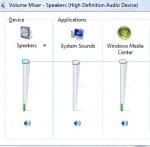
Did you try this?
1] Click Speakers icon present in the taskbar.
2] Click Mixer.
This will open the volume mixer.
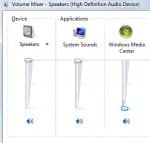
3] Drag the volume level indicator bar to the zero level under Windows Media Center icon.
MK2
My System Specs
OS
7
14 Sep 2010
#
3
MK2
7
241 posts
Hi,
Was wondering if it worked, you also could in step 3 click the blue speaker icon under the Windows Media Center icon to directly mute the channel.
MK2
My System Specs
OS
7
.
total system mute by WMC 7 problems?
«
Windows Media Center doesn't find IR receiver.
|
Reset Media Center to default settings
»
Thread Tools
Printable Version
Email this Page
Similar help and support threads for: total system mute by WMC 7
Thread
Forum
Total system management Live CD/DVD?
Software
How to keep System Sounds at 0 volume or mute?
Sound & Audio
Should I get HP total care warranty for my new system?
Chillout Room
Windows 7x64 system total freeze
BSOD Help and Support
System mute in W7?
Sound & Audio
All times are GMT -5. The time now is
02:59 AM
.
Contact Us
-
Windows 8 Support
-
Windows Vista Support
-
Legal
-
Privacy and cookies
-
Top
Google+
Windows 7 Forums is an independent web site and has not been authorized,
sponsored, or otherwise approved by Microsoft Corporation.
"Windows 7" and related materials are trademarks of Microsoft Corp.
©
Designer Media Ltd