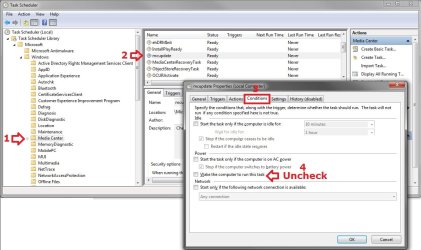
When I first installed 7 back at it's release I had this very same problem and was told how to turn off the auto update options in Media Center and had no further problems with it waking the PC sometimes more than once a week. I have since re-installed 7 a few months back and as part of my initial personalizing I went into MC and turned those options off but it continues to wake my PC randomly to do updates at 6:51am. Here is the entry in the Event Viewer regarding to this action ((there was some text anomolies I removed that were unicode that would not save properly in notepad, they were just question marks(?) where spaces were in the sleep and wake time lines))
"The system has resumed from sleep.
Sleep Time: 2010-10-24T05:33:53.365000000Z
Wake Time: 2010-10-24T10:51:01.610000000Z
Wake Source: Timer - Windows will execute '\Microsoft\Windows\Media Center\mcupdate_scheduled' scheduled task that requested waking the computer."
Why does it insist on waking the PC even though I have MC set to not update? I do not use MC but once in a while (like maybe once every 3-4 months) so having it update TV listings is not needed.
"The system has resumed from sleep.
Sleep Time: 2010-10-24T05:33:53.365000000Z
Wake Time: 2010-10-24T10:51:01.610000000Z
Wake Source: Timer - Windows will execute '\Microsoft\Windows\Media Center\mcupdate_scheduled' scheduled task that requested waking the computer."
Why does it insist on waking the PC even though I have MC set to not update? I do not use MC but once in a while (like maybe once every 3-4 months) so having it update TV listings is not needed.
My Computer
At a glance
Win7 64AMD Phenom X4 9950 2.6ghz8 gigs Corsair2 X Nvidia Geforce 8800 GTS (G92) 512 in SLI
- Computer Manufacturer/Model Number
- Custom Asus
- OS
- Win7 64
- CPU
- AMD Phenom X4 9950 2.6ghz
- Motherboard
- Asus Crosshair
- Memory
- 8 gigs Corsair
- Graphics Card(s)
- 2 X Nvidia Geforce 8800 GTS (G92) 512 in SLI
- Sound Card
- Onboard
- Monitor(s) Displays
- Samsung 22 inch
- Screen Resolution
- 1920 X 1080
- Hard Drives
- WD 1 TB, WD 500 Gig, WD 320 Gig
- PSU
- Thermaltake 850 watt
- Case
- Raidmax
- Cooling
- Zalman 9700
- Keyboard
- Microsoft
- Mouse
- Logitech MX 518
- Internet Speed
- 25 mbps