Windows 7 Forums Search
Welcome to Windows 7 Forums. Our forum is dedicated to helping you find solutions with any problems, errors or issues you are experiencing with Windows 7. The Windows 7 forum also covers news and updates and has an extensive Windows 7 tutorial section that covers a wide range of tips and tricks.


Windows 7 - How to load Movie Subtitle in Media Player 12???


01-01-2009   #11


Windows 7 Ult x64(x2), HomePrem x32(x4), Server 08 (+VM), 08 R2 (VM) , SuSe 11.2 (VM), XP 32 (VM)


are you using x64???

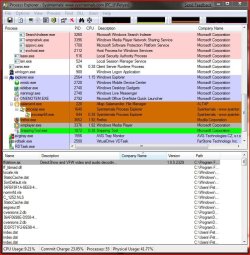
wmc uses mfpmp in media center in 32 bit......

now im seeing that you might be able to play bluray and HD-dvd's the future...

as now the framework is in media center too....

Attached Thumbnails
How to load Movie Subtitle in Media Player 12???-wmc.png  
My System SpecsSystem Spec
01-02-2009   #12


Windows 7 build 7068


Thanks darkassain

I taked the ownership and rename the file.

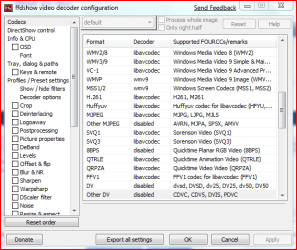
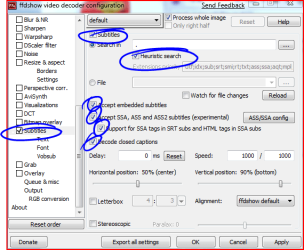
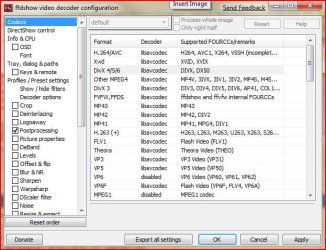
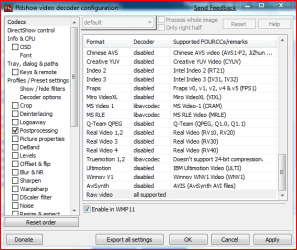
With ffdshow the subtitles does't show but i have installed vobsub and they show now with media player or media center.
My System SpecsSystem Spec
01-07-2009   #13


Windows 7 Build 7000


Hey, i wanna thank you too, renaming worked for me! ahhh i'm just loving this forum
My System SpecsSystem Spec
.


01-13-2009   #14


Windows 7


Hello everyone,

I have the subtitle problem on Wİndows Media player too.

Was it solved after taking the ownership and rename the file C:\Windows\System32\mfpmp.exe?

Is there anything else that i should do?

Thanks.
My System SpecsSystem Spec
01-13-2009   #15


Windows 7


Quote   Quote: Originally Posted by Bellerophon View Post
Why don't you just run the movie through MCE, there are subtitles in there and they can easily be turned on/off?
I couldt find the where subtitles turned on/off on the MCE.

Where is the subtitle area on MCE?

Could you show? Thanks.
My System SpecsSystem Spec
01-13-2009   #16


windows 7 64bit


In my case, I installed vista codec pack and when I double click the video file in windows explorer, I can load the subtitle. However, if I click play in media center, it will not load subtitle. Strange.
My System SpecsSystem Spec
01-13-2009   #17


Windows 7 Beta Build 7100 x86


You might want to check out this thread at the Green Button. To get soft subtitles for XViD to play in 7MC, you might either need to replace the MP3 decoder dll or Media Foundation executable with the one from Vista. The file names are mp3dmod.dll and mfpmp.exe respectively. Copy in place, restart, and that might do the trick.

The Green Button - Subtitles in AVI (DivX/Xvid) at 7MC!!!!!! - SOLVED

When I get home, I think I might just want to try swapping the mp3dmod.dll file because subtitles work with AC3 audio out of the box. Thus I'm thinking it's the mp3 dll that's the roadblock.
My System SpecsSystem Spec
01-13-2009   #18


Windows 7 Ult x64(x2), HomePrem x32(x4), Server 08 (+VM), 08 R2 (VM) , SuSe 11.2 (VM), XP 32 (VM)


the better thing to do is to let ffdshow override that since you dont have the mp3dmod.dll

ffdshow should let you see the subtitles though...

i have that as my default (with of course renaming the dll)

i came across that before but i thought it would be too risky and since no one asked until know didnt remember to give that info out...
My System SpecsSystem Spec
01-14-2009   #19


Windows 7


Quote   Quote: Originally Posted by darkassain View Post
have you right clicked and does anything show pertaining to subtitles??


-----------------if you are not adventurous please do not try this-------------------


----this might break something, but you knew that when you installed 7 didnt you...lol -----

disable the mfpmp.exe because i dont believe the wmp 12 codecs (are they still called that?) can handle subs


i am thinking your have a avi file (most like with a separate subtitle file )

what you want to do is let ffdshow (and haali + directvobsub) get preference over mfpmp.exe....

just change it back as it might cripple the playback of some of your files....

C:\Windows\System32\mfpmp.exe

take ownership and rename it

after watching the file rename it back...
Thank you darkassain. Your solution worked WMP 12 , it shows subtitles by vobsub after renaming mfpmp.exe.

But there is another problem, the subtitles dont work under Media Center. Media Center uses WMP 12, I couldnt undurstand why it doesnt work under Media Center.

Any suggestion for Media Center?

Thanks.
My System SpecsSystem Spec
01-14-2009   #20


Windows 7 Ult x64(x2), HomePrem x32(x4), Server 08 (+VM), 08 R2 (VM) , SuSe 11.2 (VM), XP 32 (VM)


you see it depends.....
i dont remember correctly (since i moved from x32 to x64 7000 build)
for 32 bit it should work....

this is for 64 (since it came back to me [my laptop came with x64 vista which led to have experience with my first x64 os....]
i just remembered that WMC uses x64 mfpmp instead of the x32 mfpmp....

if you download the x64 version of fddshow (it rather install Klite 64bit) and install it and rename the one in the
c:\windows\syswow64\mfpmp.exe
C:\Windows\winsxs\wow64_microsoft-windows-mediafoundation_31bf3856ad364e35_6.1.7000.12_none_db00135280bb7fdf\mfpmp.exe
C:\Windows\winsxs\wow64_microsoft-windows-mediafoundation_31bf3856ad364e35_6.1.7000.0_none_733c5b3e35777294\mfpmp.exe

of remember to enable subtitles....
My System SpecsSystem Spec
Reply

How to load Movie Subtitle in Media Player 12??? problems?


Thread Tools


Similar Threads for: How to load Movie Subtitle in Media Player 12???
Thread Forum
BSOD in middle a movie in Windows Media Player Crashes and Debugging
Windows Media Player 12 wont load Music, Pictures & Video
restore association dvd movie with windows media player Backup and Restore
Unable to see movie in Media Player now? What happen? Music, Pictures & Video
Windows Media Player 12 adds movie to one library but not other. Media Center


All times are GMT -5. The time now is 12:05 PM.


Windows 7 Forums is an independent web site and has not been authorized,
sponsored, or otherwise approved by Microsoft Corporation.
"Windows 7" and related materials are trademarks of Microsoft Corp.
© Designer Media Ltd
  

1 2 3 4 5 6 7 8 9 10 11 12 13 14 15 16 17 18 19 20 21 22 23 24 25 26 27 28 29 30