
Hey guys
I cant get my media center (LG BD390) to show my shared folders on my pc.
It displays my pc, but doesn't attach those shared folders that are supposed to be shared.
If i access my computer from another windows pc there is no problem at all.
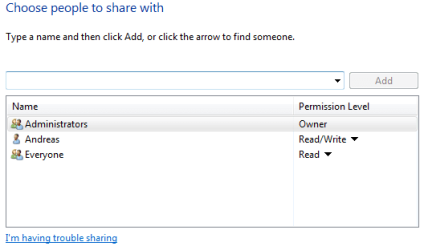
I have altered the share configurations every possible way imaginable but nothing will get it to work.
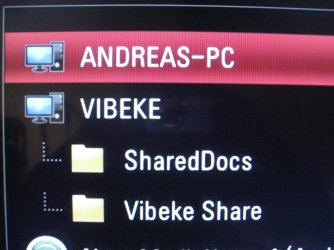
As you can see on the pic ive attached my pc is "ANDREAS-PC" my gf's is "VIBEKE", her pc is displaying her shared with no problem.
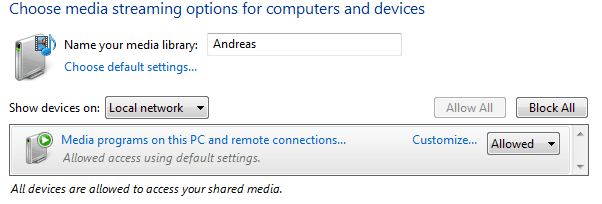
The wierd thing about this issue is its only the simple "share this folder" that does'nt work. Because on the pic attached you can see both the "ANDREAS-PC: Andreas" which is the windows media player (if im not mistaken) and the "Nero MediaHome 4".
MediaHome can share whatever i like from my pc, but by doing so it takes endless amount of resources and cannot display subtitles for video files. Thats why i don't wanna use that instead of simple windows folder share.
Things ive tried out:
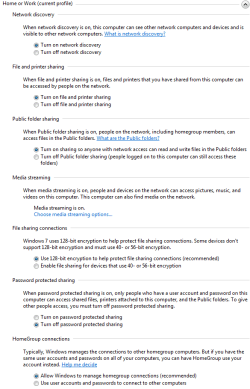
Altered every single option in the sharing center. like turn on network discovering and such (for public netowrk too)
Reinstalled windows 7
Factory defaults on my router and my LG bd390.
Does anyone have an idea about what could be wrong?
Thanks in advance ppl
I cant get my media center (LG BD390) to show my shared folders on my pc.
It displays my pc, but doesn't attach those shared folders that are supposed to be shared.
If i access my computer from another windows pc there is no problem at all.
I have altered the share configurations every possible way imaginable but nothing will get it to work.
As you can see on the pic ive attached my pc is "ANDREAS-PC" my gf's is "VIBEKE", her pc is displaying her shared with no problem.
The wierd thing about this issue is its only the simple "share this folder" that does'nt work. Because on the pic attached you can see both the "ANDREAS-PC: Andreas" which is the windows media player (if im not mistaken) and the "Nero MediaHome 4".
MediaHome can share whatever i like from my pc, but by doing so it takes endless amount of resources and cannot display subtitles for video files. Thats why i don't wanna use that instead of simple windows folder share.
Things ive tried out:
Altered every single option in the sharing center. like turn on network discovering and such (for public netowrk too)
Reinstalled windows 7
Factory defaults on my router and my LG bd390.
Does anyone have an idea about what could be wrong?
Thanks in advance ppl
Attachments
My Computer
At a glance
Windows 7 Ultimate x64
- OS
- Windows 7 Ultimate x64

