Windows 7 Forums


Windows 7: Dish Network (pressing ok)

19 Jan 2011   #1
zay

Windows 7 Ultimate
Houston, Texas
 
 
Dish Network (pressing ok)

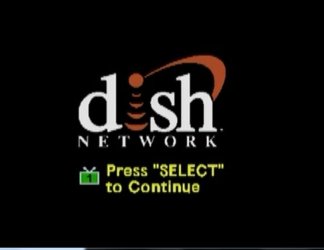
I have Dish Network, hate it, but now when ever I want to watch TV via my htpc, I have to press the OK button before it launch tv. Did not have that when I had DirectTV. This is not an issue except when I want to record shows. I noticed this when I set Remote Potato to tape Wipe out. It set the schedule fine, and it ran the recording fine as well. So what is the problem? When I tried to watch the recorded show, all I saw was the stupid Press Select to continue screen (see attached screen shot). Has anyone experienced this, if so, how was it resolved?

Attached Thumbnails
Dish Network (pressing ok)-dish-network-error.jpg  
My System SpecsSystem Spec

19 Jan 2011   #2

Windows 7 Ultimate 64-bit
Puyallup, WA, USA


My guess is it's a screensaver of sorts to prevent exactly what you're doing. If there is no input activity on the box for X minutes it goes into screen saver mode.
My System SpecsSystem Spec
19 Jan 2011   #3
zay

Windows 7 Ultimate
Houston, Texas


You know I never thought of that, good suggestion. Any idea if or how that can be turned off? In the mean time I will search the net for a solution, and I will post my findings if any.
My System SpecsSystem Spec
.


20 Jan 2011   #4

Windows 7 Ultimate 64-bit
Puyallup, WA, USA


Quote   Quote: Originally Posted by zay View Post
You know I never thought of that, good suggestion. Any idea if or how that can be turned off? In the mean time I will search the net for a solution, and I will post my findings if any.
If you have a setting on your box (I don't know if there is one. I have Comcast *shutter*). That's all I can think of.

This article is a bit older (Sept 2009) but it may be worth looking at.

http://www.audioholics.com/reviews/d...-usb-microsoft
My System SpecsSystem Spec
21 Jan 2011   #5
zay

Windows 7 Ultimate
Houston, Texas


Thanks for the response, I contacted dish network tech support, and they suggested creating a custom timer to activate the receiver and that will take the receiver out of standby. I explained to them that won't work as I need the standby feature off so that my htpc will do the recording. I sure miss direct tv. I only have dish network because my land lady works for DN so she get a big discount to have it.
My System SpecsSystem Spec
09 Feb 2011   #6

Windows 7 Ultimate 64-bit
Puyallup, WA, USA


I just got Dish Network today and I notice on my box (VIP 211K) I hit MENU > PREFERENCES (8) > Inactivity Standby (7). Is that what you're talking about?
My System SpecsSystem Spec
Reply

 Dish Network (pressing ok) problems?


Thread Tools


Similar help and support threads for: Dish Network (pressing ok)
Thread Forum
Dish network Remote Control Media Center
Need TV Card Tu Use with Dish network 722 SD Music, Pictures & Video
Direct TV and Dish Chillout Room
Dish Network via WMC 7 Media Center
USB TV Tuner and DISH Network Media Center


All times are GMT -5. The time now is 01:38 AM.


Windows 7 Forums is an independent web site and has not been authorized,
sponsored, or otherwise approved by Microsoft Corporation.
"Windows 7" and related materials are trademarks of Microsoft Corp.
© Designer Media Ltd