Windows 7 Forums


Windows 7: Movies thumbnails

14 Feb 2011   #1

windows 7 ultimate 64
 
 
Movies thumbnails

My video library thumbnails look great, including the MKV's and X264's


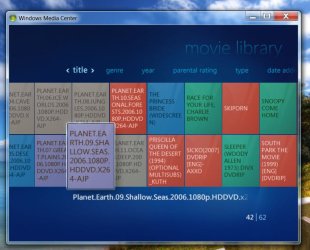
My movie library thumbnails look like this

[IMG]file:///C:/Users/Safari/Desktop/Untitled-2.jpg[/IMG]Movies thumbnails-untitled-2.jpg


Cant figure out what to do except put them all in the video lib folder
My System SpecsSystem Spec

14 Feb 2011   #2
Arc

Windows 7 Home Premium 64 Bit SP 1


It may look like this :.
Movies thumbnails-capture.jpg

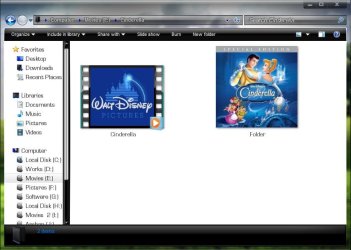
If you put every movie in a separate folder , get the album art , place it in the folder , and name it Folder.jpg . Like this :
Movies thumbnails-capture1.jpg

How to get the album art? you may scan your DVD cover inlay card , you may download it from google image search , or there are some Media Center extentions that can obtain metadata online .... I am not that familiar with the last option . I do it manually .

EDIT : I do one more thing . I edit the album art size to a square resolution , so that it look even cool in explorer, too
Movies thumbnails-capture2.jpg
My System SpecsSystem Spec
16 Feb 2011   #3

Windows 7 Professional 64 bit


Follow the guide here
Media Center- Setup Movie Library

You will end up with synopsis and info on your films as well as cover art for your movies - i expect in videos the view you have of each file is just a screen shot of something within the movie. Follow that guide and you'll get proper dvd style film art for your thumbnails.

Not sure it'll do TV programmes but give it a try
My System SpecsSystem Spec
.


Reply

 Movies thumbnails problems?


Thread Tools


Similar help and support threads for: Movies thumbnails
Thread Forum
The Movies Gaming
Movies, must see Chillout Room
My Movies Media Center
How to Add movies to WMC Media Center
Run DVD Movies from HD? (WMP or WMC) Media Center


All times are GMT -5. The time now is 12:06 AM.


Seven Forums Android App Seven Forums IOS App Follow us on Facebook

Windows 7 Forums is an independent web site and has not been authorized,
sponsored, or otherwise approved by Microsoft Corporation.
"Windows 7" and related materials are trademarks of Microsoft Corp.
© Designer Media Ltd
  

1 2 3 4 5 6 7 8 9 10 11 12 13 14 15 16 17 18 19 20 21 22 23 24 25 26 27 28 29 30 31 32