| Windows 7: Burn list in windows media player |
25 Feb 2011
|
#1 | | Windows 7 Home Premium 32 bit |
Burn list in windows media player In "My Music" folder I have tracks which have been saved using different programs. All tracks have "NAMES" , but only some have "TITLES" ( these tend to be the ones saved using WMP ). When I attempt to create a burn list using WMP , the tracks with names only , appear in the list by name ( which is what I want ) , but the ones with a NAME and TITLE appear in the list by title ( which tends to be "Track X" ).
Thus , I don't know the name of the Track by viewing the burn list.
Is there some way to do any of the following:
1. Remove or edit the "TITLE" from a saved track
2. Make the burn list only show the track by "NAME"
3.Make the "NAME" and "TITLE" for each saved track in MY MUSIC the same
I don't seem to be able to edit the "TITLE" or "#" information which is attached to my saved tracks | My System Specs |
| System Manufacturer/Model Number Apevia OS Windows 7 Home Premium 32 bit CPU Intel P43 Chipset Motherboard ASUS P5QL PRO Memory 2x 2G DDR2 Graphics Card Gigabyte Geforce 9800 GT 1GB Silent Sound Card Realtek ALC 1200 Audio CODEC Hard Drives WD Caviar Green – 800 GB |
26 Feb 2011
|
#2 | | Windows 7 SP1, Home Premium, 64-bit |
Are these MP3s?
Have you looked at the properties page of the file and looked for a "title" in there that might be editable?
If they are MP3s, it sounds like a tag issue and tags can be changed. | My System Specs | | System Manufacturer/Model Number Ignatz Special; 4 speed manual gearbox; factory air conditioning; one of one OS Windows 7 SP1, Home Premium, 64-bit CPU Intel Sandy Bridge i5-2500, not overclocked Motherboard Gigabyte H67A-UD3H-B3, full ATX Memory 4 GB Crucial DDR3-1333 Graphics Card none; graphics are integrated on CPU Sound Card onboard: Realtek ALC892; external: USB Behringer UF0-202 Monitor(s) Displays NEC 90GX2-BK 19" LCD Screen Resolution 800 x 640 Keyboard Leopold Tenkeyless with Cherry Blue switches, USB Mouse Logitech or Microsoft optical wired; either USB or PS 2 PSU Seasonic SS-560KM, modular Case Antec Solo II Cooling CPU: Scythe Big Shuriken; Case: Scythe Slipstream 800 & 500 Hard Drives System: Intel 320 Series SSD, 80 GB;
Data: Samsung Spinpoint 103SJ, 1 TB;
Backup: WD Caviar Green WD15EADS-00P8B0, 1.5TB Other Info Power consumption of this system, including monitor: 68 watts at idle; 144 watts at full load |
26 Feb 2011
|
#3 | | Windows 7 Home Premium 64 bit Illinois |
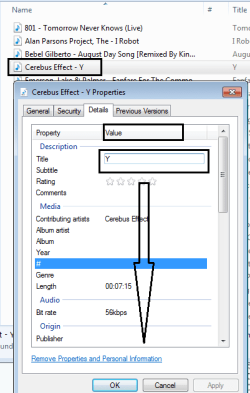
If you right click on a file, select Properties, Detail, Value, you can edit data. | My System Specs | | System Manufacturer/Model Number Self-built OS Windows 7 Home Premium 64 bit CPU Intel Core i7-3770 Motherboard MSI Z77A-G45 Memory G.SKILL 8GB (2 x 4GB) DDR3 F3-10666CL9D-8GBNT Graphics Card Sapphire ATI Radeon HD 6670 Sound Card On-Board Realtek Monitor(s) Displays Samsung SyncMaster P2370HD, Dell 1703FPT Screen Resolution 1920 x 1080, 1280 x 1024 Keyboard Logitech K270 Mouse Logitech M705 PSU SeaSonic M12II SS-500GM Case Lian Li PC-9F Cooling Zalman CNPS9900ALED Hard Drives Samsung HD103SJ Internet Speed 16 Mbps Other Info Bose Companion 2 Multimedia Speakers |
26 Feb 2011
|
#4 | | Windows 7 Home Premium 32 bit |
Edit field under properties doesn't work The files are WAVs , but the same problem occurs with MP3's. The problem only occurs with files ripped with WMP , if I use other programs ( eg Cakewalk Pyro ) the ripped tracks don't have the annoying TITLE and # ( whatever this is ???? ) saved.
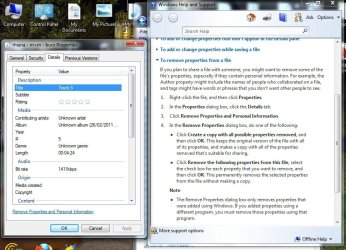
I've followed the path to "REMOVE PROPERTIES" -see attached screen shot - but there are no boxes to check so I can pick which properties to remove or edit , and trying to edit by left or right clicking with the mouse does nothing.
I can easily change the track NAME by right clicking , but this is no use because if the song has a TITLE ( which it has picked up simply based on the track order from the original CD ) , then that is what it calls the song in the BURN LIST - extremely annoying. | My System Specs | | System Manufacturer/Model Number Apevia OS Windows 7 Home Premium 32 bit CPU Intel P43 Chipset Motherboard ASUS P5QL PRO Memory 2x 2G DDR2 Graphics Card Gigabyte Geforce 9800 GT 1GB Silent Sound Card Realtek ALC 1200 Audio CODEC Hard Drives WD Caviar Green – 800 GB |
26 Feb 2011
|
#5 | | Windows 7 Home Premium 64 bit Illinois |

Quote: Originally Posted by p5bdkw If you right click on a file, select Properties, Detail, Value, you can edit data. Are you sure you can't edit the value fields? | My System Specs | | System Manufacturer/Model Number Self-built OS Windows 7 Home Premium 64 bit CPU Intel Core i7-3770 Motherboard MSI Z77A-G45 Memory G.SKILL 8GB (2 x 4GB) DDR3 F3-10666CL9D-8GBNT Graphics Card Sapphire ATI Radeon HD 6670 Sound Card On-Board Realtek Monitor(s) Displays Samsung SyncMaster P2370HD, Dell 1703FPT Screen Resolution 1920 x 1080, 1280 x 1024 Keyboard Logitech K270 Mouse Logitech M705 PSU SeaSonic M12II SS-500GM Case Lian Li PC-9F Cooling Zalman CNPS9900ALED Hard Drives Samsung HD103SJ Internet Speed 16 Mbps Other Info Bose Companion 2 Multimedia Speakers |
26 Feb 2011
|
#6 | | Windows 7 Home Premium 32 bit |
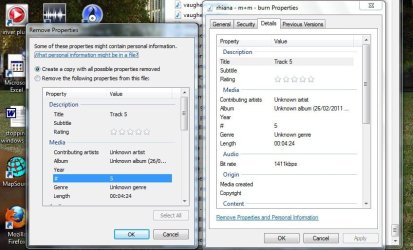
I don't get the same screen as you. I get the same DETAILS list , but never get an option to type in the list. If I click one of the values ( eg TITLE ) , the whole line just highlights , but I never get a typing box. If I click "Remove Properties and Personal Information" , another window opens ( see attachment) , again with no typing box. Could this be to do with some setting in FOLDER OPTIONS or some fault with the software ?? | My System Specs | | System Manufacturer/Model Number Apevia OS Windows 7 Home Premium 32 bit CPU Intel P43 Chipset Motherboard ASUS P5QL PRO Memory 2x 2G DDR2 Graphics Card Gigabyte Geforce 9800 GT 1GB Silent Sound Card Realtek ALC 1200 Audio CODEC Hard Drives WD Caviar Green – 800 GB |
26 Feb 2011
|
#7 | | Windows 7 Home Premium 64 bit Illinois |
I ripped a few files using WMP 12 to formats MP3, WMA and WAV (Lossless).
The MP3 and WMA values were editable.
The WAV file values were not editable. | My System Specs | | System Manufacturer/Model Number Self-built OS Windows 7 Home Premium 64 bit CPU Intel Core i7-3770 Motherboard MSI Z77A-G45 Memory G.SKILL 8GB (2 x 4GB) DDR3 F3-10666CL9D-8GBNT Graphics Card Sapphire ATI Radeon HD 6670 Sound Card On-Board Realtek Monitor(s) Displays Samsung SyncMaster P2370HD, Dell 1703FPT Screen Resolution 1920 x 1080, 1280 x 1024 Keyboard Logitech K270 Mouse Logitech M705 PSU SeaSonic M12II SS-500GM Case Lian Li PC-9F Cooling Zalman CNPS9900ALED Hard Drives Samsung HD103SJ Internet Speed 16 Mbps Other Info Bose Companion 2 Multimedia Speakers |
27 Feb 2011
|
#8 | | Windows 7 Home Premium 32 bit |
Thanks for your help guys.
Searching on Google suggests a lot of people have had the same frustration with TAGS as I have. It makes no sense to me to have the song list based on TAG info , rather than the name I have given the song - clearly if I have named a song , then that is probably what I want to use to identify it - not some obscure name like TRACK 5.
Does anyone know of a software program that allows you to rip from a CD , but not save TAG info. Cakewalk did this , but unfortunately my version is not compatible with windows 7 and the newer version is a big complex program.
All I want to do is rip songs from a CD to make CD's or MP3's to play in the car. Even with MP3's , the TAG info can be removed , but it is time consuming doing this one by one - would be easier if it was never there. | My System Specs | | System Manufacturer/Model Number Apevia OS Windows 7 Home Premium 32 bit CPU Intel P43 Chipset Motherboard ASUS P5QL PRO Memory 2x 2G DDR2 Graphics Card Gigabyte Geforce 9800 GT 1GB Silent Sound Card Realtek ALC 1200 Audio CODEC Hard Drives WD Caviar Green – 800 GB |
27 Feb 2011
|
#9 | | Windows 7 SP1, Home Premium, 64-bit |
I don't know offhand of a program that rips without making tags, but I don't do a lot of ripping. You might investigate CDex as a good ripper, but I don't know if it can avoid tags.
The easier thing to do, at least with mp3s, is to use an application like mp3tag to control tags, hundreds or thousands in a few seconds.
Suppose you had a file named Elvis Presley - Milkcow Blues Boogie.mp3, in exactly that syntax (artist space hyphen space title dot extension)
Suppose its artist tag was erroneous or blank, as was the title tag.
Suppose you had a thousand files tagged erroneously like that, BUT they had good file names.
mp3tag can FORCE the artist and title tag to agree with the file name.
So, you would load the 1000 songs into mp3 tag, "select all" and "convert" file name to tag, with a single push of a button.
Presto, the entire list of 1000 songs now has artist and title tags taken directly from the file name.
The Elvis song would now show "Elvis Presley" as the artist tag and "Milkcow Blues Boogie" as the title in any player.
You can do the same thing in reverse: FORCE the file name to be taken from the tags. That can be very handy if you have a lot of files named wrong, but tagged correctly.
I don't know if there are similar programs from WAV files. | My System Specs | | System Manufacturer/Model Number Ignatz Special; 4 speed manual gearbox; factory air conditioning; one of one OS Windows 7 SP1, Home Premium, 64-bit CPU Intel Sandy Bridge i5-2500, not overclocked Motherboard Gigabyte H67A-UD3H-B3, full ATX Memory 4 GB Crucial DDR3-1333 Graphics Card none; graphics are integrated on CPU Sound Card onboard: Realtek ALC892; external: USB Behringer UF0-202 Monitor(s) Displays NEC 90GX2-BK 19" LCD Screen Resolution 800 x 640 Keyboard Leopold Tenkeyless with Cherry Blue switches, USB Mouse Logitech or Microsoft optical wired; either USB or PS 2 PSU Seasonic SS-560KM, modular Case Antec Solo II Cooling CPU: Scythe Big Shuriken; Case: Scythe Slipstream 800 & 500 Hard Drives System: Intel 320 Series SSD, 80 GB;
Data: Samsung Spinpoint 103SJ, 1 TB;
Backup: WD Caviar Green WD15EADS-00P8B0, 1.5TB Other Info Power consumption of this system, including monitor: 68 watts at idle; 144 watts at full load Burn list in windows media player problems? All times are GMT -5. The time now is 06:54 AM. | |