Windows 7 Forums


Windows 7: Help on Windows Media Center and Mouse scrolling

05 May 2011   #1

Windows 7 Home Premium 32 bit
 
 
Help on Windows Media Center and Mouse scrolling

When i click on Windows Media Center a message comes up every time stating that "Windows Media Center has stopped working". Also my mouse pad is not scrolling up and down anymore, it use to work fine but now it doesn't scroll up or down on pages, i appreciate some help with the problems i am experiencing. I am running on Windows 7 Home Premium 32-bit, on a Toshiba Satellite L455D

My System SpecsSystem Spec

05 May 2011   #2

Win 7 Pro x64
Council Bluffs, Iowa


Quote   Quote: Originally Posted by bigboi1994 View Post
When i click on Windows Media Center a message comes up every time stating that "Windows Media Center has stopped working". Also my mouse pad is not scrolling up and down anymore, it use to work fine but now it doesn't scroll up or down on pages, i appreciate some help with the problems i am experiencing. I am running on Windows 7 Home Premium 32-bit, on a Toshiba Satellite L455D
Welcome to the Seven Forums
I may be able to help you with the mouse pad
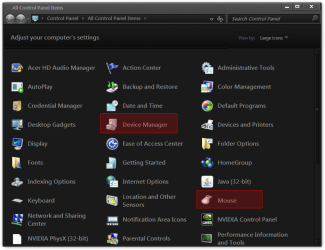
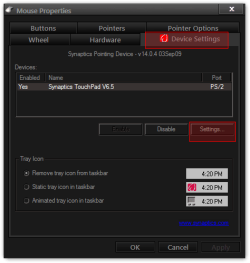
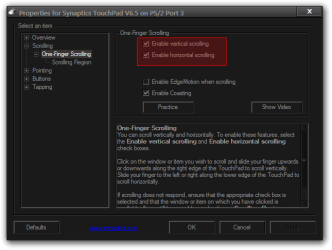
Open the Control Panel and click on Mouse, that will open up the Mouse Properties and choose Device Settings tab then click on Settings and check your scrolling settings (yours may look different than mine) see if they are enable.
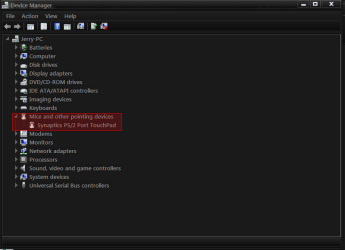
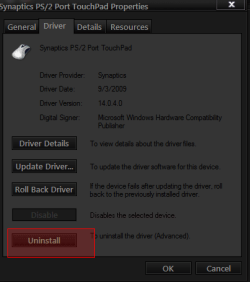
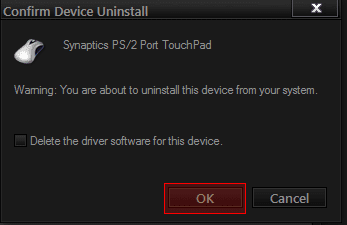
If that did not work go to Control Panel and click on Device Manager and look for Mice and other pointing devices and open it up double-click on your touch pad the property window will open click on Driver tab and choose uninstall a confirm device uninstall box will appear click on OK and close all Windows and restart your computer when it restarts it will try to load your drivers again now see if you can scroll now. If not go to Toshiba Support - Homepage and find your touchpad drivers and reinstall them.
Jerry
Help on Windows Media Center and Mouse scrolling-all-control-panel-items.png
Help on Windows Media Center and Mouse scrolling-mouse-properties.png
Help on Windows Media Center and Mouse scrolling-properties-synaptics-touchpad-v6.5-ps2-port-3.png
Help on Windows Media Center and Mouse scrolling-device.png
Help on Windows Media Center and Mouse scrolling-tp.png
Help on Windows Media Center and Mouse scrolling-tpp.png
My System SpecsSystem Spec
05 May 2011   #3

Windows 7 Ultimate X64 SP1
Cromer Norfolk UK


Hi there, welcome to SevenForums.

Have you installed any addons for Media Centre? any Tuner apps? anything at all with MCE in the name?
My System SpecsSystem Spec
.


05 May 2011   #4

Windows 7 Home Premium 32 bit


Thanks Bongo! I now can scroll with my mouse pad again, very much appreciated for the help. And to Severedsolo, i have not added any add ons or any other apps with MCE. Windows Media Center was working about three months ago and suddenly just stopped working
My System SpecsSystem Spec
05 May 2011   #5

Win 7 Pro x64
Council Bluffs, Iowa


Quote   Quote: Originally Posted by bigboi1994 View Post
Thanks Bongo! I now can scroll with my mouse pad again, very much appreciated for the help. And to Severedsolo, i have not added any add ons or any other apps with MCE. Windows Media Center was working about three months ago and suddenly just stopped working
Your Welcome help somebody can come up with a fix for your media Center.
Jerry
My System SpecsSystem Spec
Reply

 Help on Windows Media Center and Mouse scrolling problems?


Thread Tools


Similar help and support threads for: Help on Windows Media Center and Mouse scrolling
Thread Forum
Mouse Pointers Disappear in Media Center Media Center
XBOX media center won't connect to windows 7 media center computer Media Center
Dual screen mouse fixed to Media Center Media Center
Can't see mouse cursor in media center Media Center
mouse doesn't appear in media center Media Center


All times are GMT -5. The time now is 03:51 PM.


Seven Forums Android App Seven Forums IOS App Follow us on Facebook

Windows 7 Forums is an independent web site and has not been authorized,
sponsored, or otherwise approved by Microsoft Corporation.
"Windows 7" and related materials are trademarks of Microsoft Corp.
© Designer Media Ltd
  

1 2 3 4 5 6 7 8 9 10 11 12 13 14 15 16 17 18 19 20 21 22 23 24 25 26 27 28 29 30 31 32