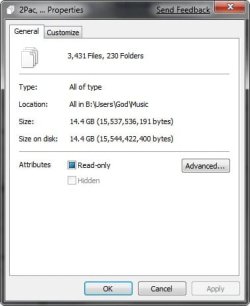
Hi everybody, I'm having a small problem with my Music Library and WMP12.
I added all my music to My Music folder, and set the Library to check that folder. The problem is that only about 5% of my music appears on WMP12.
I tried to manually drag 'n drop the files into WMP but after I restart my computer only the same 5% are there.
A workaround I found, is to remove all Library Locations and manually drag 'n drop the music files into WMP, but that's obviously not the best solution since new files aren't updated into WMP.
Can someone help me?
Thanks in advance!
I added all my music to My Music folder, and set the Library to check that folder. The problem is that only about 5% of my music appears on WMP12.
I tried to manually drag 'n drop the files into WMP but after I restart my computer only the same 5% are there.
A workaround I found, is to remove all Library Locations and manually drag 'n drop the music files into WMP, but that's obviously not the best solution since new files aren't updated into WMP.
Can someone help me?
Thanks in advance!
My Computer
At a glance
Windows 7
- OS
- Windows 7