|
Welcome to Windows 7 Forums. Our forum is dedicated to helping you find solutions with any problems, errors or issues you are experiencing with Windows 7. The Windows 7 forum also covers news and updates and has an extensive Windows 7 tutorial section that covers a wide range of tips and tricks.
Windows 7 - How to possibly remove Media Center? And re-assigning of FN keys. |
11-02-2011
|
#1 | | Windows 7 Home Premium SP1 x64 |
How to remove Media Center? And re-assigning of FN keys. So, I don't know how appreciative you guys on this board would be when I say I would like to remove Media Center from my system (LOL). I don't use it for anything, so I'd like to know if there's anyway to get it off of my system at all.
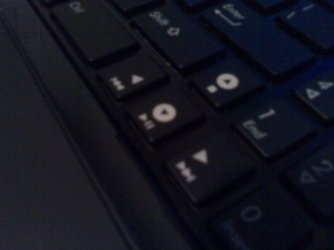
And while I'm making this thread, I was curious to know if there's anyway to re-assign those function keys--shown in the attached photo--to another media program, such as Zune perhaps? I ask since, by default, these keys are assigned to Media Center.
Thanks, and sorry if the function key question doesn't belong on this board.
Last edited by Bro; 11-02-2011 at 07:52 PM..
Reason: Changed title
| My System Specs | | System Manufacturer/Model Number ASUSTeK Computer Inc./ASUS Notebook G60Vx Series OS Windows 7 Home Premium SP1 x64 CPU Intel Core 2 Duo P7450 @ 2.13GHz Motherboard PEGATRON Corp. G60VX Memory 2x2GB DDR2 Graphics Card NVIDIA GeForce GTX 260M Sound Card Realtek High Definition Audio Monitor(s) Displays 16" HD/LED Backlight Screen Resolution 1366 x 768 Keyboard Microsoft eHome MCIR 109 Keyboard Mouse GearHead MP2425PUR Wireless Optical Nano Mouse Hard Drives 320 GB Seagate ST9320423AS Internet Speed ~1.3 MBPS |
11-02-2011
|
#2 | | |
To remove media center, go to control panel, programs and features, click the "turn windows features on or off" link, then remove media centre in there.
As for the FN key assignment, you can try typing "set your default programs" into the start menu and selecting zune then make it default player for all it can. If that doesnt work, there may be a utility for your keyboard that can re-assign it. I had a keyboard a long time ago with one. | My System Specs | | System Manufacturer/Model Number Self Build OS Windows 7 Ultimate x64 CPU Intel Core2 Quad Q8300 2.5Ghz (@3.0Ghz) Motherboard Asus P5QD Turbo Memory Kingston HyperX 2x1GB DDR2 1066Mhz Graphics Card Asus/Nvidia 9500GT 1GB Sound Card On-Board HD Monitor(s) Displays 22" Widescreen TFT Screen Resolution 1920x1080 PSU 650w Case ATX with Mesh Detail no window (yet) Cooling 140mm front, 120mm Rear, 80mm Chipset + stock CPU and GPU Hard Drives 2x 320GB Seagate SATAII RAID 0 Internet Speed 12Mbps Other Info BT Home Hub 2.0B Unlocked to other ISP and VOIP |
11-02-2011
|
#3 | | Windows 7 Home Premium SP1 x64 |

Quote: Originally Posted by Sub Styler To remove media center, go to control panel, programs and features, click the "turn windows features on or off" link, then remove media centre in there.
As for the FN key assignment, you can try typing "set your default programs" into the start menu and selecting zune then make it default player for all it can. If that doesnt work, there may be a utility for your keyboard that can re-assign it. I had a keyboard a long time ago with one. Hey Sub Styler,
I successfully removed MC thanks to you, however I'm wondering where I can get such a utility for my keyboard? I mean, are there any that work with generic laptop keyboards?
Thanks,
Bro | My System Specs | | System Manufacturer/Model Number ASUSTeK Computer Inc./ASUS Notebook G60Vx Series OS Windows 7 Home Premium SP1 x64 CPU Intel Core 2 Duo P7450 @ 2.13GHz Motherboard PEGATRON Corp. G60VX Memory 2x2GB DDR2 Graphics Card NVIDIA GeForce GTX 260M Sound Card Realtek High Definition Audio Monitor(s) Displays 16" HD/LED Backlight Screen Resolution 1366 x 768 Keyboard Microsoft eHome MCIR 109 Keyboard Mouse GearHead MP2425PUR Wireless Optical Nano Mouse Hard Drives 320 GB Seagate ST9320423AS Internet Speed ~1.3 MBPS |
11-02-2011
|
#4 | | Win 7 Home Premium (64-bit), Win 7 Pro (32-bit) |
You might try SharpKeys 2.1.1 to remap those function keys. | My System Specs | | System Manufacturer/Model Number Dell XPS 8100 Desktop, Dell Inspiron 1520 Laptop OS Win 7 Home Premium (64-bit), Win 7 Pro (32-bit) CPU 2.8Ghz Core i7 860, 2.4Ghz Core 2 Duo Motherboard Dell, Dell Memory 8G, 3G Graphics Card ATI Radeon HD 5770, Mobile Intel 965 Sound Card ATI High Definition Audio (Built-in to mobo) Monitor(s) Displays Dell 2409W 24" Screen Resolution 1920x1080 Keyboard IBM Model M - used continuously since 1986 Mouse Microsoft Hard Drives 1T OS; 1.5T Data on Desktop, 320G for laptop Internet Speed 1.5M down 1.2M up :-( Other Info Also have an Acer Aspire netbook, a home-built AMD Dual core (Minecraft server) and home-built Pent 4 all running Win 7. Also have various machines running XP, Win Server 2K, Win Server 2003, Linux and DOS. I think I have a problem... |
11-02-2011
|
#5 | | Windows 7 Home Premium SP1 x64 |

Quote: Originally Posted by strollin You might try SharpKeys 2.1.1 to remap those function keys. Hey Strollin,
Thanks for that registry hack, although I don't see a way to re-map the keys to a program. I've restarted and checked several times to see if the keys have now mapped to Zune, since I've removed both MC and WMP. Unfortunately, now the FN keys for media do nothing. Can SharpKeys help me out with this?
Thanks,
Bro | My System Specs | | System Manufacturer/Model Number ASUSTeK Computer Inc./ASUS Notebook G60Vx Series OS Windows 7 Home Premium SP1 x64 CPU Intel Core 2 Duo P7450 @ 2.13GHz Motherboard PEGATRON Corp. G60VX Memory 2x2GB DDR2 Graphics Card NVIDIA GeForce GTX 260M Sound Card Realtek High Definition Audio Monitor(s) Displays 16" HD/LED Backlight Screen Resolution 1366 x 768 Keyboard Microsoft eHome MCIR 109 Keyboard Mouse GearHead MP2425PUR Wireless Optical Nano Mouse Hard Drives 320 GB Seagate ST9320423AS Internet Speed ~1.3 MBPS |
11-02-2011
|
#6 | | |
Those keys are your arrow keys. Have you checked to see if they work pressing the FN key first?
If not, you can map the keys to the Zune functions but I would use an additional key like CTL, ALT, SHIFT, etc so you can retain the arrow funtions.
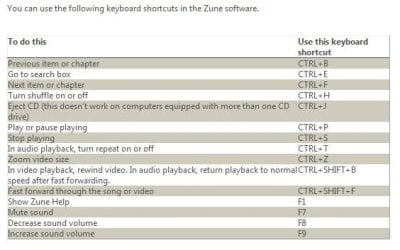
Here's Zune's short cut keys. Use SharpKeys to map your keys to Zune's functions. (Map to the characters in the right column.) | My System Specs | | System Manufacturer/Model Number Built 2/11/2011 OS Windows 7 Pro-x64 CPU i7-2600 3.4GHz - 3.8GHz Turbo Motherboard Intel DH67BL-B3 Memory 8Gb - 2x4GB, Muskin 991770 PC3-1333 Graphics Card Integrated Intel HD 2000 Sound Card Integrated Intel 10.1 HD, RealTek ALC892 Monitor(s) Displays Asus LCD VH222H, Haier HL24XSL2a Screen Resolution 1920x1080, 1920x1080 Keyboard Logitech EX100 Wireless Mouse Logitech EX100 Wireless PSU Seasonic 650W 80+ Gold Modular Case Rosewill Defender Cooling Stock CPU, Four 120mm case fans, PCH fan added Hard Drives Crucial C300-128Gb,
Western Digital WD5002AALX - 500Gb,
Western Digital WD7501AALS - 750Gb Internet Speed 2.5/1.5 Mbs Other Info Antec Veris Premier-Multimedia IR Station,
Cyber Accoustics-3602 Speakers,
AFT XM-5U Card Reader,
Hauppauge TV-HVR-2250,
Sony LX300 USB Turntable |
11-02-2011
|
#7 | | Windows 7 Home Premium SP1 x64 |

Quote: Originally Posted by carwiz Those keys are your arrow keys. Have you checked to see if they work pressing the FN key first?
If not, you can map the keys to the Zune functions but I would use an additional key like CTL, ALT, SHIFT, etc so you can retain the arrow funtions.
Here's Zune's short cut keys. Use SharpKeys to map your keys to Zune's functions. (Map to the characters in the right column.) Hey Carwiz,
Of course I tried FN keys first. With MC and WMP removed, they don't do jack now. I tried using SharpKeys to re-map those shortcuts that your attached screenshot showed, but it seems SharpKeys doesn't play nice with remapping one key to a two key shortcut. So, it wouldn't let me, say, remap the down arrow key (for play/pause) to the CTRL+P shortcut. Am I missing something here, or is this as far as SharpKeys' functionality goes? If so, anything else I can do? Thanks for bearing with me on this, lol.
Thanks,
Bro | My System Specs | | System Manufacturer/Model Number ASUSTeK Computer Inc./ASUS Notebook G60Vx Series OS Windows 7 Home Premium SP1 x64 CPU Intel Core 2 Duo P7450 @ 2.13GHz Motherboard PEGATRON Corp. G60VX Memory 2x2GB DDR2 Graphics Card NVIDIA GeForce GTX 260M Sound Card Realtek High Definition Audio Monitor(s) Displays 16" HD/LED Backlight Screen Resolution 1366 x 768 Keyboard Microsoft eHome MCIR 109 Keyboard Mouse GearHead MP2425PUR Wireless Optical Nano Mouse Hard Drives 320 GB Seagate ST9320423AS Internet Speed ~1.3 MBPS |
11-02-2011
|
#8 | | |
That's about the extent of my knowledge. Hopefully, one of the other guys will jump back in with help on SharpKeys.
I use an IR remote. | My System Specs | | System Manufacturer/Model Number Built 2/11/2011 OS Windows 7 Pro-x64 CPU i7-2600 3.4GHz - 3.8GHz Turbo Motherboard Intel DH67BL-B3 Memory 8Gb - 2x4GB, Muskin 991770 PC3-1333 Graphics Card Integrated Intel HD 2000 Sound Card Integrated Intel 10.1 HD, RealTek ALC892 Monitor(s) Displays Asus LCD VH222H, Haier HL24XSL2a Screen Resolution 1920x1080, 1920x1080 Keyboard Logitech EX100 Wireless Mouse Logitech EX100 Wireless PSU Seasonic 650W 80+ Gold Modular Case Rosewill Defender Cooling Stock CPU, Four 120mm case fans, PCH fan added Hard Drives Crucial C300-128Gb,
Western Digital WD5002AALX - 500Gb,
Western Digital WD7501AALS - 750Gb Internet Speed 2.5/1.5 Mbs Other Info Antec Veris Premier-Multimedia IR Station,
Cyber Accoustics-3602 Speakers,
AFT XM-5U Card Reader,
Hauppauge TV-HVR-2250,
Sony LX300 USB Turntable |
11-02-2011
|
#9 | | Windows 7 Home Premium SP1 x64 |

Quote: Originally Posted by carwiz That's about the extent of my knowledge. Hopefully, one of the other guys will jump back in with help on SharpKeys.
I use an IR remote.  Well, I greatly appreciate the assistance you provided. Especially with providing the shortcuts for Zune. | My System Specs | | System Manufacturer/Model Number ASUSTeK Computer Inc./ASUS Notebook G60Vx Series OS Windows 7 Home Premium SP1 x64 CPU Intel Core 2 Duo P7450 @ 2.13GHz Motherboard PEGATRON Corp. G60VX Memory 2x2GB DDR2 Graphics Card NVIDIA GeForce GTX 260M Sound Card Realtek High Definition Audio Monitor(s) Displays 16" HD/LED Backlight Screen Resolution 1366 x 768 Keyboard Microsoft eHome MCIR 109 Keyboard Mouse GearHead MP2425PUR Wireless Optical Nano Mouse Hard Drives 320 GB Seagate ST9320423AS Internet Speed ~1.3 MBPS |
11-03-2011
|
#10 | | |
Perhaps this will work? I haven't tried it myself yet but I will later. My media key launches resource hacker ..... ooops. HotKeyz - Free software downloads and software reviews - CNET Download.com | My System Specs | | System Manufacturer/Model Number Self Build OS Windows 7 Ultimate x64 CPU Intel Core2 Quad Q8300 2.5Ghz (@3.0Ghz) Motherboard Asus P5QD Turbo Memory Kingston HyperX 2x1GB DDR2 1066Mhz Graphics Card Asus/Nvidia 9500GT 1GB Sound Card On-Board HD Monitor(s) Displays 22" Widescreen TFT Screen Resolution 1920x1080 PSU 650w Case ATX with Mesh Detail no window (yet) Cooling 140mm front, 120mm Rear, 80mm Chipset + stock CPU and GPU Hard Drives 2x 320GB Seagate SATAII RAID 0 Internet Speed 12Mbps Other Info BT Home Hub 2.0B Unlocked to other ISP and VOIP How to possibly remove Media Center? And re-assigning of FN keys. problems? All times are GMT -5. The time now is 02:46 PM. |  |