| Windows 7: Media Center Component failing to load. |
22 Nov 2011
|
#1 | | |
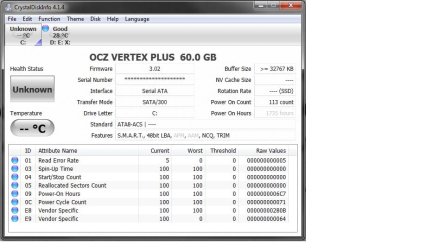
Media Center Component failing to load. *****1/12/2012. Well I have finally performed the correct search query on google & found the issue to be my 60GB OCZ Vertex + SSD. Anyone with one of these drives incurring Check disks, corrupt files, & boot issues, head over to their forum & look up the firmware update. The issue is your SSD.*******
"A necessary component of Windows Media Center did not start. Restart Windows Media Center to load files. " I get this error any time I try to use media center. Is there a way I can uninstall or reinstall to start fresh or what should I do? My set up is: Windows 7 Ultimate 64 on an SSD with all User & data Files on a separate HDD. I would assume MC would find the files itself... but I can't even find a place to tell it where to point if that is the problem. Strangely tonight it detected my music for the first time. I don't have any movies or pictures loaded other than desktop files. I haven't bothered to load anything since it won't work. /////edit: I found where to point the libraries. Any time I try this it also says a necessary component failed to load. Restart Media Center. Restart does not solve the issue.
Last edited by 02darkRS; 12 Jan 2012 at 09:55 AM..
| My System Specs |
| System Manufacturer/Model Number HomeBuilt OS 64 CPU AMD Phenom IIx4 965 Motherboard Biostar A780l3G Memory Crucial 4GB DDR3 1066 Graphics Card Nvidea GEForce 9500GT Monitor(s) Displays HP 20" / Dell 19" Screen Resolution 1600x900 PSU Zuess 650W Case Antec Two Hundred VII Cooling 4 fans Hard Drives 60GB OCZ SSD
1TB Barracuda HDD |
22 Nov 2011
|
#2 | | Windows 7 Pro-x64 South Texas |
| My System Specs | | Computer type PC/Desktop System Manufacturer/Model Number Built 2/11/2011 OS Windows 7 Pro-x64 CPU i7-2600 3.4GHz - 3.8GHz Turbo Motherboard Intel DH67BL-B3 Memory 8Gb - 2x4GB, Muskin 991770 PC3-1333 Graphics Card Integrated Intel HD 2000 Sound Card Integrated Intel 10.1 HD, RealTek ALC892 Monitor(s) Displays Asus LCD VH222H, Haier HL24XSL2a Screen Resolution 1920x1080, 1920x1080 Keyboard Logitech EX100 Wireless Mouse Logitech EX100 Wireless PSU Seasonic 650W 80+ Gold Modular Case Rosewill Defender Cooling Stock CPU, Four 120mm case fans, PCH fan added Hard Drives Crucial C300-128Gb,
Western Digital WD5002AALX - 500Gb,
Western Digital WD7501AALS - 750Gb Internet Speed 2.5/1.5 Mbs Antivirus Microsoft Security Essentials Browser Microsoft Internet Explorer 10 Other Info Antec Veris Premier-Multimedia IR Station,
Cyber Accoustics-3602 Speakers,
AFT XM-5U Card Reader,
Hauppauge TV-HVR-2250,
Sony LX300 USB Turntable |
24 Nov 2011
|
#3 | | |
I've changed all kinds of settings as far as menu times, etc. This says I'll lose changes made in explorer.exe. does this include things like removing sleep options, menu display times, no log on/off sounds, etc? | My System Specs | | System Manufacturer/Model Number HomeBuilt OS 64 CPU AMD Phenom IIx4 965 Motherboard Biostar A780l3G Memory Crucial 4GB DDR3 1066 Graphics Card Nvidea GEForce 9500GT Monitor(s) Displays HP 20" / Dell 19" Screen Resolution 1600x900 PSU Zuess 650W Case Antec Two Hundred VII Cooling 4 fans Hard Drives 60GB OCZ SSD
1TB Barracuda HDD |
24 Nov 2011
|
#4 | | |
I ran the verify only. When I attempt to open the log it says access denied. I am the admin...... | My System Specs | | System Manufacturer/Model Number HomeBuilt OS 64 CPU AMD Phenom IIx4 965 Motherboard Biostar A780l3G Memory Crucial 4GB DDR3 1066 Graphics Card Nvidea GEForce 9500GT Monitor(s) Displays HP 20" / Dell 19" Screen Resolution 1600x900 PSU Zuess 650W Case Antec Two Hundred VII Cooling 4 fans Hard Drives 60GB OCZ SSD
1TB Barracuda HDD |
24 Nov 2011
|
#5 | | Windows 7 Home Premium 64 bit Illinois |
| My System Specs | | System Manufacturer/Model Number Self-built OS Windows 7 Home Premium 64 bit CPU Intel Core i7-3770 Motherboard MSI Z77A-G45 Memory G.SKILL 8GB (2 x 4GB) DDR3 F3-10666CL9D-8GBNT Graphics Card Sapphire ATI Radeon HD 6670 Sound Card On-Board Realtek Monitor(s) Displays Samsung SyncMaster P2370HD, Dell 1703FPT Screen Resolution 1920 x 1080, 1280 x 1024 Keyboard Logitech K270 Mouse Logitech M705 PSU SeaSonic M12II SS-500GM Case Lian Li PC-9F Cooling Zalman CNPS9900ALED Hard Drives Samsung HD103SJ Internet Speed 16 Mbps Other Info Bose Companion 2 Multimedia Speakers |
25 Nov 2011
|
#6 | | Windows 7 Pro-x64 South Texas |
That may be useful if the OP hasn't installed Windows updates in over a year.
SFC detects corrupt system files. If you have modified system files directly, they will be replaced. (Or at least an attempt to.) Program options will generally not be affected since these are Registry or data file oriented.
You can view the log by running Note Pad as Administrator then opening the CBS.log file. | My System Specs | | Computer type PC/Desktop System Manufacturer/Model Number Built 2/11/2011 OS Windows 7 Pro-x64 CPU i7-2600 3.4GHz - 3.8GHz Turbo Motherboard Intel DH67BL-B3 Memory 8Gb - 2x4GB, Muskin 991770 PC3-1333 Graphics Card Integrated Intel HD 2000 Sound Card Integrated Intel 10.1 HD, RealTek ALC892 Monitor(s) Displays Asus LCD VH222H, Haier HL24XSL2a Screen Resolution 1920x1080, 1920x1080 Keyboard Logitech EX100 Wireless Mouse Logitech EX100 Wireless PSU Seasonic 650W 80+ Gold Modular Case Rosewill Defender Cooling Stock CPU, Four 120mm case fans, PCH fan added Hard Drives Crucial C300-128Gb,
Western Digital WD5002AALX - 500Gb,
Western Digital WD7501AALS - 750Gb Internet Speed 2.5/1.5 Mbs Antivirus Microsoft Security Essentials Browser Microsoft Internet Explorer 10 Other Info Antec Veris Premier-Multimedia IR Station,
Cyber Accoustics-3602 Speakers,
AFT XM-5U Card Reader,
Hauppauge TV-HVR-2250,
Sony LX300 USB Turntable |
27 Nov 2011
|
#7 | | |
thank you. I got the log opened but it's too large to post. What am I looking for? | My System Specs | | System Manufacturer/Model Number HomeBuilt OS 64 CPU AMD Phenom IIx4 965 Motherboard Biostar A780l3G Memory Crucial 4GB DDR3 1066 Graphics Card Nvidea GEForce 9500GT Monitor(s) Displays HP 20" / Dell 19" Screen Resolution 1600x900 PSU Zuess 650W Case Antec Two Hundred VII Cooling 4 fans Hard Drives 60GB OCZ SSD
1TB Barracuda HDD |
27 Nov 2011
|
#8 | | Windows 7 Pro-x64 South Texas |
The return from your command window should look something like this: Code:
Microsoft Windows [Version 6.1.7601]
Copyright (c) 2009 Microsoft Corporation. All rights reserved.
C:\Windows\system32>sfc /verifyonly
Beginning system scan. This process will take some time.
Beginning verification phase of system scan.
Verification 100% complete.
Windows Resource Protection did not find any integrity violations.
C:\Windows\system32> If you didn't get that, then there's problems that will be listed in the CBS.Log file. If you ZIP the file, it should upload. But if it's that large, I already suspect you have corrupt files. | My System Specs | | Computer type PC/Desktop System Manufacturer/Model Number Built 2/11/2011 OS Windows 7 Pro-x64 CPU i7-2600 3.4GHz - 3.8GHz Turbo Motherboard Intel DH67BL-B3 Memory 8Gb - 2x4GB, Muskin 991770 PC3-1333 Graphics Card Integrated Intel HD 2000 Sound Card Integrated Intel 10.1 HD, RealTek ALC892 Monitor(s) Displays Asus LCD VH222H, Haier HL24XSL2a Screen Resolution 1920x1080, 1920x1080 Keyboard Logitech EX100 Wireless Mouse Logitech EX100 Wireless PSU Seasonic 650W 80+ Gold Modular Case Rosewill Defender Cooling Stock CPU, Four 120mm case fans, PCH fan added Hard Drives Crucial C300-128Gb,
Western Digital WD5002AALX - 500Gb,
Western Digital WD7501AALS - 750Gb Internet Speed 2.5/1.5 Mbs Antivirus Microsoft Security Essentials Browser Microsoft Internet Explorer 10 Other Info Antec Veris Premier-Multimedia IR Station,
Cyber Accoustics-3602 Speakers,
AFT XM-5U Card Reader,
Hauppauge TV-HVR-2250,
Sony LX300 USB Turntable |
28 Nov 2011
|
#9 | | |
It did find serious integrity violations. BUT, I have Programs installed on a seperate HDD as well as the UAC assigned to a seperate HDD. Could these be the violations?
The file is very large & it has dates back to when I installed the OS. Not just the date I ran the SFC.
So, if I allow it to fix the errors. I want to understand first what the system file types are that you are referring to? Is it going to replace changes I made such as optimizing for SSD install, menu hover times, etc? What system files are you referring to? Another example, I had to make a registry entry in order to keep the system time displaying accurately due to some problem with UTC & linux, windows was always showing 4-5 hrs ahead. Also note, the next boot after I ran SFC, it had to perform a disk check. Booted up fine but it forced this action first. | My System Specs | | System Manufacturer/Model Number HomeBuilt OS 64 CPU AMD Phenom IIx4 965 Motherboard Biostar A780l3G Memory Crucial 4GB DDR3 1066 Graphics Card Nvidea GEForce 9500GT Monitor(s) Displays HP 20" / Dell 19" Screen Resolution 1600x900 PSU Zuess 650W Case Antec Two Hundred VII Cooling 4 fans Hard Drives 60GB OCZ SSD
1TB Barracuda HDD |
28 Nov 2011
|
#10 | | Windows 7 Pro-x64 South Texas |
I understand your concern but the alternative is a clean install of Windows 7. It may turn out that you will have to do that anyway. This is an attempt to restore OS files that are corrupt on your system. It's not uncommon to see system software that dates before your install. Windows 7 was released October of 2009.
The steps I use to repair a system starts with SFC. It's the easiest and most comprehensive repair for system files. If that doesn't repair the OS then a Repair Install of Windows 7 might but that's not always the case either. Then there's individual file repair. The last alternative is a clean install of Windows 7. And it makes no difference about options or Registry changes you may have set if the OS isn't working. The number one best practice with Windows 7 is NEVER run a Registry cleaner or "Regfix" unless instructed to do so and with specific settings. The default settings in most cleaners can cause more harm than good.
This article explains what SFC does and how to interpret the contents of the log. It speaks of Vista but it applies to Windows 7 also. How to analyze the log file entries that the Microsoft Windows Resource Checker (SFC.exe) program generates in Windows Vista
This article applies to Windows 7 but it's basically the same. How to use the System File Checker tool to troubleshoot missing or corrupted system files on Windows Vista or on Windows 7 Quote: The SFC.exe program performs the following operations: - It verifies that non-configurable Windows Vista system files have not changed. Also, it verifies that these files match the operating system's definition of which files are expected to be installed on the computer.
- It repairs non-configurable Windows Vista system files, when it is possible.
| My System Specs | | Computer type PC/Desktop System Manufacturer/Model Number Built 2/11/2011 OS Windows 7 Pro-x64 CPU i7-2600 3.4GHz - 3.8GHz Turbo Motherboard Intel DH67BL-B3 Memory 8Gb - 2x4GB, Muskin 991770 PC3-1333 Graphics Card Integrated Intel HD 2000 Sound Card Integrated Intel 10.1 HD, RealTek ALC892 Monitor(s) Displays Asus LCD VH222H, Haier HL24XSL2a Screen Resolution 1920x1080, 1920x1080 Keyboard Logitech EX100 Wireless Mouse Logitech EX100 Wireless PSU Seasonic 650W 80+ Gold Modular Case Rosewill Defender Cooling Stock CPU, Four 120mm case fans, PCH fan added Hard Drives Crucial C300-128Gb,
Western Digital WD5002AALX - 500Gb,
Western Digital WD7501AALS - 750Gb Internet Speed 2.5/1.5 Mbs Antivirus Microsoft Security Essentials Browser Microsoft Internet Explorer 10 Other Info Antec Veris Premier-Multimedia IR Station,
Cyber Accoustics-3602 Speakers,
AFT XM-5U Card Reader,
Hauppauge TV-HVR-2250,
Sony LX300 USB Turntable Media Center Component failing to load. problems? All times are GMT -5. The time now is 07:36 PM. | |