| Windows 7: MediaBrowser Questions |
11 Sep 2009
|
#1 | | |
MediaBrowser Questions OK guys I got mediabrowser setup pretty nicely I really like it so far, pretty cool =P i made an icon for it downloaded the shortcut and everything and pin'd it to my bar.
Now there's just a few changes I wanna make to the whole operation =P
1. The time, in the top left it shows "London" but I'm in California lol and I cant find the freaking option to change it and I've been searching for quite some time, so I'm sure its some really easy fix I'm just missing.
2. When I click my shortcut is comes up with the "Windows media Center" intro and I was wondering if there was a way to change that or get rid of it so MediaBrowser would almost act as if it was its own stand alone program.
3. How do I change the background to the main menu for it?
Thanks and please get back to asap!
-Kukag!
Last edited by johngalt; 11 Sep 2009 at 10:05 PM..
Reason: spell checked
| My System Specs |
| System Manufacturer/Model Number Custom OS Windows 7 CPU AMD Phenom II X4 940 3.0 Stock Motherboard Gigabyte GA-MA78GM-S2H Memory G.SKILL DDR2 800 PI Black 4GB+Corsair XMS2 Xtrm Gaming 2GB Graphics Card ASUS EN8800GT TOP (Fact OC) Monitor(s) Displays Optiquest 20" Flatscreen Screen Resolution 1680x1050 Keyboard Logitech G15 PSU Antec NeoHE 550W Cooling Stock AMD Phenom HSF Hard Drives Seagate 3.5' 7200RPM 750GB HDD Internet Speed Charter HighSpeed 10 Down / 5 Up |
11 Sep 2009
|
#2 | | Windows 7 Ultimate x64 SP1 Somewhere on the 3rd rock from the sun. |
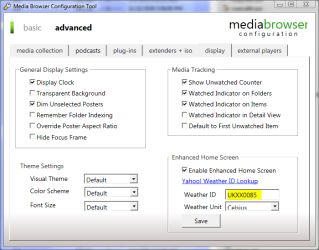
Here ya go: | My System Specs | | Computer type PC/Desktop System Manufacturer/Model Number The Beast Model V OS Windows 7 Ultimate x64 SP1 CPU Core i7 965 EE @3.6 GHz Motherboard eVGA x58 Classified3 Memory 3 * 4GB Mushkin Enh Redline CL7 DDR3 1600 MHz (PC3-12800) Graphics Card eVGA 560 Ti 448 Core Classified + eVGA GTX260 SSC (PhysX) Sound Card Realtek HD Audio (on-board) Monitor(s) Displays 2 * Acer X213Wbd Screen Resolution 2 * 1680 x 1050 Keyboard Logitech G15 Keyboard Mouse Logitech Performance Mouse MX PSU ThermalTake BlackWidow TX TR2 850 W Case ThermalTake Level 10 GT (Black) Cooling Corsair H100 CPU | 2 * TT 140mm TriLED | 2 * Antec TriCool Hard Drives 1 * Intel Cheryville 520 180 GB SATA III SSD |
1 * Intel X-25M G2 80 GB SATA II SSD |
2 * Seagate 1 TB 32MB Cache 7200.12 SATA II Mech. Internet Speed Cable - 35 Mbit down / 12 Mbit up advertised (30 / 6 act.) Antivirus M$Se / MBAM Pro / WinPatrol Pro Browser Chome(dev) / Canary / Firefox Minefield / Opera Next / IE 10 Other Info Wacom Bamboo Touch |
Hauppauge WinTV-HVR-1850 |
Optimus STAV-3400 AV Receiver |
Bose 301 Series III Speakers (Main channel) |
Bose 161 Speakers (Surround) |
Optimus 3 way 100-W speaker (Center) |
Logitech Clearchat PC Wireless Headset |
Koss ProDJ 100 Headphones |
Microsoft LifeCam Studio |
Motorola Droid BIONIC |
ASUS Transformer Infinity 64GB |
11 Sep 2009
|
#3 | | |
Awesome thanks I didnt even see the advanced tab lol anyway so that solves the weather do you know about the start screen, and changing the background?
Please help!
Thanks! | My System Specs | | System Manufacturer/Model Number Custom OS Windows 7 CPU AMD Phenom II X4 940 3.0 Stock Motherboard Gigabyte GA-MA78GM-S2H Memory G.SKILL DDR2 800 PI Black 4GB+Corsair XMS2 Xtrm Gaming 2GB Graphics Card ASUS EN8800GT TOP (Fact OC) Monitor(s) Displays Optiquest 20" Flatscreen Screen Resolution 1680x1050 Keyboard Logitech G15 PSU Antec NeoHE 550W Cooling Stock AMD Phenom HSF Hard Drives Seagate 3.5' 7200RPM 750GB HDD Internet Speed Charter HighSpeed 10 Down / 5 Up |
12 Sep 2009
|
#4 | | Windows 7 Ultimate x64 SP1 Somewhere on the 3rd rock from the sun. |
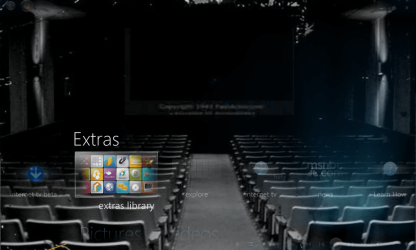
I don't see those doing much to begin with, but if you read the Changing Media Center Background / Themes sticky, I asked for a personalized one using the movie theater image as my default BG.
now my WMC looks like this: | My System Specs | | Computer type PC/Desktop System Manufacturer/Model Number The Beast Model V OS Windows 7 Ultimate x64 SP1 CPU Core i7 965 EE @3.6 GHz Motherboard eVGA x58 Classified3 Memory 3 * 4GB Mushkin Enh Redline CL7 DDR3 1600 MHz (PC3-12800) Graphics Card eVGA 560 Ti 448 Core Classified + eVGA GTX260 SSC (PhysX) Sound Card Realtek HD Audio (on-board) Monitor(s) Displays 2 * Acer X213Wbd Screen Resolution 2 * 1680 x 1050 Keyboard Logitech G15 Keyboard Mouse Logitech Performance Mouse MX PSU ThermalTake BlackWidow TX TR2 850 W Case ThermalTake Level 10 GT (Black) Cooling Corsair H100 CPU | 2 * TT 140mm TriLED | 2 * Antec TriCool Hard Drives 1 * Intel Cheryville 520 180 GB SATA III SSD |
1 * Intel X-25M G2 80 GB SATA II SSD |
2 * Seagate 1 TB 32MB Cache 7200.12 SATA II Mech. Internet Speed Cable - 35 Mbit down / 12 Mbit up advertised (30 / 6 act.) Antivirus M$Se / MBAM Pro / WinPatrol Pro Browser Chome(dev) / Canary / Firefox Minefield / Opera Next / IE 10 Other Info Wacom Bamboo Touch |
Hauppauge WinTV-HVR-1850 |
Optimus STAV-3400 AV Receiver |
Bose 301 Series III Speakers (Main channel) |
Bose 161 Speakers (Surround) |
Optimus 3 way 100-W speaker (Center) |
Logitech Clearchat PC Wireless Headset |
Koss ProDJ 100 Headphones |
Microsoft LifeCam Studio |
Motorola Droid BIONIC |
ASUS Transformer Infinity 64GB |
12 Sep 2009
|
#5 | | |
EDIT : Ok guys I figured out howto start up my media manager without the windows media center animation in the beginning I had to do is add this - /nostartupanimation
In the target box for the shortcut at the end and now it doesnt show at all =P Also along with finding this I also found some other secret startup codes courtesy of hack7mc- /nostartupanimation – disables the startup animation /noshutdownui – removes the shutdown item from Tasks /mediamode – start in “media only mode” with no minimize/close buttons /widescreen – force widescreen mode /nochrome – launch windowed mode without the containing window /playallmusic – Play all music at startup /playfavmusic – Play favorite music at startup /playfavslideshow – Play favorite slideshow at startup /playfavslideshowwithmusic – Same as above with music /playslideshow – Play all slideshows /playslideshowwithmusic – Same as above with music /screensaver – Start media center in screensaver mode /configuress – Start media center at configuring screen saver menu
There they are, hope you guys enjoy em and Like i said all credits goto Hack7MC wonderful site dedicated to just working with media center!
Thanks a bunch Hack7Mc!
-Kukag
Hmm maybe your not getting what I'm saying =P I dont go through WMC to get to media browser i use a direct shortcut on my desktop. So you know when you open Windows Media Center it comes up wit hthe little intro with the sound and it say "Windows Media Center" and stuff well I wanna see if i can replace that or get rid of it. Also my last thing was how do i change my background to MediaManager not windows media center.
Thanks,
Kukag-
Last edited by Kukag; 12 Sep 2009 at 03:17 AM..
| My System Specs | | System Manufacturer/Model Number Custom OS Windows 7 CPU AMD Phenom II X4 940 3.0 Stock Motherboard Gigabyte GA-MA78GM-S2H Memory G.SKILL DDR2 800 PI Black 4GB+Corsair XMS2 Xtrm Gaming 2GB Graphics Card ASUS EN8800GT TOP (Fact OC) Monitor(s) Displays Optiquest 20" Flatscreen Screen Resolution 1680x1050 Keyboard Logitech G15 PSU Antec NeoHE 550W Cooling Stock AMD Phenom HSF Hard Drives Seagate 3.5' 7200RPM 750GB HDD Internet Speed Charter HighSpeed 10 Down / 5 Up |
12 Sep 2009
|
#6 | | |
Go into the C:\Program Files\Media Browser\Media Browser\Application.png
Change the Application.png to any png you would like to see. Here is some you can use if you like.
Just rename the old one and name the new one Application.png and your set.
Sorry I didnt see you asking MB "Q"'s sooner, You would have gotten a much faster answer inside my MB thread. | My System Specs | | System Manufacturer/Model Number Custom Built Rig BY ME "My Baby" OS 7 Ultimate x64 CPU AMD Athlon 64X2 4600+ 2.51Ghz Motherboard ASUS M2N-E SLI Memory 6GB DDR2 900 Kingston Graphics Card 2x BFG Nvidia 9600 GT-OC Sound Card SoundBlaster XF-I Monitor(s) Displays 19"acer, 22"acer, 19"acer, 48" HITACHI HDTV Screen Resolution 1400x900, 1680x1050, 1400x900, 1920x1080 Keyboard Logitech (Bluetooth) Mouse Logitech (Bluetooth) PSU BFG 800 Watt SLI Power Supply Case Game Master Cooling Thermotake Hard Drives Seagate 500GB Sata
Seagate 500GB Sata
Seagate 500GB Sata
Seagate 500GB Sata
Seagate 320 Sata (Primary)
Western Digital 500GB IDE
Western Digital 300GB IDE
Maxter 720 Sata (USB) Internet Speed Turbo Cable Other Info ATI 650HD TV Tuner X2,
Samsung (Light scribe) DVD-R,
Sony (Dual Layer) DVD-R |
13 Sep 2009
|
#7 | | Windows 7 Ultimate x64 Milton Keynes, United Kingdom |

Quote: Originally Posted by Kukag EDIT : Ok guys I figured out howto start up my media manager without the windows media center animation in the beginning I had to do is add this - /nostartupanimation
In the target box for the shortcut at the end and now it doesnt show at all =P Also along with finding this I also found some other secret startup codes courtesy of hack7mc- /nostartupanimation disables the startup animation /noshutdownui removes the shutdown item from Tasks /mediamode start in media only mode with no minimize/close buttons /widescreen force widescreen mode /nochrome launch windowed mode without the containing window /playallmusic Play all music at startup /playfavmusic Play favorite music at startup /playfavslideshow Play favorite slideshow at startup /playfavslideshowwithmusic Same as above with music /playslideshow Play all slideshows /playslideshowwithmusic Same as above with music /screensaver Start media center in screensaver mode /configuress Start media center at configuring screen saver menu
There they are, hope you guys enjoy em and Like i said all credits goto Hack7MC wonderful site dedicated to just working with media center!
Thanks a bunch Hack7Mc!
-Kukag
Hmm maybe your not getting what I'm saying =P I dont go through WMC to get to media browser i use a direct shortcut on my desktop. So you know when you open Windows Media Center it comes up wit hthe little intro with the sound and it say "Windows Media Center" and stuff well I wanna see if i can replace that or get rid of it. Also my last thing was how do i change my background to MediaManager not windows media center.
Thanks,
Kukag- WOW! Nice find man  + rep | My System Specs | | System Manufacturer/Model Number Compaq Desktop OS Windows 7 Ultimate x64 CPU AMD Sempron Dual Core Memory 3GB Graphics Card NVIDIA GeForce 6150SE nForce 430 Screen Resolution 1024x768 Hard Drives 150GB Sata |
13 Sep 2009
|
#8 | | |
=P Thanks, happy to help! oh and 1 last question, demonseed i appreciate your response but I'm not really sure what that changes what im looking for is to change the background in the actual application so behind the main menu, that background i wanna change. lemme know if you know how!
Thnaks,
Kukag | My System Specs | | System Manufacturer/Model Number Custom OS Windows 7 CPU AMD Phenom II X4 940 3.0 Stock Motherboard Gigabyte GA-MA78GM-S2H Memory G.SKILL DDR2 800 PI Black 4GB+Corsair XMS2 Xtrm Gaming 2GB Graphics Card ASUS EN8800GT TOP (Fact OC) Monitor(s) Displays Optiquest 20" Flatscreen Screen Resolution 1680x1050 Keyboard Logitech G15 PSU Antec NeoHE 550W Cooling Stock AMD Phenom HSF Hard Drives Seagate 3.5' 7200RPM 750GB HDD Internet Speed Charter HighSpeed 10 Down / 5 Up |
13 Sep 2009
|
#9 | | |
OK Are you talking about the MB home page?
If you are you can drop a backdrop.png inside the
C:\ProgramData\MediaBrowser\StartupFolder\Backdrop.png
Again Here are some to choose from
That is if I have the right thing this time! | My System Specs | | System Manufacturer/Model Number Custom Built Rig BY ME "My Baby" OS 7 Ultimate x64 CPU AMD Athlon 64X2 4600+ 2.51Ghz Motherboard ASUS M2N-E SLI Memory 6GB DDR2 900 Kingston Graphics Card 2x BFG Nvidia 9600 GT-OC Sound Card SoundBlaster XF-I Monitor(s) Displays 19"acer, 22"acer, 19"acer, 48" HITACHI HDTV Screen Resolution 1400x900, 1680x1050, 1400x900, 1920x1080 Keyboard Logitech (Bluetooth) Mouse Logitech (Bluetooth) PSU BFG 800 Watt SLI Power Supply Case Game Master Cooling Thermotake Hard Drives Seagate 500GB Sata
Seagate 500GB Sata
Seagate 500GB Sata
Seagate 500GB Sata
Seagate 320 Sata (Primary)
Western Digital 500GB IDE
Western Digital 300GB IDE
Maxter 720 Sata (USB) Internet Speed Turbo Cable Other Info ATI 650HD TV Tuner X2,
Samsung (Light scribe) DVD-R,
Sony (Dual Layer) DVD-R |
13 Sep 2009
|
#10 | | |
Aaah there we go =P Thanks a lot man!
-Kukag | My System Specs | | System Manufacturer/Model Number Custom OS Windows 7 CPU AMD Phenom II X4 940 3.0 Stock Motherboard Gigabyte GA-MA78GM-S2H Memory G.SKILL DDR2 800 PI Black 4GB+Corsair XMS2 Xtrm Gaming 2GB Graphics Card ASUS EN8800GT TOP (Fact OC) Monitor(s) Displays Optiquest 20" Flatscreen Screen Resolution 1680x1050 Keyboard Logitech G15 PSU Antec NeoHE 550W Cooling Stock AMD Phenom HSF Hard Drives Seagate 3.5' 7200RPM 750GB HDD Internet Speed Charter HighSpeed 10 Down / 5 Up MediaBrowser Questions problems? All times are GMT -5. The time now is 12:52 AM. | |