Windows 7 Forums Search
Welcome to Windows 7 Forums. Our forum is dedicated to helping you find solutions with any problems, errors or issues you are experiencing with Windows 7. The Windows 7 forum also covers news and updates and has an extensive Windows 7 tutorial section that covers a wide range of tips and tricks.


Windows 7 - Win 7 MC not happy with HDHR QAM


01-29-2009   #1 (permalink)


Windows 7 Ultimate x64


Win 7 MC not happy with HDHR QAM

I was pleased when I saw that Windows 7 beta (build 7000) would have native QAM support. So I went ahead and installed it on my wife's HTPC, with her permission, of course. She has an HDHomeRun dual-tuner QAM box along with a Hauppauge 950 analog tuner stick. I had no problem installing the 950 and HDHR drivers and tools. I performed a scan with the HDHR Setup tool and got over 50 QAM channels. Of useful ones, about 12 are HD, and a few more are SD. I'm really only interested in the HD channels. The HDHR Setup tool properly identified all of the channels I cared about.

When I ran the MC setup, it properly recognized I had the HDHR with two QAM tuners and the 950 analog stick with one. I selected the appropriate cable service for the line up and the scan proceeded. It found all of the analog stuff, of course, and as been reported elsewhere, none of the QAM. This most recent MC is "improved". When you Edit Channels, you do not see all that were found in the QAM scan, but disabled. You only see the channels it could see and completely identify. So I could not simply clean up and enable the 12 QAM channels I know are there. I was left with using the Add Channels to the QAM line up. Unfortunately, I would need to know their channel numbers in the standard xx.x format (ex: 58.4). I have no clue where to find that out. The ZAP2IT web site only shows the channel numbers the way Time Warner likes to see them, not the way a QAM TV would see them.

So, how do I add in the QAM channels I know are there? Where can I find the guide channel numbers in the xx.x format?

Bye.

My System SpecsSystem Spec
01-29-2009   #2 (permalink)


Windows 7 Ultimate 32 & 64 -(Boot Camped Snow Leopard on a Mac Mini)


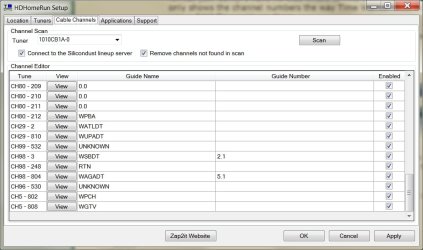
Get the numbers to input from the HDHomerun Setup program - "Cable Channels" tab (the first column - not the "guide numbers") or from the channel listings for your ZIP/Postal Code on the SiliconDust site.

My HDHR is running better on Windows 7 than it did on Vista w/ TV Pack 2008.
Attached Thumbnails
Win 7 MC not happy with HDHR QAM-hdhr-channels.jpg  

Last edited by Dragonfly; 01-29-2009 at 11:16 PM.. Reason: added graphic
My System SpecsSystem Spec
01-30-2009   #3 (permalink)


Windows 7 Ultimate x64


Thanks for the reply. You have confirmed what I was guessing, but wasn't sure.

I have entered all of the missing QAM HD channels. However, there are two problems still. One is that there is no Guide data for these added channels and if I try to simply watch one of these channels by clicking on the guide, I get a "no service" message. This is in spite of seeing the HDHR light up, which normally indicates it's locked into a QAM channel.

Do you have any suggestions for how to get the Guide data and convince MC that there is service?

Thanks,

Bye.
My System SpecsSystem Spec
.


01-30-2009   #4 (permalink)


Windows 7 Ultimate 32 & 64 -(Boot Camped Snow Leopard on a Mac Mini)


Adding the correct Guide data is easy. Go to Setup/TV/Guide/Edit Channels/ click on the channel name you want to associate Guide data with then EDIT LISTINGS and find the correct channel data. For example, my PBS HD clear QAM channel is 5.808, but I have to associate it with Comcast channel 808 to get the correct Guide data listings.

The "No Service" issue is more problematical. Can you view the channel in VLC when you click on the View button in the HDHR Setup channel list? This will establish whether the problem lies with the HDHR or the Media Center setup.

Are you located in the USA, by the way?
My System SpecsSystem Spec
01-30-2009   #5 (permalink)


Windows 7 Ultimate x64


I've updated my profile to show my location. I live in Southern California.

I was reading on the SiliconDust forum that there may be a bug in the Win 7 MC that requires that you run the HDHR Setup and specify the correct ZAP2IT lineup ID after running the MC Setup because MC usually can't get the QAM lineup right, therefore it can't find the right Guide data. I will try that when I go home for lunch.

Yes, I can see all the QAM channels in VLC from the HDHR tools. At one point, when I was very first setting up MC, I didn't have the analog tuner in place. It did find a few QAM channels and would preview them. After introducing the analog tuner, MC got a bit messed up. I hope the HDHR Setup trick fixes it. I have the option of trying the beta HDHR driver and also I could blow the whole thing away and start fresh; this time sneaking up on the QAM stuff a little slower.

Bye.

Quote   Quote: Originally Posted by Dragonfly View Post
Adding the correct Guide data is easy. Go to Setup/TV/Guide/Edit Channels/ click on the channel name you want to associate Guide data with then EDIT LISTINGS and find the correct channel data. For example, my PBS HD clear QAM channel is 5.808, but I have to associate it with Comcast channel 808 to get the correct Guide data listings.

The "No Service" issue is more problematical. Can you view the channel in VLC when you click on the View button in the HDHR Setup channel list? This will establish whether the problem lies with the HDHR or the Media Center setup.

Are you located in the USA, by the way?
My System SpecsSystem Spec
01-30-2009   #6 (permalink)


Windows 7 Ultimate 32 & 64 -(Boot Camped Snow Leopard on a Mac Mini)


I'm using the 20081231 HDHR software/firmware successfully on Windows 7 x86.

Doing a fresh setup of TV Signal in Media Center is the first thing I'd try. Adding the analog tuner after the first setup may have munged it, as you said.
My System SpecsSystem Spec
01-31-2009   #7 (permalink)


Windows 7 Ultimate x64


Success!

I upgraded to the beta driver for the HDHR and that did the trick. I was now able to perform a full QAM scan and it was recorded by MC7. I could then add, then edit the missing channels to associate with the correct line-up data. It all works well now.

The next trick will be to integrate automatic commercial skipping. I will have to wait for the tools to be updated for the new MC7 recording format.

Bye.
My System SpecsSystem Spec
Reply

Win 7 MC not happy with HDHR QAM problems?


Thread Tools


Similar Threads for: Win 7 MC not happy with HDHR QAM
Thread Forum
Happy Thanksgiving Chillout Room
HDHR, Media Center, and HDCP - an unhappy family Media Center
happy Drivers
Happy 4th ... or whatever Chillout Room


All times are GMT -5. The time now is 11:33 AM.


Windows 7 Forums is an independent web site and has not been authorized,
sponsored, or otherwise approved by Microsoft Corporation.
"Windows 7" and related materials are trademarks of Microsoft Corp.
© Designer Media Ltd
  

1 2 3 4 5 6 7 8 9 10 11 12 13 14 15 16 17 18 19 20 21 22 23 24 25 26 27 28 29 30