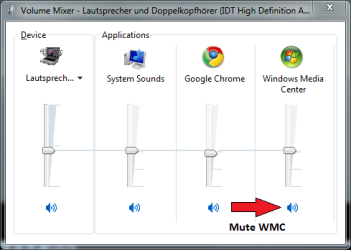
Hi all. I've just recently updated to from xp to Windows 7 and find the WMC interface much nicer than Winfast PVR, which I was previously using for live tv. However, I have one major issue with WMC. The volume control on the application is just a shortcut to the main speaker volume. Is there any way around this? If not, it is an absolute deal breaker for me. I would like to be able to have the tv on while I listen to music. I like to be able to mute the TV during the adds but still have sound for watching youtube videos and stuff.
I have searched a lot for this but can't find any mention of it. As I can't imagine that most people would be happy with this 'feature', I can only assume that fixing it is so simple and obvious that no one prior to me has needed to ask how to do it.
Another silly 'feature' on WMC is that the mouse gets stuck on my second monitor when I maximize. Very strange indeed, but at least I can avoid that by just stretching the window to fill the screen instead of maximizing it. I can't find any way around the volume control problem though.
Thanks in advance for any replies
I have searched a lot for this but can't find any mention of it. As I can't imagine that most people would be happy with this 'feature', I can only assume that fixing it is so simple and obvious that no one prior to me has needed to ask how to do it.
Another silly 'feature' on WMC is that the mouse gets stuck on my second monitor when I maximize. Very strange indeed, but at least I can avoid that by just stretching the window to fill the screen instead of maximizing it. I can't find any way around the volume control problem though.
Thanks in advance for any replies
My Computer
At a glance
Windows 7Core 2 duo (E8400)4GB DDR2 Kingston8800GT
- OS
- Windows 7
- CPU
- Core 2 duo (E8400)
- Motherboard
- GA S-Series
- Memory
- 4GB DDR2 Kingston
- Graphics Card(s)
- 8800GT
- Sound Card
- Audigy 2 Platinum
- Monitor(s) Displays
- 2693HM & TFT5015
- Hard Drives
- 2 x 1TB Seagate
1 x 320GB Seagate
- PSU
- Coolermaster 800W
- Case
- Thermaltake Armour+ MX
- Cooling
- Case fans + tricool
- Keyboard
- Razer Lycosa
- Mouse
- Razer Copperhead
- Internet Speed
- ADSL 2+
- Other Info
- Event TR8 Active Reference Monitors
Logitech G-25