Windows 7 Forums Search

Go Back Windows 7 Forums > Seven Forums > Media Center » Closed Captions


Welcome to Windows 7 Forums. Our forum is dedicated to helping you find solutions with any problems, errors or issues you are experiencing with Windows 7. The Windows 7 forum also covers news and updates and has an extensive Windows 7 tutorial section that covers a wide range of tips and tricks.
RB

Windows 7 - Closed Captions

 
4 Weeks Ago   #1


Windows 7 x64 Ultimate


Closed Captions

How do you display closed captions in Windows Media Center? Got a DVD that doesn't have any subtitles, but it has closed captions, and I just can't see how I can display them...

(Running Windows 7 x64 Ultimate)

My System SpecsSystem Spec
4 Weeks Ago   #2


This link from Microsoft should be helpful:

Show closed captions or subtitles in Windows Media Center
My System SpecsSystem Spec
4 Weeks Ago   #3


Windows 7 x64 Ultimate


Thanks, but that doesn't help much. They say that under the DVD menu I should look for the "Closed Captioning" option. I don't have a "Closed Captioning" option under the DVD menu. And turning "Subtitles" on doesn't help.

Any other suggestions? (Curiously enough, WMP has no problems displaying Closed Captions on that very same DVD!)
My System SpecsSystem Spec
4 Weeks Ago   #4


Are you running the Operating System this Forum is for (Windows 7), or Vista?
My System SpecsSystem Spec
4 Weeks Ago   #5


Windows 7 x64 Ultimate


As I was saying in my first post (see above), I am "Running Windows 7 x64 Ultimate."
My System SpecsSystem Spec
4 Weeks Ago   #6


Your system specs says Vista, which is why i asked.

According to both MS and my own review of my installation, the option is there or should be...perhaps this issue is related to the region you are in and that is what MS is referring to in their help section (linked)
My System SpecsSystem Spec
4 Weeks Ago   #7


Windows 7 x64 Ultimate


The option is there for TV, but it ain't there for DVD. Apparently deaf people aren't allowed to watch DVDs
My System SpecsSystem Spec
4 Weeks Ago   #8


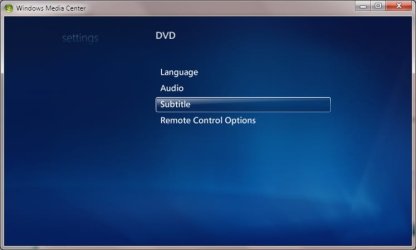
Can you provide a screenshot?

Closed Captions-dvd.jpg
My System SpecsSystem Spec
4 Weeks Ago   #9


Windows 7 x64 Ultimate


That's precisely what my screen looks like: no "Closed Captions" option. And yes, I have "Subtitles" set to "On," but no Closed Captions are displayed. Again, the DVD I have (and I have quite a few of those) has no subtitles, but only closed captions.

(Lemme guess, I stumbled upon a bug, right? )
My System SpecsSystem Spec
4 Weeks Ago   #10


There are three parts in the link I posted:


To turn closed captioning on or off
  1. On the start screen, scroll to Tasks, click settings, click TV or DVD, and then click Closed Captioning. In some regions, you may need to select Subtitles instead of Closed Captioning.
  2. Under Caption Display, click either On, Off, or On when muted.
  3. After you have completed your changes, click Save to return to the settings screen.

To select a different captioning channel for analog TV channels

If you have an analog TV signal and you want to turn on closed captioning, you need to specify closed captioning for analog channels for closed captioning to work correctly.
  1. On the start screen, scroll to Tasks, click settings, click TV, and then click Closed Captioning.
  2. Under Basic Captioning, click CC1.
  3. When you have completed your changes, click Save to return to the settings screen.

To select a different captioning channel for digital TV channels

Digital TV channels provide further closed captions options in addition to Basic Captioning. Windows Media Center will attempt to select closed captions in the language specified in the Preferred Language setting. Note that certain broadcasts may not specify the language that is associated with each captioning service.
  1. On the start screen, scroll to Tasks, click settings, click TV, and then click Closed Captioning.
  2. Under Preferred Language, select a language.
  3. When you have completed your changes, click Save to return to the settings screen.
My System SpecsSystem Spec


Windows 7 Forums is an independent web site and has not been authorized,
sponsored, or otherwise approved by Microsoft Corporation.
"Windows 7" and related materials are trademarks of Microsoft Corp.
© Designer Media Ltd

1 2 3 4 5 6 7 8 9 10 11 12 13 14 15 16 17 18 19 20 21 22 23 24 25 26