Windows 7 media Center Choppy or stuttering playback

leatherlips

New member
When playing back recorded TV files in Media Center, playback consistently stutters (video), but runs smooth when the same exact file is played back using Windows Media Player. I've tried both the 32 and 64 bit windows media players and they both work fine on the wtv files, but not in the media center player.

I loaded the shark007 codecs hoping that this would fix the problem, but it has not.

LIve TV is great, no issues. Blu Ray disks play fine via (powerdvd), I've played avi, and MKV files without issue (at least the one's I tried).
I"d really like to be able to play back recorded tv from within media center if anyone has any suggestions, I'd apprciate your input.

THANK YOU !!
 

My Computer

OS
Windows 7
CPU
AMD
Motherboard
Gigabyte
Memory
G.Skill
Graphics Card(s)
ATI
Hard Drives
Samsung
Case
ANtec
Are the files encoded as MPEG-TS? Can you also fill in your system specs? Use the preparation section in the troubleshooting guide in my sig.
 

My Computer

Computer Manufacturer/Model Number
Sony Vaio Z46GDU
OS
Windows 7 Ultimate x86-64
CPU
[email protected] 1066MHz FSB
Motherboard
Sony branded
Memory
6GB DDR3 1066MHz
Graphics Card(s)
9300M GS 256MB Dedicated (Speed) + Intel4500MHD (Stamina)
Sound Card
Realtek HD Audio
Monitor(s) Displays
13.1' WXGA
Screen Resolution
1600x900
Hard Drives
320GB 7200RPM w/ 16MB cache
Internet Speed
1MB/s
Pretty sure it's one of your ATI settings. Try disabling things that have "Dynamic xxxxxx" in the names.
 

My Computer

OS
Windows 7
CPU
i5-750
Motherboard
Asus
Memory
4GB DDR3 1600
Graphics Card(s)
GT220
For some people, choosing to disable 'Windows Defender' can often solve stutter issues.
 

My Computer

Computer Manufacturer/Model Number
Selfbuilt
OS
Windows 7 Ultimate 64bit
CPU
i7 2600k
Motherboard
asus P8Z68-V LE
Memory
16GB (4x4) corsair vengeance
Graphics Card(s)
Intel HD3000 iGPU / AMD HD6870 1024MB
Sound Card
bitstreamed to an Onkyo 609
Monitor(s) Displays
Asus VE278 27" LED / Bravia EX7 60" LED
Screen Resolution
native 1080p x2
Hard Drives
4x 2TB int. + 2x 2TB external and a SSD for the boot drive.
PSU
650w Antec
Case
NZXT tempest evo
Cooling
air/stock
Keyboard
Dell
Mouse
logitech m505
Internet Speed
dual: cable/blackberry tether for travel use
Other Info
BD re-writer //
asus notebook G73Jw
I checked the defneder, it's off. As for the ATI settings, I didn't see any "dynamic" named settings but I may be looking in the wrong place.
I will attempt to go through the troubleshooting guide to list out all the details of the system.
For now, I know it has a Radeon HD 4200 graphics. I downloaded the latest ATI drivers when I installed the system (it's a new system btw). Not sure it matters, but I am using the windows 7 Basic theme (non-aero).

I'm not sure how to tell if the WTV files are encoded in MPEG-TS. Mediainfo doesn't show anything accept the size of the file. Properties/details doesn't show the encoding either.

Why would the file play fine in windows media player, but not in the Media Center?

Thank you again for your assitance!
 

My Computer

OS
Windows 7
CPU
AMD
Motherboard
Gigabyte
Memory
G.Skill
Graphics Card(s)
ATI
Hard Drives
Samsung
Case
ANtec
I was able to view the details in mediainfo for one of the WTV files. See below:

General
Complete name : D:\Recorded TV\Blades of Glory_WFTVDT_2010_02_26_21_25_56.wtv
Format : EIA-608
Format version : Version 2
File size : 170 MiB
Duration : 2mn 57s
Overall bit rate : 7 997 Kbps

Video
Format : MPEG Video
Format version : Version 2
Format profile : Main@High
Format settings, BVOP : Yes
Format settings, Matrix : Default
Duration : 2mn 57s
Bit rate mode : Variable
Bit rate : 7 670 Kbps
Nominal bit rate : 38.8 Mbps
Width : 1 280 pixels
Height : 720 pixels
Display aspect ratio : 16:9
Frame rate : 59.940 fps
Standard : Component
Resolution : 8 bits
Colorimetry : 4:2:0
Bits/(Pixel*Frame) : 0.139
Stream size : 163 MiB (96%)
Writing library : Po1Zm;he

Text #1
ID : 608-0
Format : EIA-608
Muxing mode : EIA-708
Stream size : 0.00 Byte (0%)

Text #2
ID : 1
Format : EIA-708
Muxing mode : EIA-708
Stream size : 0.00 Byte (0%)
 

My Computer

OS
Windows 7
CPU
AMD
Motherboard
Gigabyte
Memory
G.Skill
Graphics Card(s)
ATI
Hard Drives
Samsung
Case
ANtec
Try reencoding the .wtf files to a different format.
 

My Computer

Computer Manufacturer/Model Number
Sony Vaio Z46GDU
OS
Windows 7 Ultimate x86-64
CPU
[email protected] 1066MHz FSB
Motherboard
Sony branded
Memory
6GB DDR3 1066MHz
Graphics Card(s)
9300M GS 256MB Dedicated (Speed) + Intel4500MHD (Stamina)
Sound Card
Realtek HD Audio
Monitor(s) Displays
13.1' WXGA
Screen Resolution
1600x900
Hard Drives
320GB 7200RPM w/ 16MB cache
Internet Speed
1MB/s
Ok, Some very strange happenings. I tried live TV and found that the channels that were 1080 were also stuttering. The 720 channels and analog did not seem to stutter. While looking for a solution, I found this: DVBLogic • View topic - H264 Channels above 720P stutter
which talks about a similar issue, and of uninstalling the Shark Codecs to resolve the issue.

I did just that (after doing a reset all as indicated), rebooted, and I recieved a BSOD for DGMMS1.SYS. This time when the system rebooted, I went into media center to play a live tv channel, and the same BSOD. Upon reboot this time, I was able to play Live TV and it works great! (no Stutter).

REcorded TV on the same channels that caused me issues before now also show NO ISSUE!

I tried one of the original files that would not play in Media Center, but would play in Media Player (wtv) and it too played fine in media center. SO far, my recorded TV issues are fixed, and the live TV is working even for 1080 channels.

NOW, New Problem is that I can no longer play my MKV movie files(since I unloaded the Shark Codec).

The link above talks about reinstalling Shark codec and changing the settings manually, but I would have NO idea where to start with that.

Anyone know of a way to have my cake and eat it too?

THANKS!
 

My Computer

OS
Windows 7
CPU
AMD
Motherboard
Gigabyte
Memory
G.Skill
Graphics Card(s)
ATI
Hard Drives
Samsung
Case
ANtec
Get the K-Lite Codec Pack - Basic.
 

My Computer

Computer Manufacturer/Model Number
Sony Vaio Z46GDU
OS
Windows 7 Ultimate x86-64
CPU
[email protected] 1066MHz FSB
Motherboard
Sony branded
Memory
6GB DDR3 1066MHz
Graphics Card(s)
9300M GS 256MB Dedicated (Speed) + Intel4500MHD (Stamina)
Sound Card
Realtek HD Audio
Monitor(s) Displays
13.1' WXGA
Screen Resolution
1600x900
Hard Drives
320GB 7200RPM w/ 16MB cache
Internet Speed
1MB/s
Thanks Frostmourne!
Prior to reading your post, I read an article on Hack7MC on enabling MKV in MC via a "minamilist approach".
MKVs for Minimalists on Windows 7
After following this article, upon intial review it appears that the TV is working live and recorded, and that MKV files are now accessible.
I haven't really tested it thoughroghly as of yet, but plan on doing that later tonight.
Hopefully this will do the trick. If not, I'll give the K-Lite codec a try. There seems to be so many different ways to get the MKVs working, that it's hard to know what is the best option.
Again, thank you for responding!
 

My Computer

OS
Windows 7
CPU
AMD
Motherboard
Gigabyte
Memory
G.Skill
Graphics Card(s)
ATI
Hard Drives
Samsung
Case
ANtec
I had a problem with getting choppy/stuttering live tv and recorded tv playback. I recently updated Shark007 and Radeon 4200 and rebooted and the symptoms occurred. I tried tweaking Shark007 and looking at ATI's CCC.

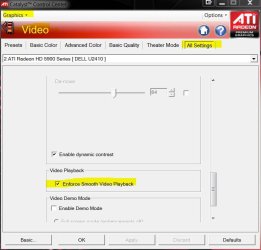
Eventually I found a ATI option in 'Video' menu saying "Enforce smooth video playback". I checked this and instantly the video was not choppy anymore.

I hope this helps anyone stuck in the same situation with an easy fix.
 

My Computer

OS
Win 7
CPU
AMD Phenom X4 9600 Black Edition
Motherboard
MSI 785GT-E63 AM3/AM2+/AM2 AMD 785G HDMI ATX AMD Motherboard
Memory
G.SKILL 4GB (2 x 2GB) 240-Pin DDR2 SDRAM DDR2 1066 (PC2 8500
Just adding a screnshot since it's not one of the 'instantly obvious' settings:


Smooth playback.JPG

   Note
This is when CCC is in Advanced mode
 

My Computer

Computer type
PC/Desktop
Computer Manufacturer/Model Number
Systems by SmartEyeball
OS
8 Pro x64
CPU
i7 3770K 4.6GHz
Motherboard
ASUS P8Z77 WS
Memory
16GB G.Skill Trident X 2666mhz
Graphics Card(s)
x2 EVGA 780 Ti Superclocked SLI
Sound Card
SB X-FI Surround 5.1 PRO USB / ATH-AD900 Headphones
Monitor(s) Displays
x3 Dell U2410 / 58" Samsung
Screen Resolution
5760*1200/ 1920*1200
Hard Drives
2x Intel 520 240GB (RAID 0) * 2x WD Caviar Blacks 2TB (RAID 0) * 2TB WD Caviar Black * Sony Optirac DVD
PSU
Silverstone Strider Evolution 1200W
Case
Thermaltake Level 10 GT Snow Edition
Cooling
Noctua NH-D14
Keyboard
Topre Realforce // Ducky Shine MX Black // Filco Ninja TKL
Mouse
Thermaltake Theron (Highly Recommended) + Razer Imperator
Antivirus
MSE
Browser
IE, FF, WaterFox
Other Info
GT Extreme V2 Sim Racing Cockpit + 40" LCD and K/B Mouse stand ▼
Fanatec CSR Elite Wheel + Clubsport V1 Pedals + CSR shifter/7G-H ▼Saitek X52 Pro ▼ TrackIR 5 Pro
Buttkicker v2 Seat Rumbler with Dedicated 5.1 and Sub Woofer attached to frame ▼
=
Bloody Big Grin
I also had the HD stuttering problem on my Windows 7 32bit Media Center and uninstalling the Vista Codec Pack (Shark007) fixed the problem for me.
 

My Computer

OS
Windows 7 Home Ultimate 32bit
I had a problem with getting choppy/stuttering live tv and recorded tv playback. I recently updated Shark007 and Radeon 4200 and rebooted and the symptoms occurred. I tried tweaking Shark007 and looking at ATI's CCC.

Eventually I found a ATI option in 'Video' menu saying "Enforce smooth video playback". I checked this and instantly the video was not choppy anymore.

I hope this helps anyone stuck in the same situation with an easy fix.

Unfortunately, for me, this option was already checked.

I'm using an Asus E35M1-M Pro (low-power, all-in-one micro-ATX board with built-on AMD E350 APU).

I noticed other options for things like "Edge Enhancement" and "De-Blocking," so I disabled them. I'd rather reduce the amount of tampering done by the video driver...especially because ATI has proven to be completely incompetent when it comes to these things. For example, I still have to change some "dynamic contrast" option to keep my premium channels from strobing/flickering, even with the latest driver software. I had none of these problems with my Intel/NVIDIA Media Center systems. I left pulldown detection and "Enforce Smooth Playback" enabled. I was connected over VNC from work, so I can't tell if it fixed the video playback issues until I check when I get home.
 

My Computer

OS
Windows 7 Ultimate 64bit
When playing back recorded TV files in Media Center, playback consistently stutters (video), but runs smooth when the same exact file is played back using Windows Media Player. I've tried both the 32 and 64 bit windows media players and they both work fine on the wtv files, but not in the media center player.

I loaded the shark007 codecs hoping that this would fix the problem, but it has not.

LIve TV is great, no issues. Blu Ray disks play fine via (powerdvd), I've played avi, and MKV files without issue (at least the one's I tried).
I"d really like to be able to play back recorded tv from within media center if anyone has any suggestions, I'd apprciate your input.

THANK YOU !!


Download CCleaner.com, it fixed the problem for me after I ran the registry cleaner application on it. Fantastic free service!
 

My Computer

Computer type
PC/Desktop
Computer Manufacturer/Model Number
Medion
OS
Windows 7 Home Premium 32bit.
Fixed Choppy Playback

I was suffering extreme choppy playback as well, it had run without a problem for 3 years. I tried all suggestions with no success.

I decided to wipe out the hard drive and try a fresh install. As I was moving files to backup I noticed that some of the files on my Recorded TV partition were reporting their files size incorrectly. I decided to do the following:
1. Delete the Recorded TV partition
2. Rebuilt the partition
3. Ran a checkdisk on the partition( no errors found)
4. Reset WMC to used the partition drive

I have been running for a week now with no further issues.

Good Luck
 

My Computer

Computer type
PC/Desktop
Computer Manufacturer/Model Number
Custom
OS
Windows 7 64 Bit
Hard Drives
1 TB Main
2 TB Storage
Back
Top