|  | | |
16 Apr 2009
|
#1 | | |
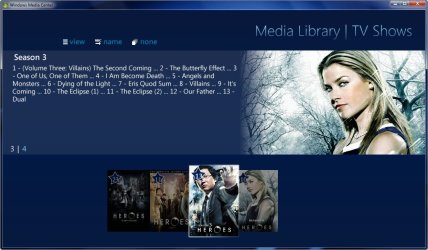
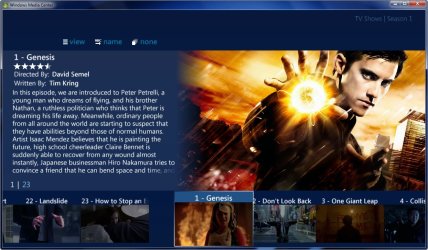
MediaBrowser I just wanted to show the world the best Media Center Plugin I have found! This is MediaBrowser AND IT'S FREE ................. It can do it all and much, much more! Sort out Giant Library's over multiple HDD's or even PC's Find cover and backdrop's with no help. It has the best UI I've ever seen. I'm going to shut up and let the videos talk for me! Check it out! Related links: Media Center- Setup Movie Library by Orbital Shark. If your looking for some custom icons to dress up your Media Browser be sure to check out my icons thread! It's Game Time in Media Browser!! A plugin for MB
Last edited by DemonSeed; 25 Jan 2012 at 04:59 PM..
Reason: cleaned up dead links
| My System Specs |
| System Manufacturer/Model Number Custom Built Rig BY ME "My Baby" OS 7 Ultimate x64 CPU AMD Athlon 64X2 4600+ 2.51Ghz Motherboard ASUS M2N-E SLI Memory 6GB DDR2 900 Kingston Graphics Card 2x BFG Nvidia 9600 GT-OC Sound Card SoundBlaster XF-I Monitor(s) Displays 19"acer, 22"acer, 19"acer, 48" HITACHI HDTV Screen Resolution 1400x900, 1680x1050, 1400x900, 1920x1080 Keyboard Logitech (Bluetooth) Mouse Logitech (Bluetooth) PSU BFG 800 Watt SLI Power Supply Case Game Master Cooling Thermotake Hard Drives Seagate 500GB Sata
Seagate 500GB Sata
Seagate 500GB Sata
Seagate 500GB Sata
Seagate 320 Sata (Primary)
Western Digital 500GB IDE
Western Digital 300GB IDE
Maxter 720 Sata (USB) Internet Speed Turbo Cable Other Info ATI 650HD TV Tuner X2,
Samsung (Light scribe) DVD-R,
Sony (Dual Layer) DVD-R |
16 Apr 2009
|
#2 | | Windows 7 RTM x64 In a house |
rep for you mate, thats awsome doesnt take long to sort out either, was looking for something for windows that had the same effect as plex for mac. Looks good, thanks | My System Specs | | System Manufacturer/Model Number Made by Mastercard OS Windows 7 RTM x64 CPU Core 2 Quad, @3.8 on aircooling Motherboard XFX 750i Nforce Memory 8 Gig Geil Black Dragon Graphics Card Nvidia 8800GTX 512 x 2 in SLI Sound Card Razor Barracuda Monitor(s) Displays 2 X 24 Inch Hannsg Screen Resolution 1600x1050 Keyboard Razor Lycosa Mouse Razor Mamba, sweet as candy PSU 600 Watt Coolermaster Elite Silent Pro Case Coolermaster Storm Cooling Coolermaster V8 Hard Drives 1X64 Gig Kingston SSD Drive
2X 320 sata
2X250 ide
1X 320 External. and lets not forget the 8 gig thumbdrive :)
and a partridge in a pear tree Internet Speed Virgin 50MB. Other Info Zalman Guardian System Fan Controls
Aerocool Modern V system monitor.
And a nice bunch of stickers on the front!! All that money for something that glows blue. But thats why we do it kids. all for the bling!!
100mbit Seedbox, loving that!
Razor Destructor Gaming Mat, Razor Moray Headphones.
To much spare money perhaps? Nah, my mrs has shoes. I have a very expensive way of her shopping for |
16 Apr 2009
|
#3 | | |
No problem
I know you'll love it just as I do.
If you or any one else needs any help with setting up the plugin
I am more than glad to help! | My System Specs | | System Manufacturer/Model Number Custom Built Rig BY ME "My Baby" OS 7 Ultimate x64 CPU AMD Athlon 64X2 4600+ 2.51Ghz Motherboard ASUS M2N-E SLI Memory 6GB DDR2 900 Kingston Graphics Card 2x BFG Nvidia 9600 GT-OC Sound Card SoundBlaster XF-I Monitor(s) Displays 19"acer, 22"acer, 19"acer, 48" HITACHI HDTV Screen Resolution 1400x900, 1680x1050, 1400x900, 1920x1080 Keyboard Logitech (Bluetooth) Mouse Logitech (Bluetooth) PSU BFG 800 Watt SLI Power Supply Case Game Master Cooling Thermotake Hard Drives Seagate 500GB Sata
Seagate 500GB Sata
Seagate 500GB Sata
Seagate 500GB Sata
Seagate 320 Sata (Primary)
Western Digital 500GB IDE
Western Digital 300GB IDE
Maxter 720 Sata (USB) Internet Speed Turbo Cable Other Info ATI 650HD TV Tuner X2,
Samsung (Light scribe) DVD-R,
Sony (Dual Layer) DVD-R |
16 Apr 2009
|
#4 | | Windows 7 Home Premium 64 bit Jackson, New Jersey |
I can't seem to get it installed. I only get to set configuration but no way to start application. I have build 7077 of windows 7. Any help would be appreciated. Thanks | My System Specs | | System Manufacturer/Model Number HP Pavilion e9107c OS Windows 7 Home Premium 64 bit CPU Intel Core 2 Quad Q8200 @ 2.33 GHz Memory 8 GB DDR3 Graphics Card ATI Radeon HD 4350 Monitor(s) Displays HP 23 in. High Definition (w2338h) Screen Resolution 1920 x 1080 Keyboard Logitech Illuminated keyboard Mouse Logitech Laser mouse Hard Drives 750 GB |
17 Apr 2009
|
#5 | | Windows 7 RTM x64 In a house |

Quote: Originally Posted by Blongs I can't seem to get it installed. I only get to set configuration but no way to start application. I have build 7077 of windows 7. Any help would be appreciated. Thanks
Start Media configurator, set your folders etc... start media centre, go to extras select media browser, there you go | My System Specs | | System Manufacturer/Model Number Made by Mastercard OS Windows 7 RTM x64 CPU Core 2 Quad, @3.8 on aircooling Motherboard XFX 750i Nforce Memory 8 Gig Geil Black Dragon Graphics Card Nvidia 8800GTX 512 x 2 in SLI Sound Card Razor Barracuda Monitor(s) Displays 2 X 24 Inch Hannsg Screen Resolution 1600x1050 Keyboard Razor Lycosa Mouse Razor Mamba, sweet as candy PSU 600 Watt Coolermaster Elite Silent Pro Case Coolermaster Storm Cooling Coolermaster V8 Hard Drives 1X64 Gig Kingston SSD Drive
2X 320 sata
2X250 ide
1X 320 External. and lets not forget the 8 gig thumbdrive :)
and a partridge in a pear tree Internet Speed Virgin 50MB. Other Info Zalman Guardian System Fan Controls
Aerocool Modern V system monitor.
And a nice bunch of stickers on the front!! All that money for something that glows blue. But thats why we do it kids. all for the bling!!
100mbit Seedbox, loving that!
Razor Destructor Gaming Mat, Razor Moray Headphones.
To much spare money perhaps? Nah, my mrs has shoes. I have a very expensive way of her shopping for |
17 Apr 2009
|
#6 | | Windows 7 Home Premium 64 bit Jackson, New Jersey |

Quote: Originally Posted by damoh Start Media configurator, set your folders etc... start media centre, go to extras select media browser, there you go  Thanks for clarifying. I did that and the program will not find my pictures or music. Tried adding several folders and also tried clearing cache and letting program rescan for media. Still shows nothing when I click on music or pictures. | My System Specs | | System Manufacturer/Model Number HP Pavilion e9107c OS Windows 7 Home Premium 64 bit CPU Intel Core 2 Quad Q8200 @ 2.33 GHz Memory 8 GB DDR3 Graphics Card ATI Radeon HD 4350 Monitor(s) Displays HP 23 in. High Definition (w2338h) Screen Resolution 1920 x 1080 Keyboard Logitech Illuminated keyboard Mouse Logitech Laser mouse Hard Drives 750 GB |
17 Apr 2009
|
#7 | | Windows 7 Ultimate x64 Milton Keynes, United Kingdom |
OMG!! This plugin is awesome!! It even has images for movies that have just come out in the cinema
Also, +rep duly given
Last edited by Orbital Shark; 17 Apr 2009 at 08:07 AM..
| My System Specs | | System Manufacturer/Model Number Compaq Desktop OS Windows 7 Ultimate x64 CPU AMD Sempron Dual Core Memory 3GB Graphics Card NVIDIA GeForce 6150SE nForce 430 Screen Resolution 1024x768 Hard Drives 150GB Sata |
17 Apr 2009
|
#8 | | |

Quote: Originally Posted by Blongs Thanks for clarifying. I did that and the program will not find my pictures or music. Tried adding several folders and also tried clearing cache and letting program rescan for media. Still shows nothing when I click on music or pictures. Yea as of now it does not support Pictures or music.
I know
It sucks But I have herd rumors that they are adding support for both.
To get a launcher on MC Home Page go to the Program Library and right click on the Media Browser and set to main strip.
Last edited by DemonSeed; 30 May 2009 at 10:34 AM..
| My System Specs | | System Manufacturer/Model Number Custom Built Rig BY ME "My Baby" OS 7 Ultimate x64 CPU AMD Athlon 64X2 4600+ 2.51Ghz Motherboard ASUS M2N-E SLI Memory 6GB DDR2 900 Kingston Graphics Card 2x BFG Nvidia 9600 GT-OC Sound Card SoundBlaster XF-I Monitor(s) Displays 19"acer, 22"acer, 19"acer, 48" HITACHI HDTV Screen Resolution 1400x900, 1680x1050, 1400x900, 1920x1080 Keyboard Logitech (Bluetooth) Mouse Logitech (Bluetooth) PSU BFG 800 Watt SLI Power Supply Case Game Master Cooling Thermotake Hard Drives Seagate 500GB Sata
Seagate 500GB Sata
Seagate 500GB Sata
Seagate 500GB Sata
Seagate 320 Sata (Primary)
Western Digital 500GB IDE
Western Digital 300GB IDE
Maxter 720 Sata (USB) Internet Speed Turbo Cable Other Info ATI 650HD TV Tuner X2,
Samsung (Light scribe) DVD-R,
Sony (Dual Layer) DVD-R |
17 Apr 2009
|
#9 | | Windows 7 Ultimate Houston, Texas |
While using the configuration for MB is good, if you have movies in more than one folder, then it shows multiple folders in MB. If you want to show one folder in MB, do this:
Before installing MB, create notepad file and save it with a .vf extension (not .vf.txt). Create it in your users\videos folder
Put this in it:
folder: C:\AVI movies 1\
folder: G:\AVI movies 2\
folder: G:\DVD's\
You can edit this to suit your needs.
When you install MB, it will look for that and set it up for you.
If you already installed MB, then go to your program data\media Browser\start up folder, and put the .vf file there.
If you want to launch MC to go straight to MB create a shortcut on your desktop with the following entry:
%systemroot%\ehome\ehshell.exe /entrypoint:{ce32c570-4bec-4aeb-ad1d-cf47b91de0b2}\{fc9abccc-36cb-47ac-8bab-03e8ef5f6f22}
Don't worry, it automatically assigns the MC icon to it. Once you double click it, it will automatically go to MB.
If you have trailers in a folder somewhere on your computer
create a XML file in the same movie folder so it points to the trailer folder. Put this in the .xml file
<Title>
<LocalTrailer>
<URL>C:\Users\Public\Videos\HD Movies\Bangkok Dangerous\trailer.mov</URL>
<Type>1</Type>
</LocalTrailer>
</Title>
MAKE SURE TO NAME IT MYMOVIES.XML
edit it to your likeness by changing the url information to point to where your trailer movies are located. | My System Specs | | System Manufacturer/Model Number Gigabyte OS Windows 7 Ultimate CPU Intel Core(TM)2 Quad- Q9550, 2.83GHz Motherboard G31M-ES2L Memory 4GB Graphics Card ATI Radeon HD4600 Sound Card On Board: Monitor(s) Displays Acer AL2223W, Acer AL1916 Screen Resolution 1680 x 1050, 1280 x 1024 Keyboard Microsoft Laser 6000 Mouse Logitech Optical Trackman PSU 600W Case Cooler Master Hard Drives 160GB
350GB
250GB
250GB Internet Speed 1.5MB Other Info I am also running a quasar gamatron flux capacitor with twin pulse tronic phasers......jk, I have no such stuff. |
17 Apr 2009
|
#10 | | Windows 7 RTM x64 In a house |

Quote: Originally Posted by zay While using the configuration for MB is good, if you have movies in more than one folder, then it shows multiple folders in MB. If you want to show one folder in MB, do this:
Before installing MB, create notepad file and save it with a .vf extension (not .vf.txt). Create it in your users\videos folder
Put this in it:
folder: C:\AVI movies 1\
folder: G:\AVI movies 2\
folder: G:\DVD's\
You can edit this to suit your needs.
When you install MB, it will look for that and set it up for you.
If you already installed MB, then go to your program data\media Browser\start up folder, and put the .vf file there.
If you want to launch MC to go straight to MB create a shortcut on your desktop with the following entry:
%systemroot%\ehome\ehshell.exe /entrypoint:{ce32c570-4bec-4aeb-ad1d-cf47b91de0b2}\{fc9abccc-36cb-47ac-8bab-03e8ef5f6f22}
Don't worry, it automatically assigns the MC icon to it. Once you double click it, it will automatically go to MB.
If you have trailers in a folder somewhere on your computer
create a XML file in the same movie folder so it points to the trailer folder. Put this in the .xml file
<Title>
<LocalTrailer>
<URL>C:\Users\Public\Videos\HD Movies\Bangkok Dangerous\trailer.mov</URL>
<Type>1</Type>
</LocalTrailer>
</Title>
MAKE SURE TO NAME IT MYMOVIES.XML
edit it to your likeness by changing the url information to point to where your trailer movies are located.
Nice one thanks mate. Also to topic starter, how do you get your background images on? I am assuming they are custom in the first shot? | My System Specs | | System Manufacturer/Model Number Made by Mastercard OS Windows 7 RTM x64 CPU Core 2 Quad, @3.8 on aircooling Motherboard XFX 750i Nforce Memory 8 Gig Geil Black Dragon Graphics Card Nvidia 8800GTX 512 x 2 in SLI Sound Card Razor Barracuda Monitor(s) Displays 2 X 24 Inch Hannsg Screen Resolution 1600x1050 Keyboard Razor Lycosa Mouse Razor Mamba, sweet as candy PSU 600 Watt Coolermaster Elite Silent Pro Case Coolermaster Storm Cooling Coolermaster V8 Hard Drives 1X64 Gig Kingston SSD Drive
2X 320 sata
2X250 ide
1X 320 External. and lets not forget the 8 gig thumbdrive :)
and a partridge in a pear tree Internet Speed Virgin 50MB. Other Info Zalman Guardian System Fan Controls
Aerocool Modern V system monitor.
And a nice bunch of stickers on the front!! All that money for something that glows blue. But thats why we do it kids. all for the bling!!
100mbit Seedbox, loving that!
Razor Destructor Gaming Mat, Razor Moray Headphones.
To much spare money perhaps? Nah, my mrs has shoes. I have a very expensive way of her shopping for All times are GMT -5. The time now is 01:16 PM. | |