
| Windows 7: TV Tuner, help please! |
21 Mar 2010
|
#1 | | 7 Ultimate x64 SP1 California, US |
TV Tuner, help please! Hey guys, me again with a new battery of inquries.
So, I got hooked up with a TV Tuner but am having a hell of a time getting it to pick up any channels from my Verizon FiOS Set-Top box. I have it connected via an S-Video cable, the RCA audio splitter and I’ve even tried directly wiring the Coaxial cable to it from the TV-Out port as well. But, still no channels.
It’s a Pinnacle PCTV HD Pro Stick, model 801e. When I installed the drivers and applications, it told me that 64bit was only Beta for this device, applications and drivers (drivers are for Vistsa as there are currently no 7 drivers for it) but that it should work just fine without any major issues.
So, is it my computer, or the provider type, or else how I’ve chosen to connect the device which is the issue here? I know that the device itself works because it was able to pick up TV-Radio. Just not any channels. I don’t know if a portable antenna is required in conjunction with a direct hookup, but I don’t think so – please correct me if I’m wrong, and I don’t have one of these.
Likewise, is there a special procedure or channel I should tune into for it to properly seek and find the channels? This is my very fist time ever messing around with TV-PC connections so please be gentle and explain things as if you’re dealing with a complete moron.
As always, any help or advice is greatly appreciated!
EDIT: The only cable I DON'T have is a RCA Video, the ones I have do NOT fit the Video-Out port on the RCA cable for the Tuner, and we don't have a spare one meant for TV connections (as all our TV's use Coaxial and S-Video). Is this wire also required in conjunction with an S-Video cable to deliver channels and images to the device? | My System Specs |
| System Manufacturer/Model Number Acer Aspire 5738PG-6306 OS 7 Ultimate x64 SP1 CPU Core 2 Duo T6600 @ 2.20GHz Motherboard Acer JV50 | Intel PM45 Chipset | BIOS Phoenix v1.21 Memory 4GB SDRAM DDR2 667 Graphics Card ATI Mobility Radeon 4570HD 512MB VDDR3 (2.25GB HyperMemory) Sound Card Integrated Dolby Home Theater HD Audio Support Monitor(s) Displays 15.6" LED backlight HD/WS CineCrystal w/ Multi-Touch Screen Resolution Notebook: 1366x768 | Syncmaster P2370HD: 1920x1080 Keyboard Microsoft Wireless 3000 (USB) Mouse Logitech V220 (USB) PSU AC Adapter Case Blue Clam shell Cooling OEM Bult-in. Hard Drives Primary internal: 320GB WD3200BEVT-22ZCT0 @ 5400 RPM | Secondary external 1: 2TB Cavalry CAXB3702T0 @7200 RPM (USB 2.0) | Secondary external 2: 500GB Calvary CAUM @7200 RPM (USB 2.0). Internet Speed 31Mbps DL/25Mbps UL - Verizon fiOs/Netgear WNDR37AV Other Info EXTERNAL DISPLAY: 23" Samsung Syncmaster P2370HD | EXTERNAL SOUND: 300 Watt MX-KB30 JVC Stereo (AUX) | ROUTER: Netgear WNDR37AV 802.11a/b/g/n Dual-Band Gigabit | Satechi 12-Port USB 2.0 Hub | GAME PAD: SteelSeries 3GC USB 2.0 (JoyToKey Mapping) | DETAILED SYSTEM SPECIFICATIONS: http://www.tigerdirect.com/applications/SearchTools/item-details.asp?EdpNo=5265887&CatId=4938 |
21 Mar 2010
|
#2 | | Windows 7 Ultimate x64, XP Mode, W8 RP VM, Linux Mint Debian 2nd OS HD- 7 Pro x64 second case New England |
I made the mistake of buying a Pinnable card sometime back when the old AVerTV card by AVerMedia let go and simply grabbed that off of a shelf in the now deceased Circuit City as a fast replacement. It only worked on XP being one of the newer PCI model supposedly?
AVerMedia has a newer updated 64bit 7 supported PCIe card to look into that allows watching one channel while recording another and accepts S-Video for analog as well as 75ohm. Newegg presently has 3 models depending on price range and features to consider since Pinnacle is certainly out here! Newegg.com - Computer Hardware,Video Cards & Video Devices,TV Tuners & Video Devices,AVerMedia,PCI-Express x1,Combo Tuner
The AVerTV previously UltraTV has been a reliable line for several builds here over the years while Haugpauge is another popular alternate. The one thing for that card noiw would be patching into a vcr first and running out from the RCA phono jacks for yellow video and the two audio into the card and select the input if you are unable to scan for channels from your present hookup.
Most cards will see that done first if the application goes on fully when installed. Sometimes you may have to remove, reboot, and perform a full fresh install if the tuner drivers are not active and no device listing is seen under "sound, video, and game controllers" in the Device Manager. That's one place to start to see if the card is being detected properly. | My System Specs | | OS Windows 7 Ultimate x64, XP Mode, W8 RP VM, Linux Mint Debian 2nd OS HD- 7 Pro x64 second case CPU AMD Phenom II X4 975 Deneb 3.6ghz - 965 on new mini tower Motherboard Gigabyte GA-790XTA-UD4 Memory Kingston Hyper X DDR3 1600 1.5v 16gb - Mushkin on 2nd build Graphics Card MSI HD Radeon 5750 1gb - MSI HD Radeon 6450 on mini tower Sound Card Creative Labs X-Fi XtremeGamer - Realtek onooard 2nd case Monitor(s) Displays 2 x Acer P191W 19" widesscreen - HP 20" widescreen mini towe Screen Resolution 1440x900 native - 1600x1024 on 7 Pro x64 build Keyboard Microsoft Recusa Razor - MS Comfort 3000 on second build Mouse MS Trackball Explorer - A4TECH dual scroll wheel trackball PSU Corsair 750TX - primary / Corsair CX600 - second Case Antec 900-2 - SSD compatible / NZXT Vulcan mini tower Cooling Zalman CNPS9900A Hard Drives Primary Ultimate x64 build-
WD Black Edition 1tb Sata 6.0 = 2
WD Black Edition 1tb Sata 3.0 = 2 (OS drives)
WD 1tb Green Power sata = 2 1 external
usb flash drives = 18
Second 7 Pro x64 mini tower-
WD Caviar SE 500gb sata II single drive presen Internet Speed 30mbps upgrade - primary hard wired - mini tower usb WiFi |
21 Mar 2010
|
#3 | | Win 8 Release candidate 8400 |

Quote: Originally Posted by EvilOzzmess Hey guys, me again with a new battery of inquries.
So, I got hooked up with a TV Tuner but am having a hell of a time getting it to pick up any channels from my Verizon FiOS Set-Top box. I have it connected via an S-Video cable, the RCA audio splitter and I’ve even tried directly wiring the Coaxial cable to it from the TV-Out port as well. But, still no channels.
It’s a Pinnacle PCTV HD Pro Stick, model 801e. When I installed the drivers and applications, it told me that 64bit was only Beta for this device, applications and drivers (drivers are for Vistsa as there are currently no 7 drivers for it) but that it should work just fine without any major issues.
So, is it my computer, or the provider type, or else how I’ve chosen to connect the device which is the issue here? I know that the device itself works because it was able to pick up TV-Radio. Just not any channels. I don’t know if a portable antenna is required in conjunction with a direct hookup, but I don’t think so – please correct me if I’m wrong, and I don’t have one of these.
Likewise, is there a special procedure or channel I should tune into for it to properly seek and find the channels? This is my very fist time ever messing around with TV-PC connections so please be gentle and explain things as if you’re dealing with a complete moron.
As always, any help or advice is greatly appreciated!
EDIT: The only cable I DON'T have is a RCA Video, the ones I have do NOT fit the Video-Out port on the RCA cable for the Tuner, and we don't have a spare one meant for TV connections (as all our TV's use Coaxial and S-Video). Is this wire also required in conjunction with an S-Video cable to deliver channels and images to the device? Do you set the verizon fios box to a set channel? (ie like cable uses channel 3) | My System Specs | | System Manufacturer/Model Number HP Pavillion dv-7 1005 Tx OS Win 8 Release candidate 8400 CPU 2@2.4 Memory 4 gigs Graphics Card Nvidia 9600M Sound Card HD built-in Monitor(s) Displays 17" Wxga Screen Resolution 1440x900 Cooling none Internet Speed 45Mb down 5Mb up |
21 Mar 2010
|
#4 | | 7 Ultimate x64 SP1 California, US |
OK, wait a second, I have picture and sound now. But I still do not have any channels. I suppose this is normal from a direct connection to a Set-Top box? I can also bring up the program guide and use the remote from the Set-Top box. This will work, but if there's a way to be able to get the channels list so I can set it to automatically record a program by itself without me having to press the button, that would be awesome!
Also, I'm unsure how I can make the Set-Top box accommodate the TV and the Tuner. It's no big deal if I can't do this, but it would be ideal. I only have crummy RCA cables to work with though, no fancy ones like which were connected to the box and TV, which I'm using for the Tuner right now. No idea if those older, lesser cords would work. Please advise.
Last edited by EvilOzzmess; 21 Mar 2010 at 09:31 PM..
| My System Specs | | System Manufacturer/Model Number Acer Aspire 5738PG-6306 OS 7 Ultimate x64 SP1 CPU Core 2 Duo T6600 @ 2.20GHz Motherboard Acer JV50 | Intel PM45 Chipset | BIOS Phoenix v1.21 Memory 4GB SDRAM DDR2 667 Graphics Card ATI Mobility Radeon 4570HD 512MB VDDR3 (2.25GB HyperMemory) Sound Card Integrated Dolby Home Theater HD Audio Support Monitor(s) Displays 15.6" LED backlight HD/WS CineCrystal w/ Multi-Touch Screen Resolution Notebook: 1366x768 | Syncmaster P2370HD: 1920x1080 Keyboard Microsoft Wireless 3000 (USB) Mouse Logitech V220 (USB) PSU AC Adapter Case Blue Clam shell Cooling OEM Bult-in. Hard Drives Primary internal: 320GB WD3200BEVT-22ZCT0 @ 5400 RPM | Secondary external 1: 2TB Cavalry CAXB3702T0 @7200 RPM (USB 2.0) | Secondary external 2: 500GB Calvary CAUM @7200 RPM (USB 2.0). Internet Speed 31Mbps DL/25Mbps UL - Verizon fiOs/Netgear WNDR37AV Other Info EXTERNAL DISPLAY: 23" Samsung Syncmaster P2370HD | EXTERNAL SOUND: 300 Watt MX-KB30 JVC Stereo (AUX) | ROUTER: Netgear WNDR37AV 802.11a/b/g/n Dual-Band Gigabit | Satechi 12-Port USB 2.0 Hub | GAME PAD: SteelSeries 3GC USB 2.0 (JoyToKey Mapping) | DETAILED SYSTEM SPECIFICATIONS: http://www.tigerdirect.com/applications/SearchTools/item-details.asp?EdpNo=5265887&CatId=4938 |
21 Mar 2010
|
#5 | | 7 Ultimate x64 SP1 California, US |
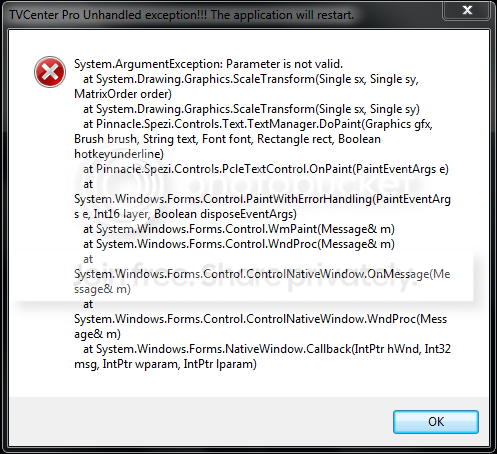
Well, it was working... but now I'm getting a dread "Unhandled Exception" error every time I start the TV Tuner program, and it crashes out. All I did was try and change the picture to 16:9 (because my Notebook is a Widescreen). What should I do now? I told it to reset settings to default, but it STILL comes up with this error and crashes out!
Should I uninstall and reinstall, along with the drivers? Could that fix the problem? | My System Specs | | System Manufacturer/Model Number Acer Aspire 5738PG-6306 OS 7 Ultimate x64 SP1 CPU Core 2 Duo T6600 @ 2.20GHz Motherboard Acer JV50 | Intel PM45 Chipset | BIOS Phoenix v1.21 Memory 4GB SDRAM DDR2 667 Graphics Card ATI Mobility Radeon 4570HD 512MB VDDR3 (2.25GB HyperMemory) Sound Card Integrated Dolby Home Theater HD Audio Support Monitor(s) Displays 15.6" LED backlight HD/WS CineCrystal w/ Multi-Touch Screen Resolution Notebook: 1366x768 | Syncmaster P2370HD: 1920x1080 Keyboard Microsoft Wireless 3000 (USB) Mouse Logitech V220 (USB) PSU AC Adapter Case Blue Clam shell Cooling OEM Bult-in. Hard Drives Primary internal: 320GB WD3200BEVT-22ZCT0 @ 5400 RPM | Secondary external 1: 2TB Cavalry CAXB3702T0 @7200 RPM (USB 2.0) | Secondary external 2: 500GB Calvary CAUM @7200 RPM (USB 2.0). Internet Speed 31Mbps DL/25Mbps UL - Verizon fiOs/Netgear WNDR37AV Other Info EXTERNAL DISPLAY: 23" Samsung Syncmaster P2370HD | EXTERNAL SOUND: 300 Watt MX-KB30 JVC Stereo (AUX) | ROUTER: Netgear WNDR37AV 802.11a/b/g/n Dual-Band Gigabit | Satechi 12-Port USB 2.0 Hub | GAME PAD: SteelSeries 3GC USB 2.0 (JoyToKey Mapping) | DETAILED SYSTEM SPECIFICATIONS: http://www.tigerdirect.com/applications/SearchTools/item-details.asp?EdpNo=5265887&CatId=4938 |
21 Mar 2010
|
#6 | | Windows 7 Ultimate x64, XP Mode, W8 RP VM, Linux Mint Debian 2nd OS HD- 7 Pro x64 second case New England |
For tuner card applications you are stuck with the standard NTSC viewing. I see that all the time for the widescreen lcds here as well. This is normal where you have to use the default for the best results.
The error was not being able to get in there and change to widescreen display as you would with your native resolution. That's tv for you! But getting the display to begin with shows some progress and now you have to go through any help info for scanning for channels so they will be added. | My System Specs | | OS Windows 7 Ultimate x64, XP Mode, W8 RP VM, Linux Mint Debian 2nd OS HD- 7 Pro x64 second case CPU AMD Phenom II X4 975 Deneb 3.6ghz - 965 on new mini tower Motherboard Gigabyte GA-790XTA-UD4 Memory Kingston Hyper X DDR3 1600 1.5v 16gb - Mushkin on 2nd build Graphics Card MSI HD Radeon 5750 1gb - MSI HD Radeon 6450 on mini tower Sound Card Creative Labs X-Fi XtremeGamer - Realtek onooard 2nd case Monitor(s) Displays 2 x Acer P191W 19" widesscreen - HP 20" widescreen mini towe Screen Resolution 1440x900 native - 1600x1024 on 7 Pro x64 build Keyboard Microsoft Recusa Razor - MS Comfort 3000 on second build Mouse MS Trackball Explorer - A4TECH dual scroll wheel trackball PSU Corsair 750TX - primary / Corsair CX600 - second Case Antec 900-2 - SSD compatible / NZXT Vulcan mini tower Cooling Zalman CNPS9900A Hard Drives Primary Ultimate x64 build-
WD Black Edition 1tb Sata 6.0 = 2
WD Black Edition 1tb Sata 3.0 = 2 (OS drives)
WD 1tb Green Power sata = 2 1 external
usb flash drives = 18
Second 7 Pro x64 mini tower-
WD Caviar SE 500gb sata II single drive presen Internet Speed 30mbps upgrade - primary hard wired - mini tower usb WiFi |
21 Mar 2010
|
#7 | | 7 Ultimate x64 SP1 California, US |
Thank you. I went ahead and uninstalled/reinstalled and it seems to have resolved the problem.
I'm OK being stuck with standard. I won't touch it again. The only thing I need to figure out now is how I should configure the video capture. I'm using both S-Video and RCA Composite for the Audio, but I have absolutely no idea if I used one or the other, if the sound and picture would both capture and save. There's Analong, Composite, S-Video, Radio, Digital Antenna, and Digital Cable. Do I need Composite, S-Video or Digital Cable to get both sound and audio with the capture/record feature? I'm thinking Digital Cable... makes the most sense to me.
Also, I'm pretty sure I need "DivX" or "File" as the type, right? Just making sure...
Thanks again guys. | My System Specs | | System Manufacturer/Model Number Acer Aspire 5738PG-6306 OS 7 Ultimate x64 SP1 CPU Core 2 Duo T6600 @ 2.20GHz Motherboard Acer JV50 | Intel PM45 Chipset | BIOS Phoenix v1.21 Memory 4GB SDRAM DDR2 667 Graphics Card ATI Mobility Radeon 4570HD 512MB VDDR3 (2.25GB HyperMemory) Sound Card Integrated Dolby Home Theater HD Audio Support Monitor(s) Displays 15.6" LED backlight HD/WS CineCrystal w/ Multi-Touch Screen Resolution Notebook: 1366x768 | Syncmaster P2370HD: 1920x1080 Keyboard Microsoft Wireless 3000 (USB) Mouse Logitech V220 (USB) PSU AC Adapter Case Blue Clam shell Cooling OEM Bult-in. Hard Drives Primary internal: 320GB WD3200BEVT-22ZCT0 @ 5400 RPM | Secondary external 1: 2TB Cavalry CAXB3702T0 @7200 RPM (USB 2.0) | Secondary external 2: 500GB Calvary CAUM @7200 RPM (USB 2.0). Internet Speed 31Mbps DL/25Mbps UL - Verizon fiOs/Netgear WNDR37AV Other Info EXTERNAL DISPLAY: 23" Samsung Syncmaster P2370HD | EXTERNAL SOUND: 300 Watt MX-KB30 JVC Stereo (AUX) | ROUTER: Netgear WNDR37AV 802.11a/b/g/n Dual-Band Gigabit | Satechi 12-Port USB 2.0 Hub | GAME PAD: SteelSeries 3GC USB 2.0 (JoyToKey Mapping) | DETAILED SYSTEM SPECIFICATIONS: http://www.tigerdirect.com/applications/SearchTools/item-details.asp?EdpNo=5265887&CatId=4938 |
21 Mar 2010
|
#8 | | Windows 7 Ultimate x64, XP Mode, W8 RP VM, Linux Mint Debian 2nd OS HD- 7 Pro x64 second case New England |
With the Pinnacle model I had briefly as well as with the tv card here you should a menu of buttons on some part of the border above or below the viewing area when not full screen. Each of those will have a specific purpose like selecting between composite or digital. You have to try each option to see where the analog signal will suddenly appear.
As for reinstalling the app that happens more often with tuner cards then other devices like sound and video cards in general. The tuner driver on some is also installed before the app but MS updates will knock it out with the same or newer version of the driver where you then have to remove and install everything all over again. Just remember that one when looking through the optional hardware updates!
For recording the incoming signal there should a vcr like console with rec, stop, play buttons on it. With the Pinnacle card I had the record button was black instead of red typically seen on most cards. Another annoyance with one of their older models.
The key or big tip is simply pressing each button or seeing if a popup descriptor is seen to get familiar with it. Once you find the record button you may want to go through the configuration to select a custom folder rather then digging through the Program Files\Pinnacle sub folders or under your user account in the users folder depending on where the app saves captures to. I replaced the other card too fast to remember just where that was found here. | My System Specs | | OS Windows 7 Ultimate x64, XP Mode, W8 RP VM, Linux Mint Debian 2nd OS HD- 7 Pro x64 second case CPU AMD Phenom II X4 975 Deneb 3.6ghz - 965 on new mini tower Motherboard Gigabyte GA-790XTA-UD4 Memory Kingston Hyper X DDR3 1600 1.5v 16gb - Mushkin on 2nd build Graphics Card MSI HD Radeon 5750 1gb - MSI HD Radeon 6450 on mini tower Sound Card Creative Labs X-Fi XtremeGamer - Realtek onooard 2nd case Monitor(s) Displays 2 x Acer P191W 19" widesscreen - HP 20" widescreen mini towe Screen Resolution 1440x900 native - 1600x1024 on 7 Pro x64 build Keyboard Microsoft Recusa Razor - MS Comfort 3000 on second build Mouse MS Trackball Explorer - A4TECH dual scroll wheel trackball PSU Corsair 750TX - primary / Corsair CX600 - second Case Antec 900-2 - SSD compatible / NZXT Vulcan mini tower Cooling Zalman CNPS9900A Hard Drives Primary Ultimate x64 build-
WD Black Edition 1tb Sata 6.0 = 2
WD Black Edition 1tb Sata 3.0 = 2 (OS drives)
WD 1tb Green Power sata = 2 1 external
usb flash drives = 18
Second 7 Pro x64 mini tower-
WD Caviar SE 500gb sata II single drive presen Internet Speed 30mbps upgrade - primary hard wired - mini tower usb WiFi |
22 Mar 2010
|
#9 | | 7 Ultimate x64 SP1 California, US |
Thanks again. I'm actually still getting that damned error, with other things now. Here's what it says:
Any ideas on how to fix it? | My System Specs | | System Manufacturer/Model Number Acer Aspire 5738PG-6306 OS 7 Ultimate x64 SP1 CPU Core 2 Duo T6600 @ 2.20GHz Motherboard Acer JV50 | Intel PM45 Chipset | BIOS Phoenix v1.21 Memory 4GB SDRAM DDR2 667 Graphics Card ATI Mobility Radeon 4570HD 512MB VDDR3 (2.25GB HyperMemory) Sound Card Integrated Dolby Home Theater HD Audio Support Monitor(s) Displays 15.6" LED backlight HD/WS CineCrystal w/ Multi-Touch Screen Resolution Notebook: 1366x768 | Syncmaster P2370HD: 1920x1080 Keyboard Microsoft Wireless 3000 (USB) Mouse Logitech V220 (USB) PSU AC Adapter Case Blue Clam shell Cooling OEM Bult-in. Hard Drives Primary internal: 320GB WD3200BEVT-22ZCT0 @ 5400 RPM | Secondary external 1: 2TB Cavalry CAXB3702T0 @7200 RPM (USB 2.0) | Secondary external 2: 500GB Calvary CAUM @7200 RPM (USB 2.0). Internet Speed 31Mbps DL/25Mbps UL - Verizon fiOs/Netgear WNDR37AV Other Info EXTERNAL DISPLAY: 23" Samsung Syncmaster P2370HD | EXTERNAL SOUND: 300 Watt MX-KB30 JVC Stereo (AUX) | ROUTER: Netgear WNDR37AV 802.11a/b/g/n Dual-Band Gigabit | Satechi 12-Port USB 2.0 Hub | GAME PAD: SteelSeries 3GC USB 2.0 (JoyToKey Mapping) | DETAILED SYSTEM SPECIFICATIONS: http://www.tigerdirect.com/applications/SearchTools/item-details.asp?EdpNo=5265887&CatId=4938 |
22 Mar 2010
|
#10 | | Windows 7 Ultimate x64, XP Mode, W8 RP VM, Linux Mint Debian 2nd OS HD- 7 Pro x64 second case New England |
The Pinnacle model I had here very briefly only installed and ran on the 32bit XP. That was a quick buy in a local retail store until a new replacement came in for the first card that went. I know their support site was good for ??? there with not really much to look at and why I won't buy another card from them.
Which model is this being seen on? That might be a help with this particular error especially if that particular card is still limited mainly to the 32bit Windows. Some dll library errors have come up with the tuner card here while a different make generally pointing out a reinstall is needed or Windows may not fully detect the card on a particular startup one day and work fine the next.
On a few occasions with a clean install of Windows I ended reinstalling the present card's application and driver 3 or 4 times until it finally went on good and no further software or driver problems came up. The apps for tuner cards are often delicate when compared to softwares for other devices. One little thing and... | My System Specs | | OS Windows 7 Ultimate x64, XP Mode, W8 RP VM, Linux Mint Debian 2nd OS HD- 7 Pro x64 second case CPU AMD Phenom II X4 975 Deneb 3.6ghz - 965 on new mini tower Motherboard Gigabyte GA-790XTA-UD4 Memory Kingston Hyper X DDR3 1600 1.5v 16gb - Mushkin on 2nd build Graphics Card MSI HD Radeon 5750 1gb - MSI HD Radeon 6450 on mini tower Sound Card Creative Labs X-Fi XtremeGamer - Realtek onooard 2nd case Monitor(s) Displays 2 x Acer P191W 19" widesscreen - HP 20" widescreen mini towe Screen Resolution 1440x900 native - 1600x1024 on 7 Pro x64 build Keyboard Microsoft Recusa Razor - MS Comfort 3000 on second build Mouse MS Trackball Explorer - A4TECH dual scroll wheel trackball PSU Corsair 750TX - primary / Corsair CX600 - second Case Antec 900-2 - SSD compatible / NZXT Vulcan mini tower Cooling Zalman CNPS9900A Hard Drives Primary Ultimate x64 build-
WD Black Edition 1tb Sata 6.0 = 2
WD Black Edition 1tb Sata 3.0 = 2 (OS drives)
WD 1tb Green Power sata = 2 1 external
usb flash drives = 18
Second 7 Pro x64 mini tower-
WD Caviar SE 500gb sata II single drive presen Internet Speed 30mbps upgrade - primary hard wired - mini tower usb WiFi TV Tuner, help please! problems? All times are GMT -5. The time now is 09:48 PM. | |