
Windows 7 Forums


Windows 7: PLEASE HELP -Freeze Panes Line Colour

02 Aug 2010   #1

Windows 7
Costa Rica
 
 
PLEASE HELP -Freeze Panes Line Colour

Hi there,

this is a very rare issue, but it's real.

I recently installed Windows 7, and I noticed that when I use the freeze pane in Excel, the line color is grey (instead of black). I know this is caused by the Windows 7 theme because if I select the "Windows Classic" theme the line turns black again. My question is: what can I do to use a Windows 7 theme and still having a black freze pane line? It appears that Excel assigns the line color based on windows theme settings or something but I haven't figured out which property do I need to affect.

Please help me, that would be much appreciated. I want a black line for when I freeze the panes. Grey line is horrible..

Please see the screen for the 2 ways:

this is the wrong way using windows 7 theme (note that line can be seen over a group of black filled cells.)
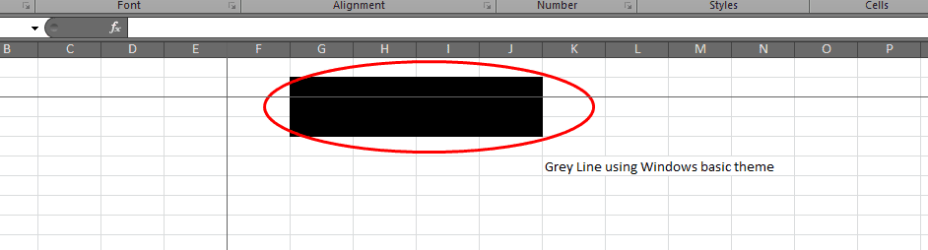
PLEASE HELP -Freeze Panes Line Colour-capture1.png

this is the good way but it only comes when I select windows classic theme which is ugly (note that line cannot be seen this time because it is black as well as the group of cells)


PLEASE HELP -Freeze Panes Line Colour-capture2.png

Doc1.docx


Last edited by roymunoz03; 02 Aug 2010 at 05:58 PM.. Reason: adding screenshots
My System SpecsSystem Spec

02 Aug 2010   #2

Windows 7
Costa Rica


help?
My System SpecsSystem Spec
02 Aug 2010   #3

Win7 Ultimate SP1 x64 / Windows 8 Pro / Android
Mauritius


Which version of Excel are you using?
Could post a screenshot of the problem
My System SpecsSystem Spec
.


02 Aug 2010   #4

Windows 7
Costa Rica


Thanks, I am using Office 2010 32 bit version.

how do I post a screenshot here?
My System SpecsSystem Spec
02 Aug 2010   #5

Windows 7
Costa Rica


Hi Yowanvista, I attached a doc file with screenshots
My System SpecsSystem Spec
02 Aug 2010   #6

Win7 Ultimate SP1 x64 / Windows 8 Pro / Android
Mauritius


  1. Click on the Start Menu and start typing "snipping" into the search box.
  2. Snipping Tool should show up in the Programs list above the search box, and you can click on it to start it.
  3. The Snipping Tool window will appear on your screen. You may move it to an edge of the screen so it's not in your way, but it will also disappear when you start dragging a selection area.
  4. The Snipping Tool assumes you want to create a new clipping as soon as you open it. Your screen will dim, and you can click and drag your cursor to select an area to copy. As you drag, the selected area will be darker, and surrounded by a red border if you've never changed the Snipping Tool options.
  5. When you release the mouse button, the captured area will open in the Snipping Tool window. If you're not happy with the selection and need to try again, click the "New" button.
  6. When you are happy with your clipping, press the second button to save the screen shot as an image file.
Then upload it by using this method: A Preferred Method of Uploading/Posting Screen Shots
My System SpecsSystem Spec
02 Aug 2010   #7

Windows 7
Costa Rica


thanks for the tip yowanvista
My System SpecsSystem Spec
02 Aug 2010   #8

Win7 Ultimate SP1 x64 / Windows 8 Pro / Android
Mauritius


Quote   Quote: Originally Posted by roymunoz03 View Post
Hi Yowanvista, I attached a doc file with screenshots
There is no doc file, re upload it
My System SpecsSystem Spec
02 Aug 2010   #9

Windows 7
Costa Rica


ok, please check now on my original entry, you should be able to see the doc file and the screenshots, please let me know
My System SpecsSystem Spec
02 Aug 2010   #10

Windows 7
Costa Rica


ok, I managed to post some pictures and screenshots.
My System SpecsSystem Spec
Reply

 PLEASE HELP -Freeze Panes Line Colour problems?


Thread Tools


Similar help and support threads for: PLEASE HELP -Freeze Panes Line Colour
Thread Forum
Command line to Change the colour depth. General Discussion
Solved navigation panes have gone away General Discussion
Black screen/vertical line freeze! Graphic Cards
Modify Navigation Panes Padding? Customization
Windows Explorer panes General Discussion


All times are GMT -5. The time now is 12:20 PM.


Seven Forums Android App Seven Forums IOS App Follow us on Facebook

Windows 7 Forums is an independent web site and has not been authorized,
sponsored, or otherwise approved by Microsoft Corporation.
"Windows 7" and related materials are trademarks of Microsoft Corp.
© Designer Media Ltd
  

1 2 3 4 5 6 7 8 9 10 11 12 13 14 15 16 17 18 19 20 21 22 23 24 25 26 27 28 29 30 31 32