Windows 7 Forums


Windows 7: Outlook 2003

04 Aug 2010   #1

Windows 7 Home Premium 32-Bit - Build 7600 SP1
Houston, Texas
 
 
Outlook 2003

Is it possible to put two email addresses in Outlook so that all mail comes to the same Inbox or even two Inboxes? Thanks,

My System SpecsSystem Spec

05 Aug 2010   #2

Windows 7 Home Premium x64
Liberty University


I've never used Outlook 2003, but as far as I know, every email client out there supports multiple accounts. Did you want something more??
My System SpecsSystem Spec
05 Aug 2010   #3
ryo

windows 7
Indonesia


Quote   Quote: Originally Posted by bigmck View Post
Is it possible to put two email addresses in Outlook so that all mail comes to the same Inbox or even two Inboxes? Thanks,
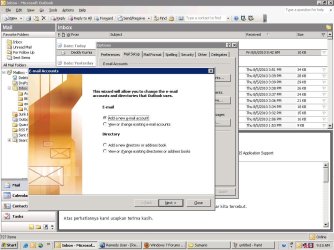
yap..it's can.
you can set the double Outlook 2003-untitled.jpg
My System SpecsSystem Spec
.


09 Sep 2010   #4

Windows XP
India


Hi,
bigmck

It is possible to create multiple accounts in outlook 2003. But all the mails will be routed to Inbox.
Two basic ways you can solve your problem, depending on what strategy you want to use.
Step 1:
The first, and perhaps easier, is to create multiple folders then have your messages routed to those folders based on the receiving address. Here are the steps involved, and, yes, you do have to create a rule, but it only takes a minute:
Please find the below attachment which explains how to create rules in Outlook 2003.(this is generic)http://technology.pitt.edu/Documents...ook%202003.pdf
After opening Rules Wizard--->Select Start from a blank rule---->Select Check messages when they arrive------>Click on Next---->Step 1: Select through the specified account, Step 2: Click on Specified and select the account---->Click Next
--->Step 1: Check move it to the specified folder, Step 2: Click on Specified and select the folder you created--->Click Next----> If there is any exceptions the choose the appropriate option----->Click Finish.
The other way is:
Step 2:
Instead of creating separate accounts you could try creating separate profiles that will give you separate data files;
Go to your Mail Settings, then START --> CONTROL PANEL --> MAIL
Select SHOW PROFILES, then ADD.
Follow through the instructions to set up a profile making sure you have the necessary info from your ISP or POP account ... (account names, passwords, addresses, etc.)
You can create multiple profiles for multiple mails. When ever you open outlook it will ask for the profile and select the profile which you want to access.

Last edited by PCS36524; 09 Sep 2010 at 04:58 AM..
My System SpecsSystem Spec
Reply

 Outlook 2003 problems?


Thread Tools


Similar help and support threads for: Outlook 2003
Thread Forum
Solved How do I transfer emails from Outlook 2003 to Outlook 2010 Browsers & Mail
outlook 2003 - any .PST file operation crashes outlook (win7-64) Microsoft Office
Outlook express folders to Outlook 2003 Browsers & Mail
Outlook 2003 Will Not Import Outlook Express folders, mail, anything Microsoft Office
Outlook 2003 Crashed by Outlook Connector (V12.1) on Wi Microsoft Office


All times are GMT -5. The time now is 01:57 AM.


Windows 7 Forums is an independent web site and has not been authorized,
sponsored, or otherwise approved by Microsoft Corporation.
"Windows 7" and related materials are trademarks of Microsoft Corp.
© Designer Media Ltd