Windows 7 Forums


Windows 7: Strange Onenote 2010 behavior

06 Sep 2010   #1

Windows 7 64
Sweden
 
 
Strange Onenote 2010 behavior

I installed Office 2010 on my Windows 7 64 system recently. Strangely I cannot get Onenote to work. This is what happens when I try to run it:
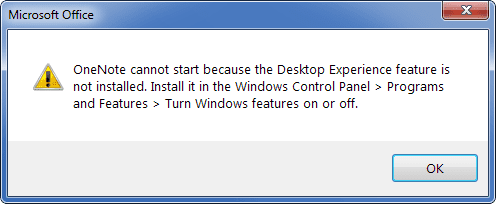
Strange Onenote 2010 behavior-snap1.png


I'm running my Windows 7 with aero enabled, no glass. Googled around a bit for an answer but what I found only applies to Server 2008. Any ideas?

Btw I have tried removing and reinstalling Onenote, same result.
My System SpecsSystem Spec

06 Sep 2010   #2

Windows 7 Ultimate x64 Service Pack 1
Doncaster, UK


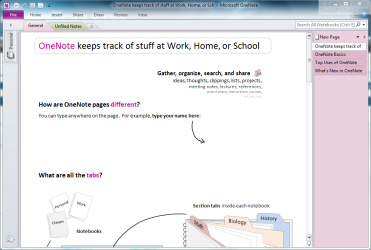
Strange. It runs fine on my system.

Strange Onenote 2010 behavior-capture3.png

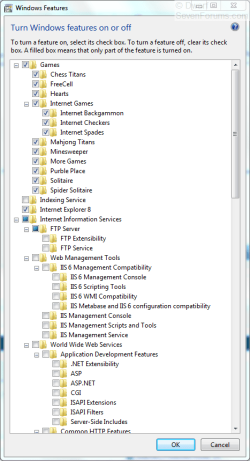
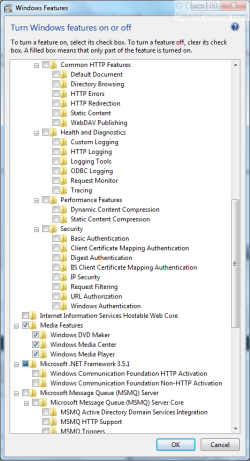
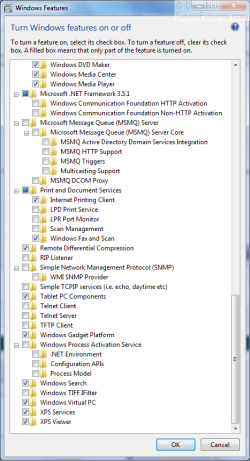
You could try re-running your WEI to see if that helps. I've had a look and Desktop Experience does not feature in Windows features.

Strange Onenote 2010 behavior-capture.png Strange Onenote 2010 behavior-capture1.png Strange Onenote 2010 behavior-capture2.png
My System SpecsSystem Spec
06 Sep 2010   #3

Windows 7 64
Sweden


Tried running WEI, no oddities there.
My System SpecsSystem Spec
.


06 Sep 2010   #4

Windows 7 Ultimate x64 Service Pack 1
Doncaster, UK


Hmm. I think we've been thrown by the incorrect information in the error message you received.

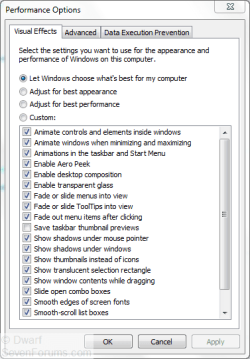
Open Computer and click on System Properties. Next, click on Advanced system settings and provide administrative credentials when prompted. On the Advanced tab, under Performance, click on Settings... and then click on the Visual Effects tab. Ensure that your settings match mine, and then click OK twice to close the dialogue panels. You may need to reboot for any changes to take effect.

Strange Onenote 2010 behavior-capture.png
My System SpecsSystem Spec
06 Sep 2010   #5

Windows 7 64
Sweden


Same result.
My System SpecsSystem Spec
06 Sep 2010   #6

Windows 7 Ultimate x64 Service Pack 1
Doncaster, UK


Do all your settings match what I have posted in my images in both of my previous posts?
My System SpecsSystem Spec
06 Sep 2010   #7

Windows 7 64
Sweden


Yes, where windows features are concerned, at least the ones that could have anything remotely to do with Desktop experience (I mean, I've removed games but that shouldn't really matter).
My System SpecsSystem Spec
06 Sep 2010   #8

Win7 HP (x64)/Win7 Ultimate (x64)


Hi

Not sure if this helps - from Office Forum

Quote:
Hi,

You may install the Desktop Experience feature by these steps:
===============
1. Click Start, then type Programs and Features in the Search box.
2. Click Programs and Features.
3. Select Turn Windows features on or off.
4. In Server Manager, expand Features Summary, and then click Add Features.
5. In the Add Features Wizard, select the Desktop Experience dialog box, and then click Next.
Note You may have to restart the computer after the Desktop Experience feature is installed. After you install the Desktop Experience feature, you can start OneNote 2010 successfully.

Best Regards,

Sally Tang

Regards

Update

Scratch this post - just re-read the OP
My System SpecsSystem Spec
06 Sep 2010   #9

Windows 7 Ultimate x64 Service Pack 1
Doncaster, UK


See my post above Strange Onenote 2010 behavior where I posted the expanded contents of my Windows Features. There is NO mention of Desktop Experience, nor is there any mention of Server Manager. My OneNote 2010 runs successfully.
My System SpecsSystem Spec
Reply

 Strange Onenote 2010 behavior problems?


Thread Tools


Similar help and support threads for: Strange Onenote 2010 behavior
Thread Forum
Send-to-OneNote Print feature causing OneNote 2010 to stop working Microsoft Office
OneNote 2010 search strange behavior Microsoft Office
import onenote 2003 data to onenote 2010? Software
Strange fan behavior Hardware & Devices
Canvas for OneNote Now Tailored to OneNote 2010. Microsoft Office


All times are GMT -5. The time now is 02:14 AM.


Windows 7 Forums is an independent web site and has not been authorized,
sponsored, or otherwise approved by Microsoft Corporation.
"Windows 7" and related materials are trademarks of Microsoft Corp.
© Designer Media Ltd