Windows 7 Forums


Windows 7: Icons changed after installing MS Office 2010 language pack

08 Oct 2010   #1

Windows 7 Home Premium 64bit
 
 
Icons changed after installing MS Office 2010 language pack

Got a little other problem though, and don't want to start a new topic so I don't clutter your forums.
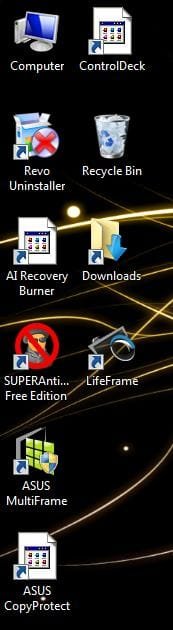
A few days ago I installed a MS Office 2010 language pack, and suddenly a lot of my programs icons just resetted Even though they don't have anything to do with Office 2010. Is that possible?

Some programs that did change can be seen in the attachments.


All the Office programs changed their icon too.
Attached Thumbnails
Icons changed after installing MS Office 2010 language pack-icons.jpg  
My System SpecsSystem Spec

12 Oct 2010   #2

Windows 7 Home Premium 64bit


Okay, I did a quick Google and came up with this tutorial. I tried both methods but it didn't work. All the icons have changed though, this is how they look now.

Still not okay though, I really wonder how to fix this, next to a System Restore....
Attached Thumbnails
Icons changed after installing MS Office 2010 language pack-achter-tut.jpg  
My System SpecsSystem Spec
12 Oct 2010   #3

Windows 7 x64 pro/ Windows 7 x86 Pro/ XP SP3 x86


Just right click each on each of the changed icons, click open with and then choose the default program of choice. Heres a tut.

Open With - Change Default Program
My System SpecsSystem Spec
.


13 Oct 2010   #4

Windows 7 Home Premium 64bit


Quote   Quote: Originally Posted by Bill2 View Post
Just right click each on each of the changed icons, click open with and then choose the default program of choice. Heres a tut.

Open With - Change Default Program
Didn't work either, the icons are still the same like in my last attachment....
My System SpecsSystem Spec
16 Oct 2010   #5

Windows 7 Home Premium 64bit


This is really sucking man, looks like shit atm :/
My System SpecsSystem Spec
18 Oct 2010   #6

Windows 7 Home Premium 64bit


Okay I uninstalled the language pack and redownloaded from another source, the 32bit version this time and it STILL WON'T WORK.
I'm getting rather desperate now, it looks like complete shit atm and I can't stand it.
My System SpecsSystem Spec
20 Oct 2010   #7

Windows 7 Home Premium 64bit


I wonder, if I just change the iconcache.db file to one from another computer running 7 64bit, one that shows the icons correctly, will it solve my problem? Is it recommended to do that because it seems kind of dangerous
My System SpecsSystem Spec
24 Oct 2010   #8

Windows 7 Home Premium 64bit


I tried some other things, including using IconPackager to change the icon style and then change it back to the default, and it still won't work. Getting really hopeless here and starting to think there's no other way then to just format this shit....
My System SpecsSystem Spec
26 Oct 2010   #9

Windows 7 Home Premium 64bit


How do I find the product key of my Windows 7? It's installed but I don't see the product key anywhere.
I did a quick Google and came up with this:

Win keyfinderProduct Key Finder For Windows 2000, Windows XP, Windows Vista, Windows 7, and MS Office 2000, MS Office XP, MS Office 2007, MS Office 2010*-*WinkeyFinder.com

But when I ran it it didn't find my 7 key....
My System SpecsSystem Spec
26 Oct 2010   #10

Windows 7 Home Premium SP1, clean install, upgrade disc
CT


My System SpecsSystem Spec
Reply

 Icons changed after installing MS Office 2010 language pack problems?


Thread Tools


Similar help and support threads for: Icons changed after installing MS Office 2010 language pack
Thread Forum
Microsoft Office 2010 language pack proofing tool without changing UI Microsoft Office
Office 2010 icons changed to default EXE icon General Discussion
Announcing Service Pack 1 for Office 2010 & SharePoint 2010 News
Can't change Office 2010 Language Pack Microsoft Office
MS Office 2007 italian language pack Microsoft Office


All times are GMT -5. The time now is 06:48 PM.


Seven Forums Android App Seven Forums IOS App Follow us on Facebook

Windows 7 Forums is an independent web site and has not been authorized,
sponsored, or otherwise approved by Microsoft Corporation.
"Windows 7" and related materials are trademarks of Microsoft Corp.
© Designer Media Ltd
  

1 2 3 4 5 6 7 8 9 10 11 12 13 14 15 16 17 18 19 20 21 22 23 24 25 26 27 28 29 30 31 32