| Windows 7: Change default display font Outlook 2010 |
21 Dec 2010
|
#1 | | |
Change default display font Outlook 2010 Outlook 2010 will display the the email in whatever font it was typed in, and if it's a HTML mail, in whatever fonts is set by the HTML tags. However is there a way to set a default font the Outlooks displays the messages in, just like you can set the default font in web browsers, regardless of what the developers specified.
The reason for this is because most emails are typed in Times New Roman and MS Mincho which aren't suitable for LCD screens. I want everything to be displayed in Verdana and Meiryo. | My System Specs |
| System Manufacturer/Model Number Dell E4300 OS Windows 7 Ultimate CPU Intel C2D SP9400 Motherboard Intel GS45 Memory 2GB DDR3 Graphics Card Integrated =( Sound Card Integrated =( Monitor(s) Displays Matte LCD Screen Resolution 1280x800 Mouse MX 518, V470 - Logitech Hard Drives Intel X25-M Gen 2 SSD
WD Caviar Black |
21 Dec 2010
|
#2 | | Windows 7 Ultimate 64-bit Puyallup, WA, USA |
Are you asking how to do it? If so, File > Options > Mail > Stationary & Fonts. | My System Specs | | OS Windows 7 Ultimate 64-bit CPU AMD Phenom II X6 1090T 3.2GHZ Motherboard MSI 890FXA-GD70 Memory G.SKILL RipJaw 3x2GB DDR3-1066 Graphics Card 2x HIS Radeon HD 6850 1 GB Sound Card VIA 8-channel Monitor(s) Displays 2x 20 inch Acer LCDs, 1x 32" Sony LCD TV Screen Resolution 4480x900 Keyboard Microsoft Wireless Keyboard 1000 Mouse Microsoft Wiresless Mouse 5000 PSU Kingwin 1000W Modular Case Coolermaster HAF 932 Cooling 1x 120mm, 3x 200mm, CoolerMaster Hyper 212+ Hard Drives 1x Crucial 64GB SSD
3x 1TB HDDs (WD, Seagate, Hitatchi)
1x 500GB Seagate External Internet Speed 20mbps Other Info Samsung BD-ROM/DVD-RW |
21 Dec 2010
|
#3 | | Windows 7 Ultimate x64 SP1 |
jelyman, that won't accomplish what the OP is asking for.
The OP wants to change the fonts in Outlook within the body of received emails.
I really don't think there is a way short of programming some VBA code or something similar. | My System Specs | | System Manufacturer/Model Number Toshiba L355D OS Windows 7 Ultimate x64 SP1 CPU Core2 Duo Motherboard Intel Memory 4 GB Graphics Card GM965 on-board Sound Card RealTek on-board Monitor(s) Displays 19"+17"(laptop) Screen Resolution 1440x900 (x 2) PSU N/A Case N/A Cooling N/A Hard Drives 500GB Ext. 200GB Internal |
21 Dec 2010
|
#4 | | Windows 7 Ultimate 64-bit Puyallup, WA, USA |

Quote: Originally Posted by mikedl jelyman, that won't accomplish what the OP is asking for.
Try again. It will if the email is plain text. It's a step in the right direction, but you're right. I haven't seen any other way to force a font. Mainly because Outlook uses Word to display emails. Word shows what it's given. | My System Specs | | OS Windows 7 Ultimate 64-bit CPU AMD Phenom II X6 1090T 3.2GHZ Motherboard MSI 890FXA-GD70 Memory G.SKILL RipJaw 3x2GB DDR3-1066 Graphics Card 2x HIS Radeon HD 6850 1 GB Sound Card VIA 8-channel Monitor(s) Displays 2x 20 inch Acer LCDs, 1x 32" Sony LCD TV Screen Resolution 4480x900 Keyboard Microsoft Wireless Keyboard 1000 Mouse Microsoft Wiresless Mouse 5000 PSU Kingwin 1000W Modular Case Coolermaster HAF 932 Cooling 1x 120mm, 3x 200mm, CoolerMaster Hyper 212+ Hard Drives 1x Crucial 64GB SSD
3x 1TB HDDs (WD, Seagate, Hitatchi)
1x 500GB Seagate External Internet Speed 20mbps Other Info Samsung BD-ROM/DVD-RW |
21 Dec 2010
|
#5 | | Windows 7 Ultimate x64 SP1 |

Quote: Originally Posted by jelyman 
Quote: Originally Posted by mikedl jelyman, that won't accomplish what the OP is asking for.
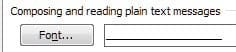
Try again. It will if the email is plain text. It's a step in the right direction, but you're right. I haven't seen any other way to force a font. Mainly because Outlook uses Word to display emails. Word shows what it's given. I already knew that, jelyman, yes, it does work on plain text messages only if one changes the font in "Options">"Mail">"Stationery and Fonts">"Composing and reading plain text messages":
However, the fact remains, as the OP asked: Quote: Outlook 2010 will display the the email in whatever font it was typed in, and if it's a HTML mail, in whatever fonts is set by the HTML tags. However is there a way to set a default font the Outlooks displays the messages in, just like you can set the default font in web browsers, regardless of what the developers specified. this will only partially solve the issue presented by the OP. | My System Specs | | System Manufacturer/Model Number Toshiba L355D OS Windows 7 Ultimate x64 SP1 CPU Core2 Duo Motherboard Intel Memory 4 GB Graphics Card GM965 on-board Sound Card RealTek on-board Monitor(s) Displays 19"+17"(laptop) Screen Resolution 1440x900 (x 2) PSU N/A Case N/A Cooling N/A Hard Drives 500GB Ext. 200GB Internal |
22 Dec 2010
|
#6 | | Windows 7 Home Premium 64bit Stafford, England |
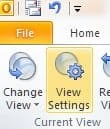
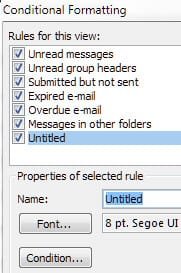
Create a conditional formatting rule I do not have Outlook 2010. However, I wonder if creating a Conditioning Formatting rule might be used?
Some examples here... .
. Automatically change incoming message colors and fonts based on sender, subject, or recipients - Outlook - Microsoft Office | My System Specs | | Computer type PC/Desktop System Manufacturer/Model Number Packard Bell OS Windows 7 Home Premium 64bit CPU Intel(R) Core(TM) i3-2120 CPU @ 3.30GHz Motherboard Packard Bell IPISB-AG Memory 3.00 GB Graphics Card (1) Intel(R) HD Graphics (2) VNC Mirror Driver Sound Card Realtek High Definition Audio Monitor(s) Displays AIO LCD Screen Resolution 1920 x 1080 Keyboard Wireless Mouse Wireless Hard Drives WDC WD10EADX-22TDHB0 ATA Device
Fixed hard disk media
4 partitions
931.51 GB Antivirus Microsoft Security Essentials Browser IE; Firefox Other Info Also:
Samsung N220 Plus Netbook - Windows 7 Home
HP laptop
iPad 5 |
22 Dec 2010
|
#7 | | Windows 7 Ultimate x64 SP1 |
| My System Specs | | System Manufacturer/Model Number Toshiba L355D OS Windows 7 Ultimate x64 SP1 CPU Core2 Duo Motherboard Intel Memory 4 GB Graphics Card GM965 on-board Sound Card RealTek on-board Monitor(s) Displays 19"+17"(laptop) Screen Resolution 1440x900 (x 2) PSU N/A Case N/A Cooling N/A Hard Drives 500GB Ext. 200GB Internal |
22 Dec 2010
|
#8 | | Windows 7 Home Premium 64bit Stafford, England |
Hmm, that's a pity. I am sure that if there is a way, you will find it Mike. | My System Specs | | Computer type PC/Desktop System Manufacturer/Model Number Packard Bell OS Windows 7 Home Premium 64bit CPU Intel(R) Core(TM) i3-2120 CPU @ 3.30GHz Motherboard Packard Bell IPISB-AG Memory 3.00 GB Graphics Card (1) Intel(R) HD Graphics (2) VNC Mirror Driver Sound Card Realtek High Definition Audio Monitor(s) Displays AIO LCD Screen Resolution 1920 x 1080 Keyboard Wireless Mouse Wireless Hard Drives WDC WD10EADX-22TDHB0 ATA Device
Fixed hard disk media
4 partitions
931.51 GB Antivirus Microsoft Security Essentials Browser IE; Firefox Other Info Also:
Samsung N220 Plus Netbook - Windows 7 Home
HP laptop
iPad 5 Change default display font Outlook 2010 problems? All times are GMT -5. The time now is 07:41 PM. | |