- Local time
- 5:49 PM
- Messages
- 58
What i want to know is....
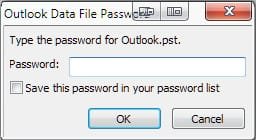
Can i get outlook to start automatically when i run windows and prompt me to login? I'm sure i can, but before i actually log in will people be able to see the emails I've previously sent/received?
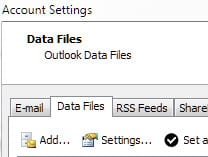
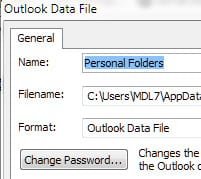
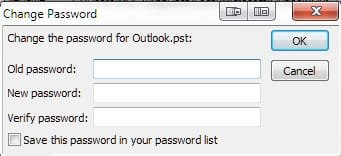
I'm guessing that when u hit send/receive it downloads it to the computer, which is fine. But i share this computer and I want to make the information where it is stored password protected.
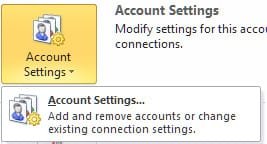
I tried to set Outlook 2010 to not remember my password and it didn't work. I configured the account to remember, than went back and unchecked the "Remember my password option". Now when you hit "Next" in the process, both of the tests fail, the log on, then the test message.
When I send/receive i WANT to enter my password every time, but can people still see the messages I've already received and sent before??
Can i password protect outlook before it completely opens on startup?
Thanks for all responses and valid, on topic information!!
Can i get outlook to start automatically when i run windows and prompt me to login? I'm sure i can, but before i actually log in will people be able to see the emails I've previously sent/received?
I'm guessing that when u hit send/receive it downloads it to the computer, which is fine. But i share this computer and I want to make the information where it is stored password protected.
I tried to set Outlook 2010 to not remember my password and it didn't work. I configured the account to remember, than went back and unchecked the "Remember my password option". Now when you hit "Next" in the process, both of the tests fail, the log on, then the test message.
When I send/receive i WANT to enter my password every time, but can people still see the messages I've already received and sent before??
Can i password protect outlook before it completely opens on startup?
Thanks for all responses and valid, on topic information!!
My Computer
At a glance
Windows 7 64 BitIntel Core2 Quad 2.42GBWill Update
- Computer Manufacturer/Model Number
- Dell Inspiron Q6600
- OS
- Windows 7 64 Bit
- CPU
- Intel Core2 Quad 2.4
- Motherboard
- Intel G33 Express
- Memory
- 2GB
- Graphics Card(s)
- Will Update
- Sound Card
- Onboard
- Monitor(s) Displays
- Samsung SyncMaster181T
- PSU
- 300w
- Keyboard
- Logitech G15
- Mouse
- Logitech G7
- Internet Speed
- Crappy (changing that soon)
- Other Info
- What other info could i possibly put? The other stuff i left out? Who cares. =)