Windows 7 Forums


Windows 7: Formatting issues in Word

05 Jan 2011  
luxurymode

Windows 7 32 bit
14 posts
 
 
Formatting issues in Word

MS Office 2007 on Win 7.

Two issues/problems.

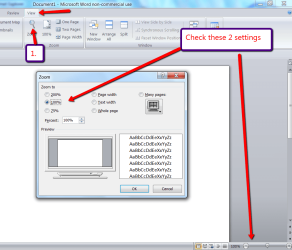
Every time I open a document, it displays two pages at a time. If I click to show only single page, it shrinks the document to a point where its too small to be readable. The only way I can really view one at a time is if I zoom in to 120%. I just want to view one page at a time at 100%.

Also, margins I have set (left, right, top, bottom) for other docs seems to be applying to documents I'm opening for the first time. How do I make it so that it opens docs with default formatting?

My System SpecsSystem Spec

05 Jan 2011  
Imperfect1

Vista 64 bit and 32 bit (SP2)
2,622 posts
Los Angeles, California + Milwaukee, Wis


In regard to your first question, generally speaking, the view of the Word page will automatically jump to 2 side-by-side pages at approximately 75%. Once you get much larger than that, it should revert to showing one page at a time, with the next page below it. Check your “Two Pages” icon (in the Ribbon) to see if it is enabled. If it is, uncheck it.

In regard to your second question, there are several possible explanations. The new document will open up in the format of the Normal template, so check the formatting section to make sure that your Normal template settings are what you want for your new docs, and don’t forget to click the link at the bottom of the formatting screen that says to apply the settings to either:
1. Only this document, or
2. New documents based on this template

If you wish to have each new doc to have different margins, you have to set them for each such document:
Click the Start orb, go into Word Options, Advanced and check:
1. Keep track of formatting.
2. Choose your Default paragraph style.
3. And at the very bottom of the screen, at the link entitled: Compatibility options for: select either This Document (Document’s Title) or All New Documents.
My System SpecsSystem Spec
05 Jan 2011  
whs

Vista, Windows7, Mint Mate, Zorin, Windows 8
17,868 posts
Florida in winter, Black Forest/Germany


For your first problem, see picture
Attached Thumbnails
Formatting issues in Word-2011-01-05_2235.png  
My System SpecsSystem Spec
.


Reply

 Formatting issues in Word problems?


Thread Tools


Similar help and support threads for: Formatting issues in Word
Thread Forum
Word '03 Formatting from XP to Win 7 Microsoft Office
Keep formatting in protected word templates 2010 Microsoft Office
USB Stick - Formatting Issues Hardware & Devices
Word formatting problem Microsoft Office
Just a simple Word formatting question? Microsoft Office


All times are GMT -5. The time now is 01:46 PM.


Windows 7 Forums is an independent web site and has not been authorized,
sponsored, or otherwise approved by Microsoft Corporation.
"Windows 7" and related materials are trademarks of Microsoft Corp.
© Designer Media Ltd