
Windows 7 Forums


Windows 7: Outlook 2010 Taskbar Icon Right Click Menu

13 Jan 2011   #1

Windows 7 Ultimate 64bit
 
 
Outlook 2010 Taskbar Icon Right Click Menu

I have Outlook 2010 with the icon pinned to the taskbar. Before, I could right click on this icon and a menu would show up with options like "New Email, New Calendar Item", etc.

I ran a System Cleaner and the Extended Menu is no longer there. I've searched thru the Option settings and was not able to find anything.

Does anyone know where I can re-activate this?
Thank you!

My System SpecsSystem Spec

13 Jan 2011   #2

Windows 7 Home Premium 64 bit SP1
Toronto


Hello TheFifthWave and welcome to Seven Forums. You could try to unpin it from the taskbar and then repin it. If that doesn't work maybe try a System Restore. Good Luck
My System SpecsSystem Spec
13 Jan 2011   #3

Windows 7 Ultimate 64bit


I tried to unpin and repin and it's still the same. I was afraid the restore would be required. I'll do that late tonight.
Thank you for the fast response!
My System SpecsSystem Spec
.


13 Jan 2011   #4

Windows 7 Home Premium 64 bit SP1
Toronto


My pleasure, and again welcome and good luck. I can't say for sure that the system restore will work although I think it should. Keep checking back here, someone may have a better solution.
My System SpecsSystem Spec
14 Jan 2011   #5

Windows 7 Ultimate x64 SP1


alfred01, your solution is the best, at the moment (great job!), provided TheFifthWave (a big welcome to the Seven Forums from me, as well ) has a restore point prior to the "System Cleaner" used.
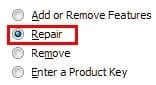
Another option would be to repair the installation of Outlook 2010.

Name:  ScreenShot00393.jpg
Views: 3114
Size:  19.6 KB Name:  ScreenShot00394.jpg
Views: 3119
Size:  12.6 KB
My System SpecsSystem Spec
14 Jan 2011   #6

Windows 7 Home Premium 64 bit SP1
Toronto


Quote   Quote: Originally Posted by mikedl View Post
alfred01, your solution is the best, at the moment (great job!), provided TheFifthWave (a big welcome to the Seven Forums from me, as well ) has a restore point prior to the "System Cleaner" used.

Another option would be to repair the installation of Outlook 2010.

Attachment 131896 Attachment 131897
Yes, of course you're absolutely right mikedl, I obviously didn't think this one through enough. This is the second time now that I've given an answer that hasn't been the correct one. Guess I better just answer when I'm absolutely sure of the answer in the future. Thanks for setting me straight mike, the important thing is that we get the correct answer to the people with the questions.
My System SpecsSystem Spec
14 Jan 2011   #7

Windows 7 Ultimate x64 SP1


alfred, your answer was fine!
I just presented another option. Keep up the good work. We all contribute in helping solve issues and I thank you for doing so.
My System SpecsSystem Spec
14 Jan 2011   #8

Windows 7 Home Premium 64 bit SP1
Toronto


Quote   Quote: Originally Posted by mikedl View Post
alfred, your answer was fine!
I just presented another option. Keep up the good work. We all contribute in helping solve issues and I thank you for doing so.
Thanks mikedl.
My System SpecsSystem Spec
14 Jan 2011   #9

Windows 7 Ultimate 64bit


Thank you both for the help. Last night I performed the Outlook Repair and my Menu is back!

Thank you again and have a great weekend!
My System SpecsSystem Spec
14 Jan 2011   #10

Windows 7 Ultimate x64 SP1


That's great, TheFifthWave!

I'm very happy you got it sorted!
My System SpecsSystem Spec
Reply

 Outlook 2010 Taskbar Icon Right Click Menu problems?


Thread Tools


Similar help and support threads for: Outlook 2010 Taskbar Icon Right Click Menu
Thread Forum
Solved Cant click links in outlook 2010 Microsoft Office
Taskbar button right click menu is cut off General Discussion
Taskbar Icon Behavior On Left Click General Discussion
Taskbar menu right click instead of shift+right click? Customization
Right click menu on programs in the taskbar General Discussion


All times are GMT -5. The time now is 09:03 AM.


Seven Forums Android App Seven Forums IOS App Follow us on Facebook

Windows 7 Forums is an independent web site and has not been authorized,
sponsored, or otherwise approved by Microsoft Corporation.
"Windows 7" and related materials are trademarks of Microsoft Corp.
© Designer Media Ltd
  

1 2 3 4 5 6 7 8 9 10 11 12 13 14 15 16 17 18 19 20 21 22 23 24 25 26 27 28 29 30 31 32