| Windows 7: Office 2010 Office File Type Descriptions & Icons Incorrect |
12 Feb 2011
|
#1 | | Windows 7 Home Premium 64bit |
Office 2010 Office File Type Descriptions & Icons Incorrect Okay, I've never posted on anything like this before so bear with me please. I've got an issue and it's driving me nuts because I can't resolve it. I'll try and give a description of what I did. Any help would be greatly appreciated!
I purchased a new Dell computer (Windows 7 Home Premium 64bit) that came with a trial version of Office 2010. I had previously purchased an Office 2010 Pro so I wanted to install the full version on my computer. When I did, I had both versions installed, so I uninstalled the trial version. That's when I think my problem arose, but I can't say for sure that it didn't exist before that because I hadn't even looked. Here's the problem:
When I'm in Windows Explorer looking at my files, my Excel and Word files (.doc, .docx, .xls, .xlsx) show up with an improper file type description. Instead of saying "Microsoft Word Document" or "Microsoft Excel 1997-2003 Worksheet" (or whatever they're supposed to say) the simply say "DOCX File" or "XLS File". Not only that, but the icons don't look right either. They sort of look right, but they're smaller and sort of greyed out (Except the .docx icon is just a white page with lines object).
The strange thing is, is that ALL my other Office files show up with correct descriptions and icons etc. (.ppt, .pptx, .csv....etc - ALL of them!) What I've tried to fix it:
I uninstalled all Office Products and then reinstalled Office 2010.
I tried MS's little bug finder program that popped up on their website.
I've tried associating the Word files with WordPad and then back to Word.
It seems like there was more things I've tried, but that is all I remember right now. I've attached a screen shot of one of my folders so you can see what I mean. If anyone has a similar problem, or knows how to fix it, please let me know! Thanks!
[I forgot to mention, when I select any of the problem file types, they still open in the correct default program without any prompting...if that matters at all]
Last edited by mbwilde; 12 Feb 2011 at 06:42 PM..
Reason: Adding more info
| My System Specs |
| OS Windows 7 Home Premium 64bit |
12 Feb 2011
|
#2 | | Windows 7 Ultimate SP1 (x64) South Australia |
Hi,
Welcome to SevenForums.
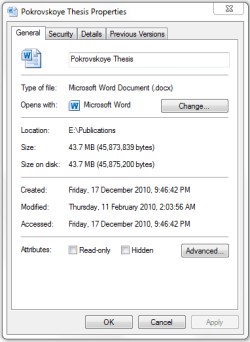
If you right-click on one of your Word documents and choose properties, does the icon look correct in that panel? Like this:
Regards,
Golden | My System Specs | | Computer type PC/Desktop System Manufacturer/Model Number Golden Mk. I.3 OS Windows 7 Ultimate SP1 (x64) CPU Intel i7 860 @ 2.80 GHz Motherboard Gigabyte P55A-UD3R Rev.1. Award BIOS F13 Memory 16GB Corsair Vengance DDR3 @ 661 MHz Dual Channel (9-9-9-24) Graphics Card EVGA NVidia GTX 560 1024MB Sound Card Realtek Integrated Monitor(s) Displays Dual Samsung SyncMaster 2494HS Screen Resolution 1920*1080 and 1920*1080 Keyboard Logitech G110 Mouse Logitech MX518 PSU Thermaltake ToughPower QFan 750W Case Thermaltake Element S VK60001W2Z Cooling Corsair H60 Water Cooling, 2*230mm and 2*80mm case fans Hard Drives 1*OCZ Vertex 2 60GB SSD;
2*Samsung F3 SpinPoint 1TB in RAID0;
3*Samsung F1 SpinPoint 1TB in RAID5;
1*Western Digital 500GB External USB 3.0
1*Seagate 500GB External USB 2.0 Internet Speed Not fast enough!!! Antivirus MSE and Malwarebytes Pro Browser Chrome Version 25 Other Info Laptop: ASUS X54C, Intel Core i3-2330M @ 2.0Ghz, 4GB RAM, Intel HD on-board graphics, Windows 7 Professional SP1 (x64), LinuxMint 14 (x64), PepperMint 3 (x86) |
12 Feb 2011
|
#3 | | Windows 7 Home Premium 64bit |
no it is not correct...it still just looks like the white page with lines | My System Specs | | OS Windows 7 Home Premium 64bit |
12 Feb 2011
|
#4 | | Windows 7 Ultimate SP1 (x64) South Australia |
OK. And if you click the Change button on that panel and then associate with Word, it still looks the same? | My System Specs | | Computer type PC/Desktop System Manufacturer/Model Number Golden Mk. I.3 OS Windows 7 Ultimate SP1 (x64) CPU Intel i7 860 @ 2.80 GHz Motherboard Gigabyte P55A-UD3R Rev.1. Award BIOS F13 Memory 16GB Corsair Vengance DDR3 @ 661 MHz Dual Channel (9-9-9-24) Graphics Card EVGA NVidia GTX 560 1024MB Sound Card Realtek Integrated Monitor(s) Displays Dual Samsung SyncMaster 2494HS Screen Resolution 1920*1080 and 1920*1080 Keyboard Logitech G110 Mouse Logitech MX518 PSU Thermaltake ToughPower QFan 750W Case Thermaltake Element S VK60001W2Z Cooling Corsair H60 Water Cooling, 2*230mm and 2*80mm case fans Hard Drives 1*OCZ Vertex 2 60GB SSD;
2*Samsung F3 SpinPoint 1TB in RAID0;
3*Samsung F1 SpinPoint 1TB in RAID5;
1*Western Digital 500GB External USB 3.0
1*Seagate 500GB External USB 2.0 Internet Speed Not fast enough!!! Antivirus MSE and Malwarebytes Pro Browser Chrome Version 25 Other Info Laptop: ASUS X54C, Intel Core i3-2330M @ 2.0Ghz, 4GB RAM, Intel HD on-board graphics, Windows 7 Professional SP1 (x64), LinuxMint 14 (x64), PepperMint 3 (x86) |
12 Feb 2011
|
#5 | | Windows 7 Home Premium 64bit |
It is already associated with Word, but I have tried changing it and switching it back and it still looks the same. | My System Specs | | OS Windows 7 Home Premium 64bit |
12 Feb 2011
|
#6 | | Windows 7 Ultimate SP1 (x64) South Australia |
OK. The only thing that springs to mind is that the icon cache may be corrupted. In the absence of any other suggestions, you can rebuild the icon cache using this very simple tutorial: Icon Cache - Rebuild
Post back here so we know if it works or not.
Regards,
Golden | My System Specs | | Computer type PC/Desktop System Manufacturer/Model Number Golden Mk. I.3 OS Windows 7 Ultimate SP1 (x64) CPU Intel i7 860 @ 2.80 GHz Motherboard Gigabyte P55A-UD3R Rev.1. Award BIOS F13 Memory 16GB Corsair Vengance DDR3 @ 661 MHz Dual Channel (9-9-9-24) Graphics Card EVGA NVidia GTX 560 1024MB Sound Card Realtek Integrated Monitor(s) Displays Dual Samsung SyncMaster 2494HS Screen Resolution 1920*1080 and 1920*1080 Keyboard Logitech G110 Mouse Logitech MX518 PSU Thermaltake ToughPower QFan 750W Case Thermaltake Element S VK60001W2Z Cooling Corsair H60 Water Cooling, 2*230mm and 2*80mm case fans Hard Drives 1*OCZ Vertex 2 60GB SSD;
2*Samsung F3 SpinPoint 1TB in RAID0;
3*Samsung F1 SpinPoint 1TB in RAID5;
1*Western Digital 500GB External USB 3.0
1*Seagate 500GB External USB 2.0 Internet Speed Not fast enough!!! Antivirus MSE and Malwarebytes Pro Browser Chrome Version 25 Other Info Laptop: ASUS X54C, Intel Core i3-2330M @ 2.0Ghz, 4GB RAM, Intel HD on-board graphics, Windows 7 Professional SP1 (x64), LinuxMint 14 (x64), PepperMint 3 (x86) |
12 Feb 2011
|
#7 | | Windows 7 Home Premium 64bit |
tried running rebuilding the icon cache...no dice...same problems still exist | My System Specs | | OS Windows 7 Home Premium 64bit |
12 Feb 2011
|
#8 | | Windows 7 Ultimate SP1 (x64) South Australia |
Mmmm. Odd.....I need to give this some more thought. Perhaps someone else might have some suggestions in the mean time. | My System Specs | | Computer type PC/Desktop System Manufacturer/Model Number Golden Mk. I.3 OS Windows 7 Ultimate SP1 (x64) CPU Intel i7 860 @ 2.80 GHz Motherboard Gigabyte P55A-UD3R Rev.1. Award BIOS F13 Memory 16GB Corsair Vengance DDR3 @ 661 MHz Dual Channel (9-9-9-24) Graphics Card EVGA NVidia GTX 560 1024MB Sound Card Realtek Integrated Monitor(s) Displays Dual Samsung SyncMaster 2494HS Screen Resolution 1920*1080 and 1920*1080 Keyboard Logitech G110 Mouse Logitech MX518 PSU Thermaltake ToughPower QFan 750W Case Thermaltake Element S VK60001W2Z Cooling Corsair H60 Water Cooling, 2*230mm and 2*80mm case fans Hard Drives 1*OCZ Vertex 2 60GB SSD;
2*Samsung F3 SpinPoint 1TB in RAID0;
3*Samsung F1 SpinPoint 1TB in RAID5;
1*Western Digital 500GB External USB 3.0
1*Seagate 500GB External USB 2.0 Internet Speed Not fast enough!!! Antivirus MSE and Malwarebytes Pro Browser Chrome Version 25 Other Info Laptop: ASUS X54C, Intel Core i3-2330M @ 2.0Ghz, 4GB RAM, Intel HD on-board graphics, Windows 7 Professional SP1 (x64), LinuxMint 14 (x64), PepperMint 3 (x86) |
14 Feb 2011
|
#9 | | Windows 7 Ultimate SP1 (x64) South Australia |
Hi,
I haven't been able to think of a solution yet, so am going to request more help for you.
Regards,
Golden | My System Specs | | Computer type PC/Desktop System Manufacturer/Model Number Golden Mk. I.3 OS Windows 7 Ultimate SP1 (x64) CPU Intel i7 860 @ 2.80 GHz Motherboard Gigabyte P55A-UD3R Rev.1. Award BIOS F13 Memory 16GB Corsair Vengance DDR3 @ 661 MHz Dual Channel (9-9-9-24) Graphics Card EVGA NVidia GTX 560 1024MB Sound Card Realtek Integrated Monitor(s) Displays Dual Samsung SyncMaster 2494HS Screen Resolution 1920*1080 and 1920*1080 Keyboard Logitech G110 Mouse Logitech MX518 PSU Thermaltake ToughPower QFan 750W Case Thermaltake Element S VK60001W2Z Cooling Corsair H60 Water Cooling, 2*230mm and 2*80mm case fans Hard Drives 1*OCZ Vertex 2 60GB SSD;
2*Samsung F3 SpinPoint 1TB in RAID0;
3*Samsung F1 SpinPoint 1TB in RAID5;
1*Western Digital 500GB External USB 3.0
1*Seagate 500GB External USB 2.0 Internet Speed Not fast enough!!! Antivirus MSE and Malwarebytes Pro Browser Chrome Version 25 Other Info Laptop: ASUS X54C, Intel Core i3-2330M @ 2.0Ghz, 4GB RAM, Intel HD on-board graphics, Windows 7 Professional SP1 (x64), LinuxMint 14 (x64), PepperMint 3 (x86) |
17 Feb 2011
|
#10 | | Windows 7 Home Premium 64bit |
I would really appreciate that. Thank you very much. | My System Specs | | OS Windows 7 Home Premium 64bit Office 2010 Office File Type Descriptions & Icons Incorrect problems? All times are GMT -5. The time now is 09:46 AM. | |