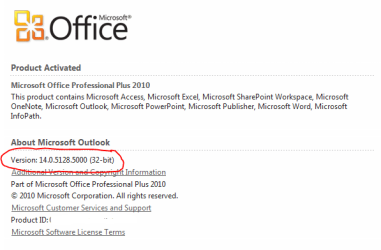
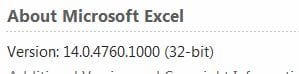
Hi, currently installed on my machine is Office 2010. I want install Access 2003 because I'm going to be doing a course which requires 2003. 2010 is not backward compatible to 2003!
Now I've done a duel install on my Toshiba Satellite (32bit) and they seem to have cozied up together very well. However on my main machine (64bit system) as soon as I put the 2010 Office on it seemed to have kick 2003 three out of bed
I'm assuming it’s a dust up between the 32bt system and the 64bit??????
I could do the course on the lappy but I prefer 32inch screen to 17 any day!
Access 2003 is not installed at the moment but I'm thinking should I install it to another directory "Programme Files" for win 7U or X86?
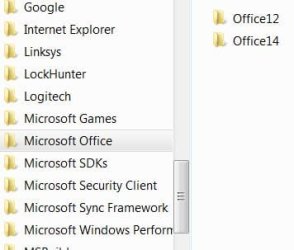
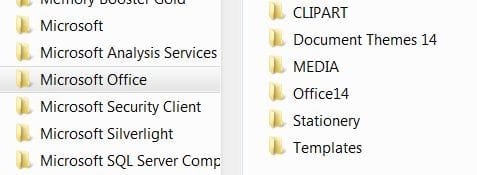
But on checking out dir's it seems that "office12/14 are in Prog files and there is "office 12" in X86 not sure if that is left over bits from when 2003 was previously Installed.
How do I get both to work on my 64bit system like they do on my 32bit system?????
Thank you for reading
Now I've done a duel install on my Toshiba Satellite (32bit) and they seem to have cozied up together very well.
However on my main machine (64bit system) as soon as I put the 2010 Office on it seemed to have kick 2003 three out of bedI'm assuming it’s a dust up between the 32bt system and the 64bit??????
I could do the course on the lappy but I prefer 32inch screen to 17 any day!
Access 2003 is not installed at the moment but I'm thinking should I install it to another directory "Programme Files" for win 7U or X86?
But on checking out dir's it seems that "office12/14 are in Prog files and there is "office 12" in X86 not sure if that is left over bits from when 2003 was previously Installed.
How do I get both to work on my 64bit system like they do on my 32bit system?????
Thank you for reading
Attachments
My Computer
At a glance
VISTA HP UPGRADED TO WIN7 HPAND PHENOM II X4 965 BLACK EDITION 3.4 GHZSOC...8GB CORSAIR XMS2 DUAL-DDR2 800MHz - LIFETIME ...1GB NVIDIA GEFORCE 9600GT PCI EXPRESS
- OS
- VISTA HP UPGRADED TO WIN7 HP
- CPU
- AND PHENOM II X4 965 BLACK EDITION 3.4 GHZSOCKET AM3CACHE
- Motherboard
- ASUS® CROSSHAIR II FORMULA: SATA II, 3 x PCI-Ex, 2 x PCI
- Memory
- 8GB CORSAIR XMS2 DUAL-DDR2 800MHz - LIFETIME WARRANTY!
- Graphics Card(s)
- 1GB NVIDIA GEFORCE 9600GT PCI EXPRESS
- Screen Resolution
- SONY TN 1024X768
- Hard Drives
- X2 1TB SERIAL ATA 3-Gb/s HARD DRIVE WITH 16MB CACHE (7,200rpm)
- PSU
- 700W Quiet Quad Rail PSU + 120mm Case Fan
- Other Info
- Power Supply & Case Cooling
22x DUAL LAYER DVD WRITER ±R/±RW/RAM
700W Quiet Quad Rail PSU + 120mm Case Fan