| Windows 7: Big Problem ReConnecting to Outlook Data Files |
26 Mar 2011
|
#1 | | |
Big Problem ReConnecting to Outlook Data Files As I am having to rebuild my system from scratch, but with my data files saved, things are not going to plan.
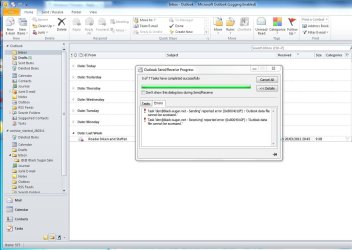
I installed Outlook after having changed MyDocuments. The new installation created new Outlook.pst and Archive.pst, and I have been vainly trying to hook these back to my old versions. Things are getting tangled, despite uninstalling and reinstalling Outlook a couple of times and hiding my old versions away, but Outlook seems to know where they are and half picks them up. Half, as they are the ones which are listed on the left hand pane, but when I try to send/receive, I get an error 'Outlook Data File Cannot be Accessed' with an error code 0x8004010F.
Any suggestions gratefully received... | My System Specs |
| System Manufacturer/Model Number PCSpecialist OS Windows 7/64 CPU i7 eXtreme 980, 3.33GHz, 6 Cores, 12 Logical Processors Motherboard Asus P6TD Deluxe, BIOS 0501 Memory 12 GB Graphics Card Nvidia GeForce GTX 285 Sound Card SoundMax Integrated Digital HD Audio Monitor(s) Displays NEC Multisync LCD2690wuxi2 Reference Case Cosmos 1000 Hard Drives 2 x 300G WD3000 Velociraptor
2 x 1.5TB Seagate 315 Barracuda (in Mirror, RAID 1) Internet Speed 20Mbps |
26 Mar 2011
|
#2 | | Windows 7 Ultimate 32bit SP1 |
| My System Specs | | System Manufacturer/Model Number Bruce ... somewhere in his 40's OS Windows 7 Ultimate 32bit SP1 CPU Intel(R) Core(TM)2 Quad CPU @ 2.40GHz, 2400 MHz Motherboard INTEL/D975XBX2 Memory 4 GB Graphics Card ATI Radeon HD 2600 Pro Monitor(s) Displays Samsung SyncMaster 914v Screen Resolution 1280 x 1024 Keyboard Standard PS/2 Keyboard Mouse Microsoft PS/2 Mouse PSU Rocketfish 700 W Case G.Skill Gigabyte Chassis Hard Drives 2/500GB each ... ST3500630AS ATA Device.
One is not connected Internet Speed DSL Antivirus Avira Internet Security Browser IE 9 Other Info ATI HDMI Audio |
26 Mar 2011
|
#3 | | |
Additional Info: If you look at the screenshot, you will see that Outlook seems to have opened up two files, one for InBox etc and one for Archive (funny name is just indicative of the problems I am having). However both send and receive fail. The files are there, Outlook sees them. I have now uninstalled and reinstalled about 4 times. If I dont try to hide these two files, Outlook.pst and Archive.....pst, then Outlook just opens them up as you see them, and then refuses to use them. I have gone into sharing and they are available to everybody, read and write. I am tearing my hair over this one.
If I remove and reinstall, why doesnt Outlook create virgin files? How does it track down these, which it cant really use? Somewhere info is hidden, perhaps in the Registry? | My System Specs | | System Manufacturer/Model Number PCSpecialist OS Windows 7/64 CPU i7 eXtreme 980, 3.33GHz, 6 Cores, 12 Logical Processors Motherboard Asus P6TD Deluxe, BIOS 0501 Memory 12 GB Graphics Card Nvidia GeForce GTX 285 Sound Card SoundMax Integrated Digital HD Audio Monitor(s) Displays NEC Multisync LCD2690wuxi2 Reference Case Cosmos 1000 Hard Drives 2 x 300G WD3000 Velociraptor
2 x 1.5TB Seagate 315 Barracuda (in Mirror, RAID 1) Internet Speed 20Mbps |
27 Mar 2011
|
#4 | | Windows 7 Home Premium 64bit Stafford, England |
Lots of information in the following thread - including people who have resolved the issue: Outlook data file cannot be accessed (error 8004010F)
One resolution here: Quote: I also had an issue with sendig and receiving with Outlook 2010 (RTM) with one email account (have about 6 setup) when I migrated from Outlook 2003. Errors were as follows:
Receiving reported error (0x8004010F) : 'Outlook data file cannot be accessed.'
Sending reported error (0x8004010F) : 'Outlook data file cannot be accessed.'
I was able to access the email folders, and all of the other email accounts that accessed the same PST were fine. This proved that there were no issues actually accessing the PST file - what was going on.
An Internet search or 2 later, it looked like it might be a profile issue, but I wasn't willing to just accept this and re-create the profile. I started looking at the profile setup, and in particular the location for the received email for the account that was failing. The Account Settings - Email accounts screen indicated that the email was being received in the correct location - personal folders\inbox, and this was also the case for the email accounts that were working. I then went to change the receive location (Change Location button), and noticed that it didn't display the same receive location as the summary screen! I checked a working account, and it did display correctly. I then changed the folder on the "broken" account to Personal Folders\inbox (just as it had said it was set to in the Email Accounts screen) and everything started working again.
In summary, it appears that one email account was trying to save incoming email into my hotmail account inbox, even though the configuration looked like it should be delivering it to my Personal Folders\Inbox. So if you have the above error, make sure the email is being delivered to the correct location before trying the other suggestion of re-creating the profile. Another of the answers: Quote: I solved it 100%.
After changing my Outlook data location, I got the same error. What did I do?
Step 1: I created a temporary Outlook Data File (by: Toolbar/New items/more items/Outlook Data File, or create a new email account)
Step 2: Open account settings, change my folder to the temporary Out look file in step 1, close the form. Then open the form and change my folder back.
It works with me. It's well worth reading through the whole thread... . | My System Specs | | Computer type PC/Desktop System Manufacturer/Model Number Packard Bell OS Windows 7 Home Premium 64bit CPU Intel(R) Core(TM) i3-2120 CPU @ 3.30GHz Motherboard Packard Bell IPISB-AG Memory 3.00 GB Graphics Card (1) Intel(R) HD Graphics (2) VNC Mirror Driver Sound Card Realtek High Definition Audio Monitor(s) Displays AIO LCD Screen Resolution 1920 x 1080 Keyboard Wireless Mouse Wireless Hard Drives WDC WD10EADX-22TDHB0 ATA Device
Fixed hard disk media
4 partitions
931.51 GB Antivirus Microsoft Security Essentials Browser IE; Firefox Other Info Also:
Samsung N220 Plus Netbook - Windows 7 Home
HP laptop
iPad 5 |
27 Mar 2011
|
#5 | | |
A question of ownership Thankyou,
Well I had a good read of those, but my problem was not addressed by those issues, as I have a good idea of how to drive Outlook and how to identify the correct files.
I have sorted it out, and will leave this note for anyone who has similar troubles which are not covered by some of the issues covered in your refs.
Having rebuilt Windows 7 from scratch, the new Outlook was trying to access those files which came from the old Windows 7 build. It was able to read them, so I could see everything as I expected to, but it could not write to them! That was the problem.
To cut a long story short, I found that the ownership of the file was an UNKNOWN owner with some long hexadecimal id - it was not the new ME, it was the old ME which new Windows 7 did not recognize!! So I had to take ownership of the files, and then everything started working. How to take ownership in Windows 7 was something I had to dig up with Google. If one is doing this, one should open up the Outlook.pst and archive.pst which Outlook will create on the first firing-up, and at the same time open the old files and using Properties of old and new on the screen together, make the old files look exactly the same as the new. And don't play about with the names, make them the same. | My System Specs | | System Manufacturer/Model Number PCSpecialist OS Windows 7/64 CPU i7 eXtreme 980, 3.33GHz, 6 Cores, 12 Logical Processors Motherboard Asus P6TD Deluxe, BIOS 0501 Memory 12 GB Graphics Card Nvidia GeForce GTX 285 Sound Card SoundMax Integrated Digital HD Audio Monitor(s) Displays NEC Multisync LCD2690wuxi2 Reference Case Cosmos 1000 Hard Drives 2 x 300G WD3000 Velociraptor
2 x 1.5TB Seagate 315 Barracuda (in Mirror, RAID 1) Internet Speed 20Mbps |
28 Mar 2011
|
#6 | | Windows 7 Home Premium 64bit Stafford, England |
Thank you very much for posting back with your results.
There is no doubt in my mind that someone in the future will be very grateful for your feedback. | My System Specs | | Computer type PC/Desktop System Manufacturer/Model Number Packard Bell OS Windows 7 Home Premium 64bit CPU Intel(R) Core(TM) i3-2120 CPU @ 3.30GHz Motherboard Packard Bell IPISB-AG Memory 3.00 GB Graphics Card (1) Intel(R) HD Graphics (2) VNC Mirror Driver Sound Card Realtek High Definition Audio Monitor(s) Displays AIO LCD Screen Resolution 1920 x 1080 Keyboard Wireless Mouse Wireless Hard Drives WDC WD10EADX-22TDHB0 ATA Device
Fixed hard disk media
4 partitions
931.51 GB Antivirus Microsoft Security Essentials Browser IE; Firefox Other Info Also:
Samsung N220 Plus Netbook - Windows 7 Home
HP laptop
iPad 5 |
05 Jul 2012
|
#7 | | |
I was having same problem. I didn't alter any settings whatsoever to fix it. I ran the 'Test Account Settings' dialog and Hey Presto, Send/Receive started working. Worth trying before you attempt one of the more time consuming workarounds here. | My System Specs | | System Manufacturer/Model Number Me OS Windows Home Premium x64 CPU Intel Core i7 2600k @ 4.7ghz Motherboard P8P67-pro Memory 8GB DDR3 1600 Graphics Card 2x HD5870 XFire Sound Card Integrated Monitor(s) Displays LG Flatron L225WT & Hitachi 42" LCD Keyboard QWERTY with sticky wine stain on the L key Mouse Logitech G9 PSU Coolermaster Silent Pro Gold 800W Case CoolerMaster HAF932 Cooling Mugen Scythe rev b Hard Drives Corsair 120GB SSD
2x Samsung 500GB in RAID 0 for storage Internet Speed 20mB Big Problem ReConnecting to Outlook Data Files problems? All times are GMT -5. The time now is 04:51 AM. | |