Dear Friends,
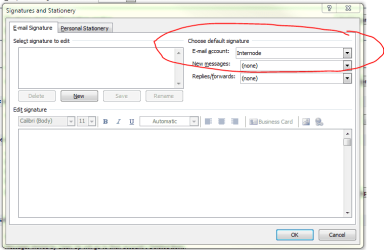
I have problems setting up Outlook 2010 to use the appropriate email account and signature automatically when replying to messages.
I use 3 email accounts, and for each account I have created a distinct signature both for new and reply emails.
The problem is that when someone sends me an email to any of the 3 accounts and I reply, no matter what, Outlook always uses the reply signature of the default email account. It should use the reply signature corresponding to the account the email was sent to.
So far, when replying to messages, I always have to remember to manually switch the “from” account to match the account the sender used to send me the email.
Outlook is supposed to use the appropriate account when replying to messages. So if someone sends an email to my business email account, and even if that is not the default account, Outlook should use the account and signature I have assigned to reply to messages for that specific account and not always use by default the reply account and signature assigned to the default account.
Please help me resolve this issue so that I do not mistakenly reply to someone using the wrong account.
For example, I do not want to reply to family and friends with the account used for business. If family and friends send emails to my personal email account, Outlook should automatically use that account when replying and thus inserting the reply signature for my personal account.
Look forward to any guidance.
Sincerely,
Mario Crespi
I have problems setting up Outlook 2010 to use the appropriate email account and signature automatically when replying to messages.
I use 3 email accounts, and for each account I have created a distinct signature both for new and reply emails.
The problem is that when someone sends me an email to any of the 3 accounts and I reply, no matter what, Outlook always uses the reply signature of the default email account. It should use the reply signature corresponding to the account the email was sent to.
So far, when replying to messages, I always have to remember to manually switch the “from” account to match the account the sender used to send me the email.
Outlook is supposed to use the appropriate account when replying to messages. So if someone sends an email to my business email account, and even if that is not the default account, Outlook should use the account and signature I have assigned to reply to messages for that specific account and not always use by default the reply account and signature assigned to the default account.
Please help me resolve this issue so that I do not mistakenly reply to someone using the wrong account.
For example, I do not want to reply to family and friends with the account used for business. If family and friends send emails to my personal email account, Outlook should automatically use that account when replying and thus inserting the reply signature for my personal account.
Look forward to any guidance.
Sincerely,
Mario Crespi
My Computer
- OS
- Windows 7 64 bit