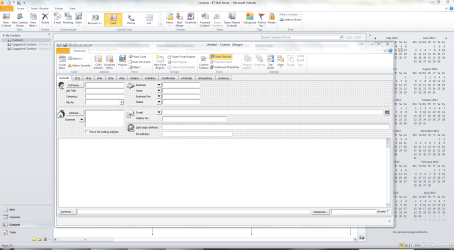
In the CONTACTS section of Outlook 2007 there are various default settings that I don't like. But I don't find options to change them.
1.
The main one is that the address box LOOKS as ONE field, but is in fact a collection of invisible fields: Street, City, State, Zip, Country. What you type in that big box is sometimes unclear to Outlook, then it pops up an edit box with all the separate fields. Sometimes there WAS already a (default) Country/Region in the box and then the result of a printed address could be: John Johnson, 1st Street 1, LA, CA 98765, USA, The Netherlands.
I would prefer to see the 'split' address view by default. How?
And if it is not possible, how can I force Outlook to show the split box when I need it?
2.
The same address box has two options, business and home. Business is shown by default, so often I type private addresses in the wrong box - with confusing results when grouping, printing etc.
Can BOTH the Home AND the Business address box be displayed at the same time?
If not possible, then can I instruct Outlook to display the Home box by default?
3.
Similar problem with the Email box. I always have to use the dropdownlist to see/edit/use a 2nd or 3rd email. In this time where many people have several email addresses, at least 2 of them should be visible by default in the standard view.
I know that I can customize my Outlook Contact page completely to my own needs. I gave it a few attempts, but the result was a bewildering mess. Lots worse than the original.
If 2007 does not offer solutions for my display problems, does Office 2010 do?
Anyone experienced with 2010 who can tell me two or three major differences (improvements!) with 2007?
Thanks.
1.
The main one is that the address box LOOKS as ONE field, but is in fact a collection of invisible fields: Street, City, State, Zip, Country. What you type in that big box is sometimes unclear to Outlook, then it pops up an edit box with all the separate fields. Sometimes there WAS already a (default) Country/Region in the box and then the result of a printed address could be: John Johnson, 1st Street 1, LA, CA 98765, USA, The Netherlands.
I would prefer to see the 'split' address view by default. How?
And if it is not possible, how can I force Outlook to show the split box when I need it?
2.
The same address box has two options, business and home. Business is shown by default, so often I type private addresses in the wrong box - with confusing results when grouping, printing etc.
Can BOTH the Home AND the Business address box be displayed at the same time?
If not possible, then can I instruct Outlook to display the Home box by default?
3.
Similar problem with the Email box. I always have to use the dropdownlist to see/edit/use a 2nd or 3rd email. In this time where many people have several email addresses, at least 2 of them should be visible by default in the standard view.
I know that I can customize my Outlook Contact page completely to my own needs. I gave it a few attempts, but the result was a bewildering mess. Lots worse than the original.
If 2007 does not offer solutions for my display problems, does Office 2010 do?
Anyone experienced with 2010 who can tell me two or three major differences (improvements!) with 2007?
Thanks.
My Computer
At a glance
windows 7Genuine Intel u23004Gb?
- Computer Manufacturer/Model Number
- AcerAspire 1410 Netbook with external CD/DVD-RW
- OS
- windows 7
- CPU
- Genuine Intel u2300
- Motherboard
- ?
- Memory
- 4Gb
- Graphics Card(s)
- ?
- Sound Card
- ?
- Monitor(s) Displays
- ?
- Hard Drives
- Hitachi HTS
various WD external hard drives
- PSU
- ?
- Case
- ?
- Cooling
- ?