Computer type PC/Desktop System Manufacturer/Model Number Hewlett-Packard/G62-107SA Notebook OS Microsoft Windows 7 Home Premium 64-bit 7601 Multiprocessor Free Service Pack 1 CPU Intel(R) Core(TM) i3 CPU M 330 @ 2.13GHz Motherboard Hewlett-Packard 1425 Memory 8 GB DDR3 Graphics Card Intel(R) HD Graphics Sound Card Realtek High Definition Audio Monitor(s) Displays Builtin Screen Resolution 1366 x 768 x 32 bits (4294967296 colors) @ 60 Hz
Mouse Microsoft Bluetooth Notebook Mouse 5000 Hard Drives 250 GB SATA Hard Disk Drive 7200 rpm
2TB Seagate GoFlex USB 2 Drive
1TB Iomega Prestige USB 2 Drive
1.5TB Iomega Prestige USB 2 Drive (Samsung)
1TB Iomega NAS. Internet Speed 60 Mbs download 3 Mbs upload Antivirus Norton 360 Browser Chrome
i will need to learn onenote i tried sending your picture to onenote 2010 but ok is greyed out even when i put a desciption in. I then tried to send the webpage to onenote but ok is greyed out even when i put a desciption in. What am i doing wrong?
I'm not sure. I don't have that issue with send to oneNote. Do you have OneNote in your startup? It creates a process for its quick launcher and also a tray icon. You could also try opening OneNote before doing the send to.
Computer type PC/Desktop System Manufacturer/Model Number Hewlett-Packard/G62-107SA Notebook OS Microsoft Windows 7 Home Premium 64-bit 7601 Multiprocessor Free Service Pack 1 CPU Intel(R) Core(TM) i3 CPU M 330 @ 2.13GHz Motherboard Hewlett-Packard 1425 Memory 8 GB DDR3 Graphics Card Intel(R) HD Graphics Sound Card Realtek High Definition Audio Monitor(s) Displays Builtin Screen Resolution 1366 x 768 x 32 bits (4294967296 colors) @ 60 Hz
Mouse Microsoft Bluetooth Notebook Mouse 5000 Hard Drives 250 GB SATA Hard Disk Drive 7200 rpm
2TB Seagate GoFlex USB 2 Drive
1TB Iomega Prestige USB 2 Drive
1.5TB Iomega Prestige USB 2 Drive (Samsung)
1TB Iomega NAS. Internet Speed 60 Mbs download 3 Mbs upload Antivirus Norton 360 Browser Chrome
I'm not sure. I don't have that issue with send to oneNote. Do you have OneNote in your startup? It creates a process for its quick launcher and also a tray icon. You could also try opening OneNote before doing the send to.
got it mate the folder was not created in my documents i need to add mor commands like you showed in picture previously.
Computer type PC/Desktop System Manufacturer/Model Number Hewlett-Packard/G62-107SA Notebook OS Microsoft Windows 7 Home Premium 64-bit 7601 Multiprocessor Free Service Pack 1 CPU Intel(R) Core(TM) i3 CPU M 330 @ 2.13GHz Motherboard Hewlett-Packard 1425 Memory 8 GB DDR3 Graphics Card Intel(R) HD Graphics Sound Card Realtek High Definition Audio Monitor(s) Displays Builtin Screen Resolution 1366 x 768 x 32 bits (4294967296 colors) @ 60 Hz
Mouse Microsoft Bluetooth Notebook Mouse 5000 Hard Drives 250 GB SATA Hard Disk Drive 7200 rpm
2TB Seagate GoFlex USB 2 Drive
1TB Iomega Prestige USB 2 Drive
1.5TB Iomega Prestige USB 2 Drive (Samsung)
1TB Iomega NAS. Internet Speed 60 Mbs download 3 Mbs upload Antivirus Norton 360 Browser Chrome
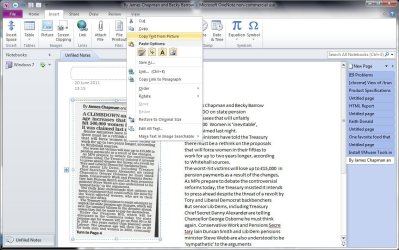
Once you have the picture right click on it and chose text from picture. Then click where you want the text and past it. I probably confused you by re-showing the copy dialog after I had done the paste.
Computer type PC/Desktop System Manufacturer/Model Number Hewlett-Packard/G62-107SA Notebook OS Microsoft Windows 7 Home Premium 64-bit 7601 Multiprocessor Free Service Pack 1 CPU Intel(R) Core(TM) i3 CPU M 330 @ 2.13GHz Motherboard Hewlett-Packard 1425 Memory 8 GB DDR3 Graphics Card Intel(R) HD Graphics Sound Card Realtek High Definition Audio Monitor(s) Displays Builtin Screen Resolution 1366 x 768 x 32 bits (4294967296 colors) @ 60 Hz
Mouse Microsoft Bluetooth Notebook Mouse 5000 Hard Drives 250 GB SATA Hard Disk Drive 7200 rpm
2TB Seagate GoFlex USB 2 Drive
1TB Iomega Prestige USB 2 Drive
1.5TB Iomega Prestige USB 2 Drive (Samsung)
1TB Iomega NAS. Internet Speed 60 Mbs download 3 Mbs upload Antivirus Norton 360 Browser Chrome
Computer type PC/Desktop System Manufacturer/Model Number Hewlett-Packard/G62-107SA Notebook OS Microsoft Windows 7 Home Premium 64-bit 7601 Multiprocessor Free Service Pack 1 CPU Intel(R) Core(TM) i3 CPU M 330 @ 2.13GHz Motherboard Hewlett-Packard 1425 Memory 8 GB DDR3 Graphics Card Intel(R) HD Graphics Sound Card Realtek High Definition Audio Monitor(s) Displays Builtin Screen Resolution 1366 x 768 x 32 bits (4294967296 colors) @ 60 Hz
Mouse Microsoft Bluetooth Notebook Mouse 5000 Hard Drives 250 GB SATA Hard Disk Drive 7200 rpm
2TB Seagate GoFlex USB 2 Drive
1TB Iomega Prestige USB 2 Drive
1.5TB Iomega Prestige USB 2 Drive (Samsung)
1TB Iomega NAS. Internet Speed 60 Mbs download 3 Mbs upload Antivirus Norton 360 Browser Chrome