| Windows 7: older Word files showing as wps in Office 2010 |
31 Jul 2011
|
#1 | | Windows Vista Home Basic Singapore |
older Word files showing as wps in Office 2010 I finally upgraded from MS Office 2002 to Office 2010, and all of my Word documents were automatically converted to wps files. In addition, when I download Word documents not created in Word 2010, they default to wps files. I can work around the problem manually to pull up older Word files in new Word, but it's incredibly annoying that any workaround is necessary. (Incidentally, when I try using the "open as" box with downloaded files, Word 2010 does not appear as one of the options.) I've been using Word for many years and have no need or desire to switch to MS Works. Please advise! | My System Specs |
| System Manufacturer/Model Number Dell Vostro A860 OS Windows Vista Home Basic Memory 1.00 GB |
01 Aug 2011
|
#2 | | Windows 7 Home Premium 64bit Stafford, England |
Hi Denise, welcome to the forum.
This might do the trick - please let us know how you get on: How to open a Works 6.0, a Works 7.0, a Works 8.0, or a Works 9.0 word processing document in Word Quote: Method 2: If you do not have Microsoft Works installed on your computer
If you have a Works document (.wps) that you want to open and you do not have Works installed, you can still use Word to open the file. To do this, first use the Works 6-9 Converter in Word and then open the document directly in Word. Step 1: Download the Works 6-9 Converter
If you have previously installed Works on the same computer on which Word is installed, the Works 6-9 Converter is already installed and you can go on to step 2: "Open the Works document in Word."
If you have not previously installed Works on your computer, you must download the Works 6-9 Converter in order to open the document in Word. To download the Works 6-9 Converter, follow these steps: - If it is open, close Microsoft Word.
In your Web browser, visit the following Microsoft Web site: Download Details - Microsoft Download Center - Microsoft Works 6 - Click Download. The File Download dialog box opens.
- In the File Download dialog box, click Save file.
- Double-click the saved file to start the Works 6-9 Converter installer.
- Click I accept to accept the terms of the License Agreement, and then follow the instructions to install the Works 6-9 Converter.
Note If you do not accept the terms of the License Agreement, the installation cannot continue. - Click Install to install the file converter on your computer. The Works 6-9 Converter Setup now extracts the Works 6-9 File Converter and installs it on your computer. You can now open the Works file in Word.
Note If the file does not download or is installed incorrectly, you can go to the "Next Steps" section for more help. Step 2: Open the Works document in Word
You can use Word to open a Works document file (.wps), even if the file has not been converted to Word format (.doc) beforehand, by using the Works 6-9 Converter. Follow these steps to open the Works document by using the Works 6-9 Converter: - Start Word.
- In Word 2000, Word 2002 or Word 2003, click the File menu, and then click Open. In Word 2007 or Word 2010, click Microsoft Office Button, and then click Open.
- In the Open dialog box, follow these steps:
- Change the Look in box to the location of your Works document.
- In the Files of type box, click All Files (*.*).
- Select the Works document (.wps) that you want to open, and then click Open.
- If the document opens correctly, click File, click Save As, and then change the file type to a Microsoft Word document (.doc).
- Save the document and you have successfully converted the file to a Word document.

| My System Specs | | Computer type PC/Desktop System Manufacturer/Model Number Packard Bell OS Windows 7 Home Premium 64bit CPU Intel(R) Core(TM) i3-2120 CPU @ 3.30GHz Motherboard Packard Bell IPISB-AG Memory 3.00 GB Graphics Card (1) Intel(R) HD Graphics (2) VNC Mirror Driver Sound Card Realtek High Definition Audio Monitor(s) Displays AIO LCD Screen Resolution 1920 x 1080 Keyboard Wireless Mouse Wireless Hard Drives WDC WD10EADX-22TDHB0 ATA Device
Fixed hard disk media
4 partitions
931.51 GB Antivirus Microsoft Security Essentials Browser IE; Firefox Other Info Also:
Samsung N220 Plus Netbook - Windows 7 Home
HP laptop
iPad 5 |
01 Aug 2011
|
#3 | | Windows 7 Pro-x64 South Texas |
Sounds like the default save is set to Works 6-9 files (wps). Set your default to *.docx (Word 2010) or one of the other Word versions. | My System Specs | | Computer type PC/Desktop System Manufacturer/Model Number Built 2/11/2011 OS Windows 7 Pro-x64 CPU i7-2600 3.4GHz - 3.8GHz Turbo Motherboard Intel DH67BL-B3 Memory 8Gb - 2x4GB, Muskin 991770 PC3-1333 Graphics Card Integrated Intel HD 2000 Sound Card Integrated Intel 10.1 HD, RealTek ALC892 Monitor(s) Displays Asus LCD VH222H, Haier HL24XSL2a Screen Resolution 1920x1080, 1920x1080 Keyboard Logitech EX100 Wireless Mouse Logitech EX100 Wireless PSU Seasonic 650W 80+ Gold Modular Case Rosewill Defender Cooling Stock CPU, Four 120mm case fans, PCH fan added Hard Drives Crucial C300-128Gb,
Western Digital WD5002AALX - 500Gb,
Western Digital WD7501AALS - 750Gb Internet Speed 2.5/1.5 Mbs Antivirus Microsoft Security Essentials Browser Microsoft Internet Explorer 10 Other Info Antec Veris Premier-Multimedia IR Station,
Cyber Accoustics-3602 Speakers,
AFT XM-5U Card Reader,
Hauppauge TV-HVR-2250,
Sony LX300 USB Turntable |
03 Aug 2011
|
#4 | | Windows Vista Home Basic Singapore |
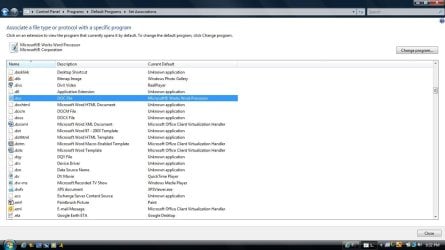
Word doesn't show up as a default option Carwiz, your answer came closer to solving my problem, but it seems to have uncovered another problem. Here's what my current defaults look like:
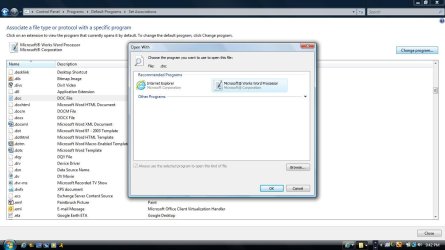
Seems straightforward enough. I attempt to switch from Works to Word, but get this screen:
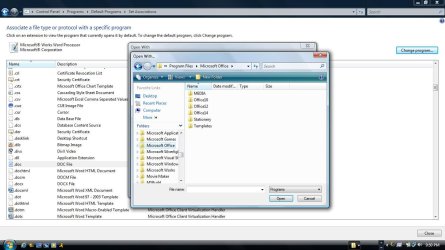
Mmmkay. So I browse and locate Microsoft Office, but where is Word? Where are any of my programs?
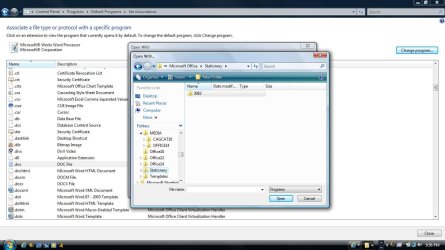
From here, I start messing around and quickly get in over my head:
Should I uninstall and reinstall Office? Should any of this be happening? | My System Specs | | System Manufacturer/Model Number Dell Vostro A860 OS Windows Vista Home Basic Memory 1.00 GB |
03 Aug 2011
|
#5 | | Windows 7 Pro-x64 South Texas |
Take a snapshot of the Uninstall area for Microsoft Word. Include Works too. It appears you have three versions of Word and Works on your system.  And... Word doesn't look like it installed. Did you just copy files to your HDD or was it an install from a Microsoft DVD? | My System Specs | | Computer type PC/Desktop System Manufacturer/Model Number Built 2/11/2011 OS Windows 7 Pro-x64 CPU i7-2600 3.4GHz - 3.8GHz Turbo Motherboard Intel DH67BL-B3 Memory 8Gb - 2x4GB, Muskin 991770 PC3-1333 Graphics Card Integrated Intel HD 2000 Sound Card Integrated Intel 10.1 HD, RealTek ALC892 Monitor(s) Displays Asus LCD VH222H, Haier HL24XSL2a Screen Resolution 1920x1080, 1920x1080 Keyboard Logitech EX100 Wireless Mouse Logitech EX100 Wireless PSU Seasonic 650W 80+ Gold Modular Case Rosewill Defender Cooling Stock CPU, Four 120mm case fans, PCH fan added Hard Drives Crucial C300-128Gb,
Western Digital WD5002AALX - 500Gb,
Western Digital WD7501AALS - 750Gb Internet Speed 2.5/1.5 Mbs Antivirus Microsoft Security Essentials Browser Microsoft Internet Explorer 10 Other Info Antec Veris Premier-Multimedia IR Station,
Cyber Accoustics-3602 Speakers,
AFT XM-5U Card Reader,
Hauppauge TV-HVR-2250,
Sony LX300 USB Turntable older Word files showing as wps in Office 2010 problems? All times are GMT -5. The time now is 02:38 AM. | |