

Hello everyone,
In my Microsoft Office 2010 apps, and particularly in OneNote, is there any way to get the screen fonts for my displayed text to display the text better? (For example, it seems that the character spacing and kerning is off, and the spacing between letters is inconsistent.) What can be done to make this look better, or is this just a problem I must live with as a Microsoft Windows user?
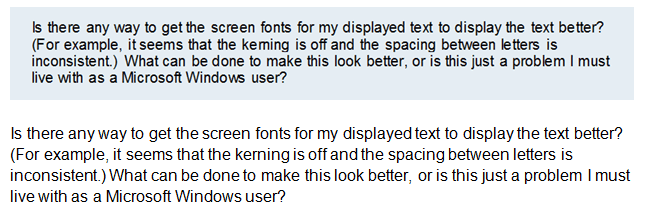
As you can see from the screen capture that I have attached, I am having problems with fonts displaying kerning and letter spacing improperly in Office 2010 applications. While Windows has never been as good as Apple at font display, this seems particularly bad. As well, it seems worse in OneNote (the first paragraph in the screen clipping) than in Word (the second example).
While the character spacing is bad throughout, examples of specific words in the screen clipping, and their 'problem' are described in 3 instances below:
I am using Microsoft's Arial font in 12 point, so I don't understand why this would be an issue. It is just bugging me enough to want some help with it.
Thanks for any advice that you can offer!
In my Microsoft Office 2010 apps, and particularly in OneNote, is there any way to get the screen fonts for my displayed text to display the text better? (For example, it seems that the character spacing and kerning is off, and the spacing between letters is inconsistent.) What can be done to make this look better, or is this just a problem I must live with as a Microsoft Windows user?
As you can see from the screen capture that I have attached, I am having problems with fonts displaying kerning and letter spacing improperly in Office 2010 applications. While Windows has never been as good as Apple at font display, this seems particularly bad. As well, it seems worse in OneNote (the first paragraph in the screen clipping) than in Word (the second example).
While the character spacing is bad throughout, examples of specific words in the screen clipping, and their 'problem' are described in 3 instances below:
- The second word, "there", has placed the "h" fully kerned with the "t", but the "e"s both have differing degrees of spacing between them and the surrounding letters.
- In "Microsoft", the "M' and the "i" seem to be too close.
- In "Windows", the "w" and the "s" are touching each other, an obvious problem with kerning.
I am using Microsoft's Arial font in 12 point, so I don't understand why this would be an issue. It is just bugging me enough to want some help with it.
Thanks for any advice that you can offer!
Attachments
My Computer
At a glance
Microsoft Windows 7 Home Premium 32-bit 7601 ...Intel(R) Pentium(R) D CPU 2.80GHz2.00 GBNVIDIA GeForce 6200SE TurboCache(TM)
- Computer Manufacturer/Model Number
- HP Pavilion Media Center PC m7350n
- OS
- Microsoft Windows 7 Home Premium 32-bit 7601 Multiprocessor Free Service Pack 1
- CPU
- Intel(R) Pentium(R) D CPU 2.80GHz
- Motherboard
- ASUSTek Computer INC. EMERY
- Memory
- 2.00 GB
- Graphics Card(s)
- NVIDIA GeForce 6200SE TurboCache(TM)
- Sound Card
- Realtek High Definition Audio
- Monitor(s) Displays
- HP L1710 LCD Display
- Screen Resolution
- 1280 x 1024 x 32 bits (4294967296 colors) @ 60 Hz
- Hard Drives
- (1) SAMSUNG SP2504C (2) EPSON Stylus Storage USB Device (3) Generic USB CF Reader USB Device (4) Generic USB MS Reader USB Device (5) Generic USB SD Reader USB Device (6) Generic USB SM Reader USB Device (7) Seagate FA GoFlex Desk USB Dev
- Internet Speed
- 20+mbps


