| Windows 7: Outlook 2010 Signature help |
04 Oct 2011
|
#1 | | Windows 7 home premium 64bit |
Outlook 2010 Signature help Hello All, I have designed a signature in word. It has a logo (jpeg) with text to the right of it. When I try and copy and paste the whole thing into the signature editor the picture never appears. When I try and do the two separately you cant wrap the text. This is become somewhat frustrating but if someone could shed any light on the I would be very grateful.
Thanks | My System Specs |
| OS Windows 7 home premium 64bit |
04 Oct 2011
|
#2 | | Windows 7 Ultimate SP1 64-Bit Peterborough, England |
Welcome to Windows Seven Forums.
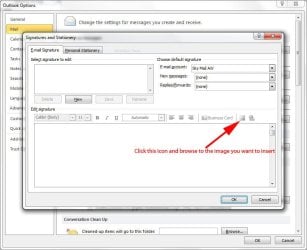
Exactly how are you trying to insert the image into your signature?
This is how it should be done: | My System Specs | | System Manufacturer/Model Number HP Pavilion Elite 495UK OS Windows 7 Ultimate SP1 64-Bit CPU Intel Core i7 870 @ 2.93GHz Motherboard MSI 2A9C (CPU1) Memory 8Gb Dual-Channel DDR3 @ 664MHz Graphics Card nVidia GeForce GTX 460 1024MB dedicated RAM Sound Card Realtek HD Audio Monitor(s) Displays HP2310i Screen Resolution 1920 x 1080 Keyboard Logitech K750 solar-powered keyboard Mouse Logitech Wireless M180 mouse PSU 460W Case HP Elite Cooling Air cooled Hard Drives 1x1954GB Hitachi HDS22020ALA 330 (RAID), 1x1954GB Hitachi External for backup and storage Internet Speed 2Mb Other Info Pure Avanti Flow Internet Radio with iPod Dock, 64Gb iPod, HP USB Speakers, Sony MDR-V500 Headphones, Sony Vaio F-Series Laptop |
05 Oct 2011
|
#3 | | Windows 7 home premium 64bit |
That is how I have been doing it, however I want to have a jpeg, side by side to text. At present I have had to make it all one jpeg but this means the hyper links of the email and website don't work which defeats the object to it!! | My System Specs | | OS Windows 7 home premium 64bit |
05 Oct 2011
|
#4 | | Windows 7 home premium 64bit |
Thanks by the way for your reply, rude of me not to say!! | My System Specs | | OS Windows 7 home premium 64bit |
05 Oct 2011
|
#5 | | Windows 7 Ultimate SP1 64-Bit Peterborough, England |
You're welcome.
I think the problem is the logo, which of course has an unusual outline.
When you create a signature, you can only import an electronic business card, hyperlink or picture, so your logo would need to be in the form of one of those three for you to be able to choose how you wrap your text round it. Create and add an email message signature - Outlook - Office.com
Some excellent advice here, in which the writer makes the pertinent point that having an image as a signature increases the e-mail's size and is likely to be blocked before the message can be opened. http://www.smashingmagazine.com/2010...ail-signature/ | My System Specs | | System Manufacturer/Model Number HP Pavilion Elite 495UK OS Windows 7 Ultimate SP1 64-Bit CPU Intel Core i7 870 @ 2.93GHz Motherboard MSI 2A9C (CPU1) Memory 8Gb Dual-Channel DDR3 @ 664MHz Graphics Card nVidia GeForce GTX 460 1024MB dedicated RAM Sound Card Realtek HD Audio Monitor(s) Displays HP2310i Screen Resolution 1920 x 1080 Keyboard Logitech K750 solar-powered keyboard Mouse Logitech Wireless M180 mouse PSU 460W Case HP Elite Cooling Air cooled Hard Drives 1x1954GB Hitachi HDS22020ALA 330 (RAID), 1x1954GB Hitachi External for backup and storage Internet Speed 2Mb Other Info Pure Avanti Flow Internet Radio with iPod Dock, 64Gb iPod, HP USB Speakers, Sony MDR-V500 Headphones, Sony Vaio F-Series Laptop |
06 Oct 2011
|
#6 | | Windows 7 home premium 64bit |
Thanks for the information, I have had our designs send through the logo as many types, it is just a rectangular logo. I can insert that using the picture tab, but I can't add text to the right of the logo, it just won't let me wrap it. In the second link you provided, there was one logo with text to the right where the hyperlinks work so it must be possible, I am just too much of a novice!! Any more ideas would be much appreciated... | My System Specs | | OS Windows 7 home premium 64bit |
06 Oct 2011
|
#7 | | Windows 7 Ultimate SP1 64-Bit Peterborough, England |
If you have access to Adobe software such as Illustrator, you have far more options. For example, you could use a vector shape and wrap text round it. Wrapping Text Around an Image in Illustrator
Even a desktop publishing application such as Microsoft Publisher would help, although Adobe's InDesign is far better, and then there is Quark XPress, which is used extensively in main stream publishing.
That said, I'm just wondering whether you might be better off posting in the Graphics forum as I'm no expert on this sort of thing. | My System Specs | | System Manufacturer/Model Number HP Pavilion Elite 495UK OS Windows 7 Ultimate SP1 64-Bit CPU Intel Core i7 870 @ 2.93GHz Motherboard MSI 2A9C (CPU1) Memory 8Gb Dual-Channel DDR3 @ 664MHz Graphics Card nVidia GeForce GTX 460 1024MB dedicated RAM Sound Card Realtek HD Audio Monitor(s) Displays HP2310i Screen Resolution 1920 x 1080 Keyboard Logitech K750 solar-powered keyboard Mouse Logitech Wireless M180 mouse PSU 460W Case HP Elite Cooling Air cooled Hard Drives 1x1954GB Hitachi HDS22020ALA 330 (RAID), 1x1954GB Hitachi External for backup and storage Internet Speed 2Mb Other Info Pure Avanti Flow Internet Radio with iPod Dock, 64Gb iPod, HP USB Speakers, Sony MDR-V500 Headphones, Sony Vaio F-Series Laptop |
25 Sep 2012
|
#8 | | |
I know this is an old thread, but I have finally figured out how to do this!
You have to locate where Outlook places the files for your signatures. Here are the locations on the hard drive for Vista/Windows 7 machines:
Windows 7 and Windows Vista
drive:\Users\username\AppData\Roaming\Microsoft\Signatures
(You'll need to be able to view Hidden Files to see the AppData folder)
Once you get there, open the HTML file for the signature that you want to open by right clicking on the file, and selecting 'Open With' Microsoft Word.
Once open, double click on the jpg you have in your signature block. Then select 'Wrap Text' in the header and select 'Square'. Close and save the document, and that's it!
Hope this helps. | My System Specs | | Outlook 2010 Signature help problems? All times are GMT -5. The time now is 08:04 AM. | |