Windows 7 Forums


Windows 7: No recent documents for Word 2007

04 Nov 2011   #1

Windows 7 Professional, 32 bit
 
 
No recent documents for Word 2007

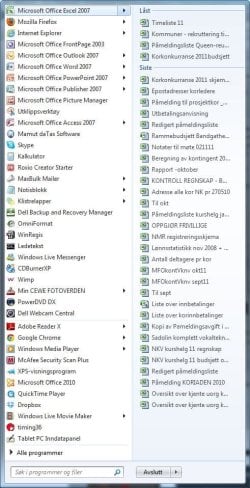
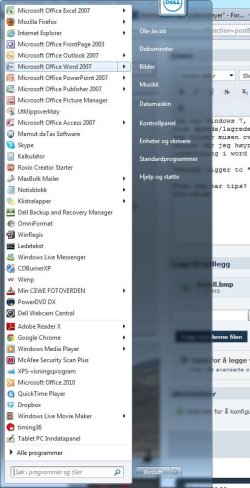
I have several program icons om my Start Menu, and by holding the mouce over an arrow (not shure if this is the correct translation from Norwegian), the most recent documents opens in a "window" at left.

Suddenly no "recent documents" appear for Word, but it appears for all other programs.

Attached is screendumps from holding mouce over "arrow" at Excell and Word.

Does anybody how to turn on the "recent dosuments" for Word here at the start menu? When I run Word, the recend doccuments appear at the "Office button", on the top left.


Excuse my bad English.
Ole-Jacob
Attached Thumbnails
No recent documents for Word 2007-excell.jpg   No recent documents for Word 2007-word.jpg  
My System SpecsSystem Spec

05 Nov 2011   #2

Windows 7 Home Premium 64bit
Stafford, England


Perhaps you need to specify the number to keep - like this:
Customize the list of recently used files - Word - Office.com
.
.

Quote:
Word

  1. Click the Microsoft Office Button, and then click Word Options.
  2. Click Advanced.
  3. Under Display, in the Show this number of Recent Documents list, click the number of files that you want to display.
My System SpecsSystem Spec
05 Nov 2011   #3

Vista 64 bit and 32 bit (SP2)
Los Angeles, California + Milwaukee, Wis


My System SpecsSystem Spec
.


Reply

 No recent documents for Word 2007 problems?


Thread Tools


Similar help and support threads for: No recent documents for Word 2007
Thread Forum
Saving thumbnails of Word 2007 documents. Microsoft Office
Converting ClarisWorks documents to Word documents Microsoft Office
Word, Excel Recent Documents Microsoft Office
Solved word 2007 won't start new documents at document1 Software
Word 2007 sometimes crashes when opening documents? Microsoft Office


All times are GMT -5. The time now is 03:49 AM.


Seven Forums Android App Seven Forums IOS App Follow us on Facebook

Windows 7 Forums is an independent web site and has not been authorized,
sponsored, or otherwise approved by Microsoft Corporation.
"Windows 7" and related materials are trademarks of Microsoft Corp.
© Designer Media Ltd
  

1 2 3 4 5 6 7 8 9 10 11 12 13 14 15 16 17 18 19 20 21 22 23 24 25 26 27 28 29 30 31 32