What happens? Please provide a clear description. We will resolve this issue.
Your posts are extremely difficult to decipher. I cannot even determine what you are trying to do.[/QUOTE]
I'm trying to take a Word document that I made in Office XP and bring it up in Office 2007. This is how I have done it. This is from my past post in detail.
Double click on an XP Word Document using Word 2007 which has no association (blank icon)
It auto goes to "Open With" and there is no Word or Excel program or any program from Office
Click other Documents and still no Word or Excel Program
Click Browse
It auto goes to program files which in Microsoft Office it has no files, just folders because I'm using a 64 bit Windows
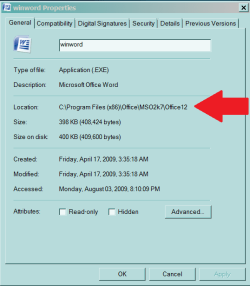
I click on C:\Windows and go to program files (x86) where winword.exe is at
I double click on winword.exe and it does not appear in "Open With"
I go back and click on winword.exe and click "open" and still not in "Open With"
For some reason none of my Office programs are in "OPEN WITH" I have re-installed, un-installed, re-installed, put in two types of Office 2007 and spent all day on this and it still does not work. In the morning I'll re-install again and maybe after my computer has a nights rest it might work but I'm not going to bet on it.
I don't know how to be any more clear but if I left anything out or something that is not understandable please let me know and I will do the best I can to clear it up. Thank you for your patance.
Your posts are extremely difficult to decipher. I cannot even determine what you are trying to do.[/QUOTE]
I'm trying to take a Word document that I made in Office XP and bring it up in Office 2007. This is how I have done it. This is from my past post in detail.
Double click on an XP Word Document using Word 2007 which has no association (blank icon)
It auto goes to "Open With" and there is no Word or Excel program or any program from Office
Click other Documents and still no Word or Excel Program
Click Browse
It auto goes to program files which in Microsoft Office it has no files, just folders because I'm using a 64 bit Windows
I click on C:\Windows and go to program files (x86) where winword.exe is at
I double click on winword.exe and it does not appear in "Open With"
I go back and click on winword.exe and click "open" and still not in "Open With"
For some reason none of my Office programs are in "OPEN WITH" I have re-installed, un-installed, re-installed, put in two types of Office 2007 and spent all day on this and it still does not work. In the morning I'll re-install again and maybe after my computer has a nights rest it might work but I'm not going to bet on it.
I don't know how to be any more clear but if I left anything out or something that is not understandable please let me know and I will do the best I can to clear it up. Thank you for your patance.
My Computer
At a glance
Windows 7 x64 RC1, Vista Ultimate, XP ProAMD 9554 gigs - 13335750
- OS
- Windows 7 x64 RC1, Vista Ultimate, XP Pro
- CPU
- AMD 955
- Memory
- 4 gigs - 1333
- Graphics Card(s)
- 5750
- Monitor(s) Displays
- i-inc 28"
- Screen Resolution
- 1920x1200
- Hard Drives
- 2 SATA2 750 GB - 1 SATA2 1TB - 1 SATA3 1TB - 1 USB3 2TB - 1 USB3 500 GB, SSD 60 GB
- Internet Speed
- 7 Megs