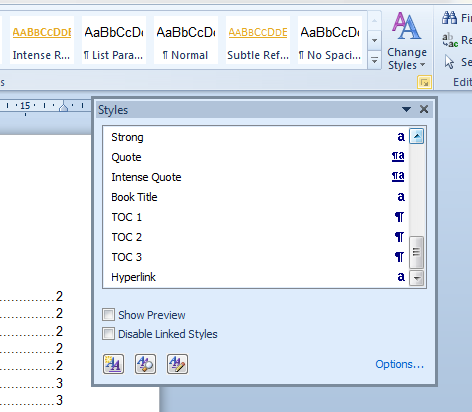
A friend of mine indicated that on their computer at home, the are not able to see the preview formatting which normally appears above the style name in the quick styles gallery on the Home tab. (See sample.) She tells me that only the style names appear.
I could be wrong, but I seem to recall that there is a toggle to switch that feature on (or off) but I can't seem to locate it anywhere either in Word Options or the Manage Styles dialog boxes.
Any ideas?
Thanks in advance.
I could be wrong, but I seem to recall that there is a toggle to switch that feature on (or off) but I can't seem to locate it anywhere either in Word Options or the Manage Styles dialog boxes.
Any ideas?
Thanks in advance.
Attachments

My Computer
At a glance
Windows 7
- OS
- Windows 7