

[SIZE=+3]Instantly Forward Mail From One E-Mail Account to Another Using Outlook 2007[/SIZE]
Information
This tip is particularly handy for filtering mail when using multiple E-Mail accounts. It's very basic i know, but people ask me how to do it all the time 
Warning
Rules won't work on Outlook Connector accounts.
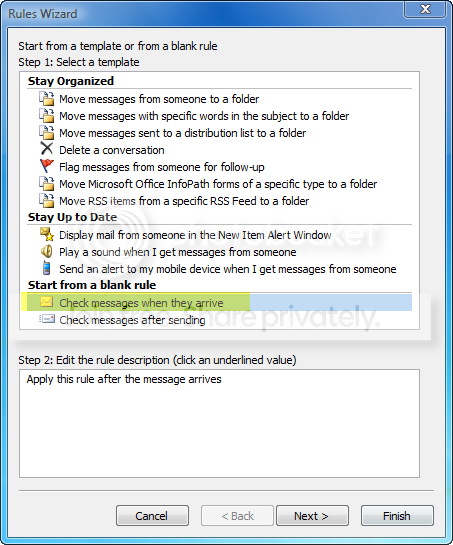
[SIZE=+1]1.[/SIZE] In Outlook navigate to, Tools > Rules and Alerts, make sure the E-Mail rules tab is on and click New Rule...

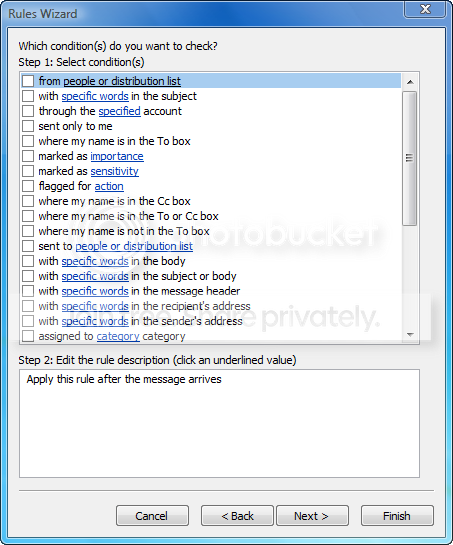
With specific word in the sender's address usually works best.
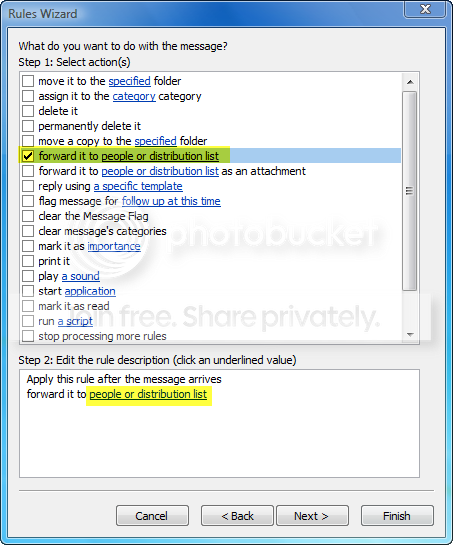
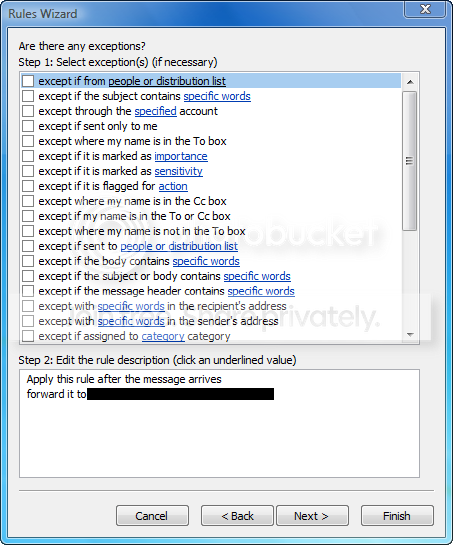
choose the E-Mail address you want to forward to and click ok then Next

Last edited by a moderator:
My Computer
At a glance
Windows 7 Ultimate x64AMD Turion(tm) 64 X2 Mobile Technology TL-563GB Nanya PC2-6400 DDR2-SDRAM SO-DIM (400MHz)NVIDIA GeForce Go 7600 256MB GDDR3 SDRAM
- Computer Manufacturer/Model Number
- HP Touchsmart IQ771.uk
- OS
- Windows 7 Ultimate x64
- CPU
- AMD Turion(tm) 64 X2 Mobile Technology TL-56
- Motherboard
- ASUS Pheonix
- Memory
- 3GB Nanya PC2-6400 DDR2-SDRAM SO-DIM (400MHz)
- Graphics Card(s)
- NVIDIA GeForce Go 7600 256MB GDDR3 SDRAM
- Sound Card
- High Definition Intergrated NVIDIA MCP51
- Monitor(s) Displays
- 46" Sony Bravia HDTV
- Screen Resolution
- 1600x1200
- Hard Drives
- 1.5TB Samsug
320GB Seagate ST3320820AS - SATA 3Gb/s 8MB
500GB Maxtor Basics STM305003EHD301-RK
- Internet Speed
- ↓6.32 Mb/s ↑0.35 Mb/s ↔26ms
- Other Info
- BIOS - American Megatrends Inc. 5.07
Ethernet Port - NVIDIA nForce 10/100/1000 Mbps
DVD Drive - TSSTcorp DVDR/RW TS-T632L


